Portico Attendance: Default Site Management
Portico's mobile Attendance solution (formerly CourseKey) is leveling up with Default Site Management -- a faster, smarter way to set up GPS-enabled courses. Campus admins can now assign a default site once, and every new course automatically inherits it. This removes repetitive setup, keeps configurations consistent, and helps prevent check-in issues caused by missing or incorrect site settings.

Default Site Management
The Default Site Management enhancement introduces the ability for campus administrators to set a default site at the campus level. When configured, all new GPS courses created for that campus will automatically inherit the designated default site assignment.
This automation simplifies course setup, eliminates repetitive manual work, and ensures consistent site assignments across all courses. It also reduces the likelihood of student check-in issues caused by missing or incorrect site configurations
Key Features:
Default Site Toggle
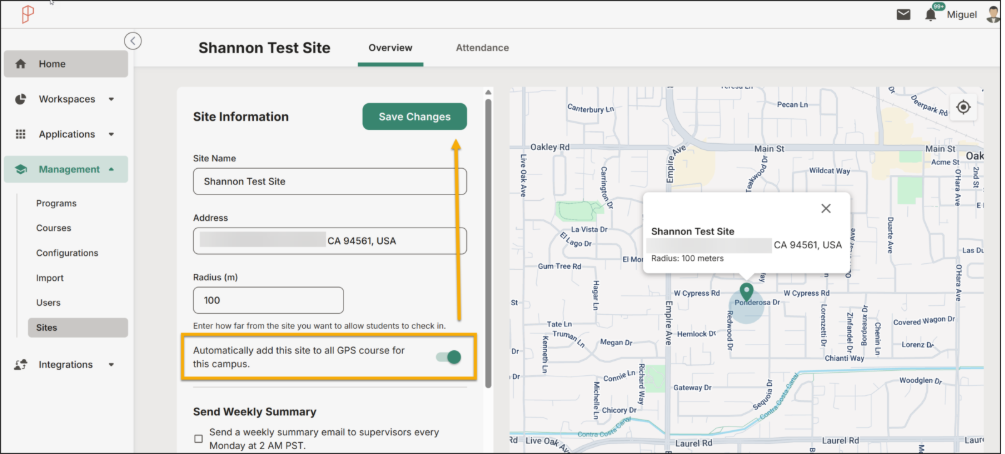
- A new “Default Site for Campus” toggle is now available under Site Management → Site Settings.
- When enabled, the selected site will automatically apply to all newly created GPS courses associated with that campus.
Automatic Site Assignment
- All new GPS Technology courses created under the campus will inherit the default site configuration.
- Ensures consistent site alignment without requiring manual setup for each new course.
Admin Control
- Only users with the “Manage Locations” permission can enable or modify the default site setting.
- A visual indicator displays in Site Settings confirming whether a default site is active for a given campus.
Prospective Application
- The feature applies to new and active courses once the toggle has been enabled.
Benefits:
- Time Savings: Automates site assignment for new & active courses, reducing manual setup.
- Consistency: Ensures that every course under a campus is correctly associated with the proper site by default.
- Improved Accuracy: Minimizes check-in issues related to unassigned or incorrect site configurations.
- Operational Efficiency: Streamlines course management workflows for administrators overseeing multiple campuses.
- Scalability: Simplifies expansion by supporting campus-level defaults as institutions grow.
Constraints:
- Permission-Based Access: Only users with “Manage Locations” admin rights can configure default sites.
- Campus Scope Only: The default site applies only to the campus level — not to individual programs or cross-campus scenarios.
- Manual Overrides: Administrators can still modify or override the site on a per-course basis if necessary.
Enablement Settings:
- Navigate to Sites → select the site → select Manage
- Locate the new “Default Site for Campus” toggle.
- Enable the toggle
- Once enabled, all active & new GPS courses created for that campus will automatically include this site assignment.
- To revert to manual configuration, simply turn off the toggle.

We’d love to hear from you and your colleagues about product feedback or what you'd like to see next.
Sign up to participate in future product feedback sessions or early design reviews.
Was this article helpful?
That’s Great!
Thank you for your feedback
Sorry! We couldn't be helpful
Thank you for your feedback
Feedback sent
We appreciate your effort and will try to fix the article