Portico SIS Release Notes - April 21, 2026
This month, we’re excited to announce that Class Session Segments are now available, expanding Class Session Code configuration allowing schedules to evolve throughout the duration of a single class. We're also previewing Automated Status Changes for students, which is coming soon and will save time, reduce manual work, and improve student status reporting.
TABLE OF CONTENTS

Class Session Segments
Support evolving class schedules within a single course.
What It Is
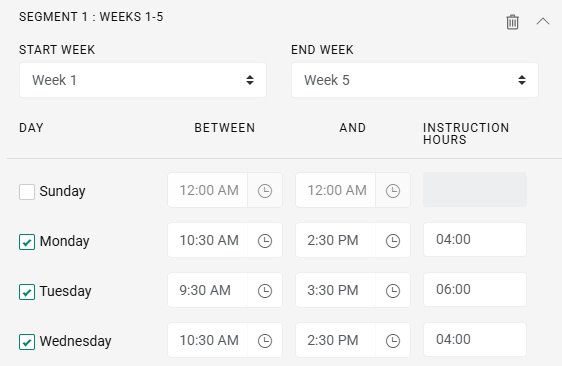
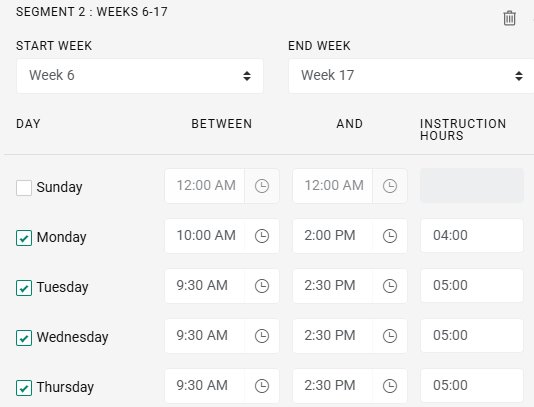
Institutions will now be able to define multiple scheduling structures within a single class, allowing schedules to evolve throughout the duration of a course. Whether adjusting instructional hours mid-course or blending structured and flexible formats, this capability will better reflect how programs operate in practice.
Class Session Codes now support three distinct class types: Fixed, Alternating, and Variable. See below for details.
- Fixed – A consistent schedule throughout the duration of the class
- Alternating – Two schedule patterns that alternate (e.g., weeks 1, 3, 5 follow one schedule; weeks 2, 4, 6 follow another)
- Variable – Multiple schedule segments defined across specific week ranges, allowing schedules to change throughout the course
When creating a Class Session Code, users select the type and configure the appropriate number of schedule segments.
Who It’s For
Registrars and Academic operations teams managing complex schedules, especially for clock-hour, clinical rotation, and hybrid classes.
Problem Solved
Previously, evolving schedules required manual adjustments or separate class structures, leading to inefficiencies and potential inaccuracies.
Why It Matters
This enhancement reduces the need for manual workarounds while improving accuracy in attendance tracking, instructional hour calculations, and reporting — especially for clock-hour and hybrid programs. It allows institutions to model real-world instructional delivery within a single class — saving time while improving accuracy in:
- Attendance tracking
- Instructional hour calculations
- Reporting
When applied to a class, schedule segments are consistently reflected across student records, portals, reports, utilities, and integrations. This ensures a single source of truth.
Details
- Define multiple schedule segments within one class
- Support changes in instructional hours mid-course
- Enable blended or hybrid scheduling models
- Improves accuracy in: Attendance tracking, Instructional hour calculations, and Reporting
Action Required
No configuration is required. Users can begin leveraging Class Session Segments through the updated Class Session Code configuration.

Class Session Code Management
Improve scalability, usability, and data integrity when configuring class schedules.
What’s Improved
- New Active flag to manage which Class Session Codes are available for use
- Default filter to display active codes when accessing Class Session Codes in List Inventory
- Only active codes are available when creating classes
- Enforced unique code values to prevent duplication
- Warning message when a configuration is an **exact duplicate** of an existing code
Problem Solved
Class Session Codes define how and when classes meet, including instructional days, times, and hours. As institutions grow, managing these configurations can become complex and difficult to maintain.
Why It Matters
These enhancements help Registrars and academic teams:
- Reduce clutter and improve navigation by focusing on active schedules
- Prevent duplicate or conflicting configurations
- Maintain cleaner, more scalable schedule management
- Improve overall efficiency when creating and managing classes
Action Required
No configuration is required. Existing Class Session Codes can be reviewed and marked as active or inactive as needed.

Automated Student Status Changes (Coming Soon)
No more chasing status updates: let your workflows do the work.
What It Is
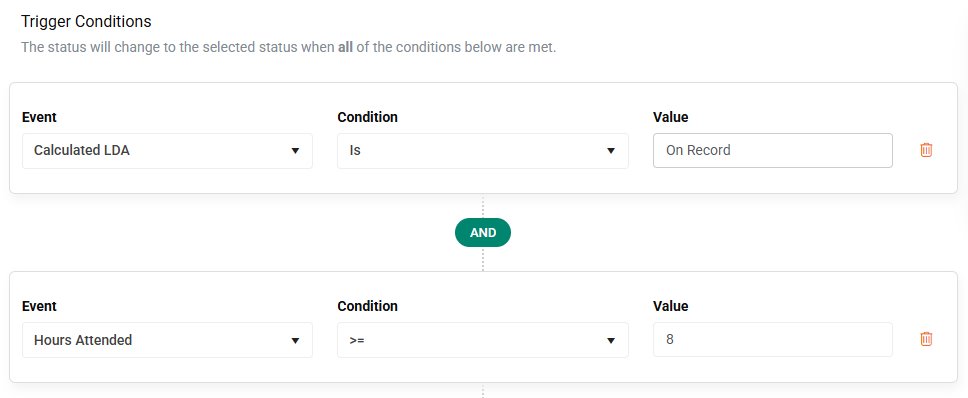
Institutions will be able to define enrollment-based rules and triggers that automatically update student statuses based on specific conditions.
Who It’s For
Staff and admins managing student lifecycle progression, compliance tracking, and enrollment operations.
Problem Solved
Manually identifying and updating student statuses is time-consuming, often delayed, and prone to inconsistency—especially when dependent on reports or multiple staff members to take action.
Why It Matters
By automating status changes, institutions can create a more efficient and reliable process that reflects real-time student activity. This leads to
- More timely student progression
- More accurate compliance reporting
- Less manual administrative effort
- More consistent updates
- Better student progression tracking
- Greater operational efficiency without manual intervention
Details
This new feature will let you:
- Configure rules based on enrollment conditions — to drive status changes
- Automatically update student statuses — as soon as criteria are met
- Eliminate the need for manual reports and follow-up actions
- Improve accuracy and timeliness of reporting and progression tracking
Stay tuned for additional details on configuration and release timing.


We’d love to hear from you and your colleagues about product feedback or what you'd like to see next.
Sign up to participate in future product feedback sessions or early design reviews.
Was this article helpful?
That’s Great!
Thank you for your feedback
Sorry! We couldn't be helpful
Thank you for your feedback
Feedback sent
We appreciate your effort and will try to fix the article