Portico SIS Release Notes – August 2026
This month’s Portico SIS release is one of the biggest of the year -- with updates that provide greater flexibility, stronger compliance support, and improved efficiency across key workflows.
Enhanced LOA and re-entry tracking helps institutions proactively manage important Title IV compliance limits, while new scheduling tools make it easier to adapt class and student schedules as needs change. We’ve also made the Gradebook faster and easier to configure, including the ability to schedule multiple graded items at once instead of configuring them individually. Expanded 1098-T configuration and new Student Portal controls provide even more ways to reduce manual effort, improve accuracy, and give institutions greater control over every day processes.
Explore the release notes below to see what’s new.
TABLE OF CONTENTS
- LOA & Re-Entry Compliance Enhancements
- Academic Scheduling Flexibility
- Gradebook Performance & Productivity Improvements
- Expanded 1098-T Configuration & Reporting
- Student Portal Profile Picture Controls
- Additional Improvements

LOA & Re-Entry Compliance Enhancements
We've expanded Leave of Absence (LOA) and Re-Entry functionality to help institutions more easily monitor Title IV compliance and proactively identify students approaching important regulatory deadlines.
What's New
Student records now display:
- Total days for each Leave of Absence
- Aggregate LOA days used within a rolling 12-month period
- Maximum Return Date for active LOAs
- Maximum Re-Entry Date for withdrawn students
When creating or updating an LOA, the system now warns users if the student would meet or exceed the 180-day Title IV limit before allowing the record to be saved.
The LOA & Re-Entry Details Report has also been enhanced with new columns:
- Remaining Aggregate LOA Days
- Maximum LOA Return Date
- Maximum Re-Entry Date
Why It Matters
Tracking cumulative LOA usage can be difficult, particularly when multiple LOAs occur within a rolling 12-month period.
These enhancements improve compliance visibility by helping institutions:
- Monitor the 180-day Title IV limit
- Identify students approaching compliance deadlines
- Reduce manual calculations
- Support proactive advising and re-entry planning
- Review compliance directly from reporting without opening individual student records
Who It Impacts
- Registrars
- Compliance Teams
- Financial Aid
- Student Services
Action Required
No configuration is required.


Academic Scheduling Flexibility
We've expanded scheduling capabilities to give institutions greater flexibility when managing class schedules and student attendance.
What's New
Bulk Unschedule & Swap Class Days
Users can now bulk unschedule or swap future class days across multiple classes from the Class List Inventory.
Bulk schedule changes automatically synchronize throughout the SIS, including:
- Gradebooks
- Student Attendance Logs
- Student Portal
- Faculty Portal
- Reports
- Attendance integrations

Extended Schedule Improvements
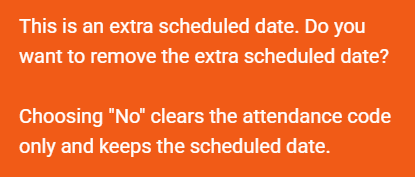
When removing an attendance code from an extended scheduled date, users can now choose whether to:
- Remove the scheduled date and move those hours to the end of the student's schedule, or
- Keep the scheduled date while simply clearing the attendance code
Expanded Academic Engagement Dates
Academic Engagement Dates can now be entered for any date up to today, including dates beyond the class end date or last scheduled day, provided the date is not in the future.
Why It Matters
Academic schedules frequently change throughout a student's enrollment.
These enhancements provide greater flexibility while ensuring schedule changes remain synchronized across the SIS, reducing manual effort and improving consistency throughout attendance tracking, reporting, and integrations.
Who It Impacts
- Registrars
- Academic Operations
- Faculty
- Attendance Administrators
Action Required
Bulk Unschedule & Swap functionality is being released in a controlled rollout. Please contact Support regarding availability.

Gradebook Performance & Productivity Improvements
We've enhanced the Gradebook to improve performance, simplify instructor workflows, and strengthen grading accuracy.
What's New
Faster Gradebook Loading
Long-running classes now load significantly faster by displaying only recent and current weeks by default. Previous weeks can be loaded on demand without affecting grading accuracy.
Batch Schedule Assignment
Users can now assign scheduled dates to multiple graded items simultaneously when configuring a Gradebook template, reducing repetitive setup.

Improved Score Alignment
Score alignment has been corrected when using the windowed Gradebook view, ensuring grades display against the correct instructional dates.
Enhanced Audit Logging
Attendance updates received through system integrations now correctly identify the system as the source of the change, improving audit accuracy.
Why It Matters
These enhancements reduce Gradebook load times, simplify configuration, improve data accuracy, and provide more reliable audit history for academic records.
Who It Impacts
- Faculty
- Academic Departments
- Registrars
Action Required
The faster Gradebook loading option is configurable and disabled by default. Please contact Support to enable this feature.

Expanded 1098-T Configuration & Reporting
We've expanded 1098-T configuration options to provide greater flexibility and improve reporting for multi-campus institutions.
What's New
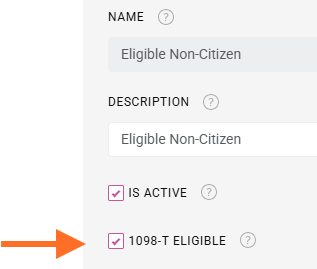
Citizenship-Based Eligibility
Finance and Registrar administrators can now configure whether individual citizenship values are eligible for 1098-T reporting directly within the Citizenship List Inventory.
Multi-Campus Reporting by EIN
Students attending multiple campuses now receive 1098-T forms grouped by Employer Identification Number (EIN).
Campuses sharing the same EIN generate a single form, while campuses with separate EINs generate separate forms in accordance with IRS reporting guidance.
Why It Matters
These enhancements provide greater administrative control over 1098-T reporting while reducing manual processing for institutions operating across multiple campuses.
Who It Impacts
- Finance Offices
- Registrars
- Business Office
Action Required
Existing citizenship values have been initialized to match current behavior. Review and update eligibility settings as needed.

Student Portal Profile Picture Controls
Administrators now have greater control over student profile pictures within the Student Portal.
What's New
A new Student Portal setting allows administrators to enable or disable students' ability to upload or edit profile pictures.
When disabled, profile picture upload and editing options are removed from the Student Portal and prevented through system validation.
Why It Matters
This enhancement allows institutions to better manage student identity and ensure profile pictures align with institutional policies without requiring engineering assistance.
Who It Impacts
- Student Services
- Portal Administrators
Action Required
The feature is enabled by default. Administrators may disable profile picture management through Student Portal settings.

Additional Improvements
Disbursement Cancellation Validation
Additional validation has been added to prevent canceled disbursements from remaining in a projected state when associated with pending batches, improving financial data integrity and reducing reconciliation issues.

A preview of what's on the way. Dates and details may shift as work progresses.
Repeat Course Policy (Coming Soon)
Automate how repeat coursework is identified and applied to student academic progress.
What It Is
Institutions will soon be able to define how repeated courses are considered in GPA and GA calculations at the Program of Enrollment level, with policy options including All Attempts, Highest Grade, First Attempt, or Latest Attempt.
Why It Matters
Managing repeated coursework today can be a highly manual process. It may not always be clear when a course has been repeated, requiring users to identify the repeat and manually adjust grades at individual student records. This creates significant administrative effort and increases the potential for records to be handled inconsistently or missed altogether.
With Repeat Course Policy, the SIS will automatically identify and apply repeated coursework according to the institution's configured policy — reducing manual intervention, improving consistency, and ensuring GPA and GA calculations reflect institutional academic policy.
Takeaway: Less manual maintenance. More consistent academic records.

We'd love to hear from you and your colleagues about product feedback or what you'd like to see next.
Sign up to participate in future product feedback sessions or early design reviews.
Was this article helpful?
That’s Great!
Thank you for your feedback
Sorry! We couldn't be helpful
Thank you for your feedback
Feedback sent
We appreciate your effort and will try to fix the article