Portico SIS Release Notes – June 2026
This month, we’re excited to announce several enhancements across registrar operations, gradebook processing, and inbound API capabilities. These updates are designed to improve efficiency, data accuracy, and integration flexibility for institutions using Portico SIS.
TABLE OF CONTENTS
- Registrar Power Tools Enhancements
- Automatic Gradebook Recalculation for MyPortico Integrations
- Expanded SIS Inbound API Endpoints
- SIS Support Agent
- Portico Payments + Portico SIS Integration

Registrar Power Tools Enhancements
We've introduced several enhancements designed to improve visibility, reporting, and operational efficiency for Registrars and Academic Operations teams.
Expanded Actionable Features in Reporting
Actionable Features are now available directly within the following reports:
- Withdrawal Details Report
- Gradebook Grade Report
Users can select one or multiple students from report results and perform bulk actions without leaving the report, including:
- Sending documents
- Printing documents
- Making student record updates
- Adding students to communication campaigns:
- Text campaigns
- Email campaigns
- Team campaigns

Enhanced Class Count Ratio Search & Filtering
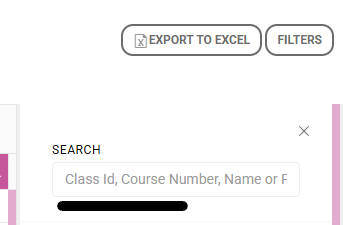
The Class Count Ratio screen now includes expanded filtering and search capabilities, making it easier to analyze class utilization and scheduling data. New filters include:
- Session
- Room
- Modality
- Course
New search options include:
- Class ID
- Course Number
- Course Name
- Faculty Member
Class Session Export Improvements
Class Session exports now include two additional fields:
- Type (Fixed, Alternating, or Variable)
- Is Active
These new columns provide greater visibility into Class Session configurations and simplify auditing, reporting, and data analysis outside of the SIS.
Why It Matters
These enhancements help academic teams spend less time navigating screens, searching for information, and managing manual processes. Institutions can now:
- Take action directly from report results
- Improve communication and follow-up workflows
- Gain greater visibility into Class Session configurations
- Quickly locate classes and classroom utilization data
- Increase operational efficiency across registrar and academic functions
Who It Impacts
- Registrars
- Academic Operations Teams
- Student Services Teams
- Faculty and Academic Administrators
Action Required
No configuration is required.
Automatic Gradebook Recalculation for MyPortico App Integrations
We've enhanced gradebook processing to improve grading accuracy and ensure grade percentages automatically recalculate whenever scores are received from integrations with Portico Attendance & Skills Tracker (via the MyPortico App, formerly CourseKey Student).
What's New
Previously, scores imported through integrations appeared in the gradebook, but overall grade percentages did not automatically recalculate.
With this enhancement, gradebook recalculation is now automatically triggered when scores are received from:
- Class Gradebook entries
- Student Gradebook updates
- Portico attendance & Skills (Legacy CourseKey) integrations
- Newer 'Portico Attendance & Skills' integrations
Additional gradebook enhancements include:
- When multiple scores exist for the same assignment, only the highest score is used in rubric calculations.
- Assignment submission dates now reflect the student's local time zone, providing a more accurate view of submission activity.
Why It Matters
Grade percentages drive final grades and academic outcomes. By automatically recalculating grades as scores are received, institutions can ensure grade percentages, final grades, and related calculations remain accurate regardless of how scores enter the system.
Using the highest assignment score in rubric calculations better reflects student achievement, while time zone-aware submission dates provide greater clarity for students and instructors reviewing assignment activity.
Who It Impacts
- Academic Departments
- Registrars
- Faculty and Instructional Staff
- Students
Action Required
No configuration is required.

Expanded SIS Inbound API Endpoints
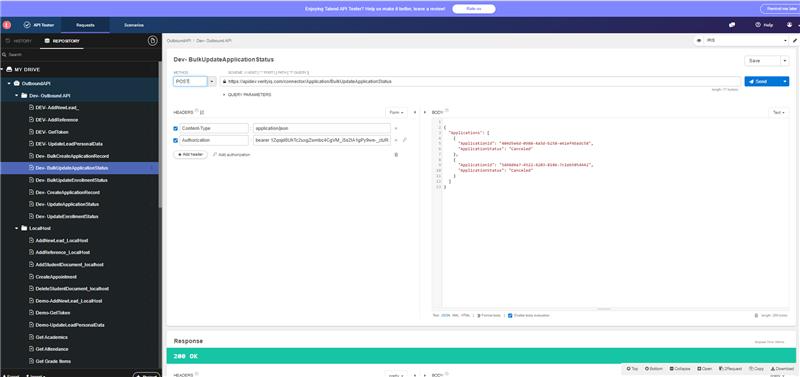
We're continuing to expand the Portico SIS Inbound API framework, enabling integration partners and third-party systems to programmatically push additional data directly into the SIS.
What's New
Portico SIS now supports inbound REST API endpoints for:
- Awards & Disbursements
- Ledger Entries
- Placement Profiles
These endpoints follow the same inbound API framework established across the Portico platform and support both individual and bulk processing. Integration partners can now:
- Create and update award records and associated disbursements
- Create ledger transactions, including credits and debits
- Create and update placement profile records
- Process large volumes of data through bulk API requests
- Receive detailed processing responses, including validation and record-level results
Why It Matters
Schools and integration partners often manage financial aid, financial, and career services data across multiple systems. These new inbound API capabilities reduce manual entry and improve data consistency by allowing external systems to securely synchronize information directly into Portico SIS. This enhancement helps institutions:
- Reduce administrative overhead
- Improve data accuracy across systems
- Support automated and real-time integrations
- Process large volumes of records efficiently
- Maintain a single source of truth within the SIS
Who It Impacts
- Integration Partners
- School IT and Technical Teams
- Financial Aid Offices
- Business Office and Bursar Teams
- Career Services Departments
Action Required
API credentials and integration configuration are required. Technical documentation is available for implementation teams.
SIS Support Agent
Get answers faster — without leaving Portico.
What It Is
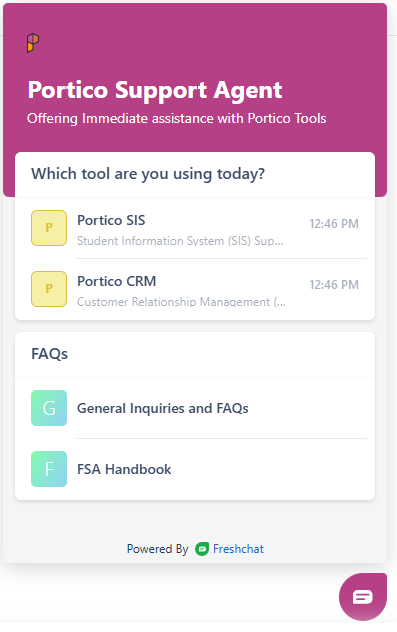
The new Portico SIS Support Agent (nicknamed "Freddy") is Portico's new AI-powered support chat solution. Embedded directly inside the platform, the Support Agent can help you quickly find answers to questions about the platform and common workflows without losing your place. Most importantly, our expert support team is still standing by to help at any time (just ask to contact Support). The Support Agent is simply another option to help you get the answers you need. To begin, simply click the floating "P" icon and select Portico SIS.
Who It's For
All Portico admin, staff and faculty users
Problem Solved
Staff had no way to get immediate answers — every support request required composing an email and waiting for a response.
Why It Matters
Staff can now get instant answers to common questions without disrupting their workflow. When our Agent can't resolve an issue, it automatically creates a support ticket for our team — no extra steps are required.
Details
- Access Portico Support Agent through the existing Help/support button in the bottom-left corner of the UI (or find the floating P icon)
- SIS Support Agent attempts to answer questions using AI-powered responses
- If unresolved, the Agent automatically creates and submits a support ticket on the user's behalf
- SIS/CRM users are directed to a FreshDesk portal to select the appropriate product-specific agent

Portico Payments + Portico SIS Integration
COMING SOON: A direct integration with the Portico SIS for those using the Portico Payments mobile solution through the MyPortico student app. (formerly CourseKey Payments)

We'd love to hear from you and your colleagues about product feedback or what you'd like to see next.
Sign up to participate in future product feedback sessions or early design reviews.
Was this article helpful?
That’s Great!
Thank you for your feedback
Sorry! We couldn't be helpful
Thank you for your feedback
Feedback sent
We appreciate your effort and will try to fix the article