Portico Recruit Release Notes: June 2026
This month brings some of the most impactful CRM and document management updates we've released yet.
To start we are highlighting Calendar 2.0 — a reimagined scheduling experience built on a centralized availability engine, with self-service booking, advisor-level configuration, and built-in PTO management, all inside the Portico Recruit CRM. The release of Bulk Document Send now makes it possible to deliver documents to entire cohorts in seconds instead of hours. And our new CRM Support Agent gives staff instant answers without leaving Portico. Along with new communication, workflow, and productivity enhancements, these updates help your team spend less time on administrative work and more time supporting students.
*If you do not see any of these features in your environment, please contact Portico Support for assistance with enablement.
TABLE OF CONTENTS
- Calendar 2.0
- Bulk Document Send
- New CRM Support Agent
- Custom Email Signature
- Document Workflow Expiration Logic
- Voicemail Forwarding & In-App Notification Center
- COMING SOON
June '26 Updates: CRM & Paperless by mark@verityiq.com

Calendar 2.0
A smarter, fully connected scheduling experience
What It Is
A reimagined scheduling experience built on a centralized availability engine, with dynamic self-service booking, advisor-level configuration, and built-in global scheduling rules — all inside Portico.
Who It's For
Admissions Advisors, Financial Aid Teams, Academic Advisors, System Administrators, and prospective students booking appointments or campus tours
Problem Solved
Scheduling was disconnected from real availability, prone to conflicts, and managed outside the CRM — resulting in invalid bookings, fragmented experiences, and missed lead capture.
Why It Matters
Users configure their availability once, and the system enforces it everywhere — during manual scheduling, student self-booking, and Campus Tours. Every appointment is valid, every lead is captured, and your team spends less time managing the calendar and more time with students.
Details
- Unified Availability Engine: Advisors configure weekly availability and planned time off; System Administrators set organization-wide Global Scheduling Rules (hours of operation, institutional holidays); rules are enforced during manual appointment creation
- Advisor Booking Link (New Self Booking Experience - configuration required): Students book directly through a dynamic, advisor-specific link that evaluates availability, PTO, existing appointments, appointment types, and global rules in real time — only valid, conflict-free timeslots are shown
- Configurations: Create and manage configurations in System Settings and User Permissions, Update Templates, and expose them via advisor booking links, dedicated and embedded website experiences; all registrations are processed through existing CRM lead matching and distribution logic
- Advisor Booking Link replaces "Preassigned Landing Page" terminology across the platform if enabled
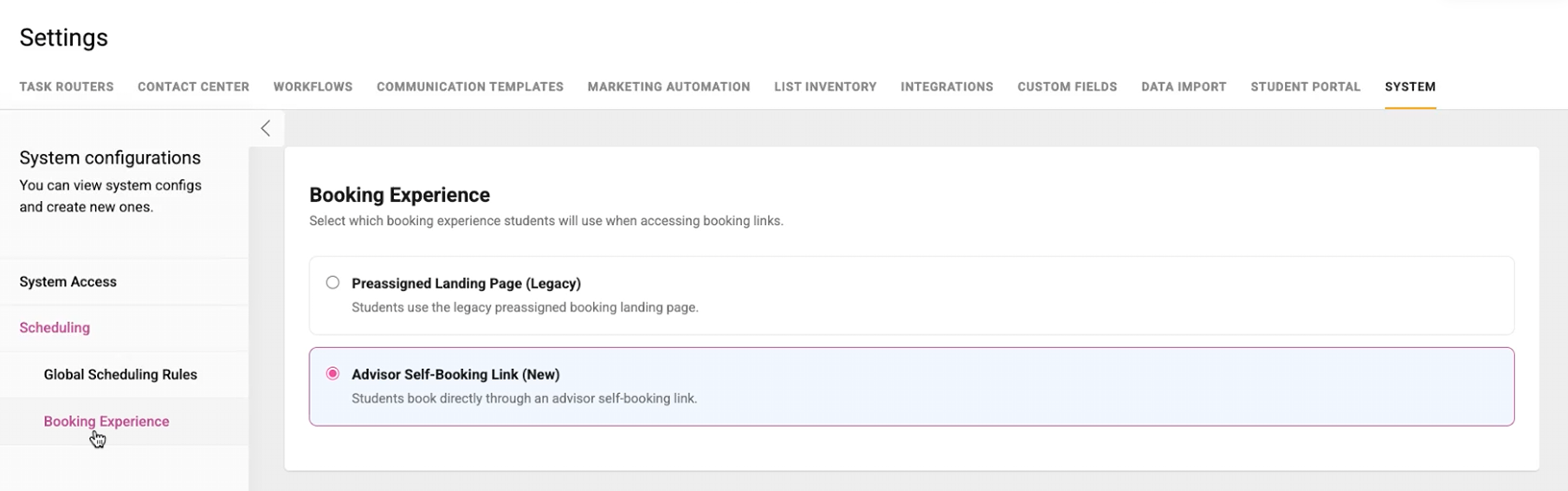
Set up self-booking appointments
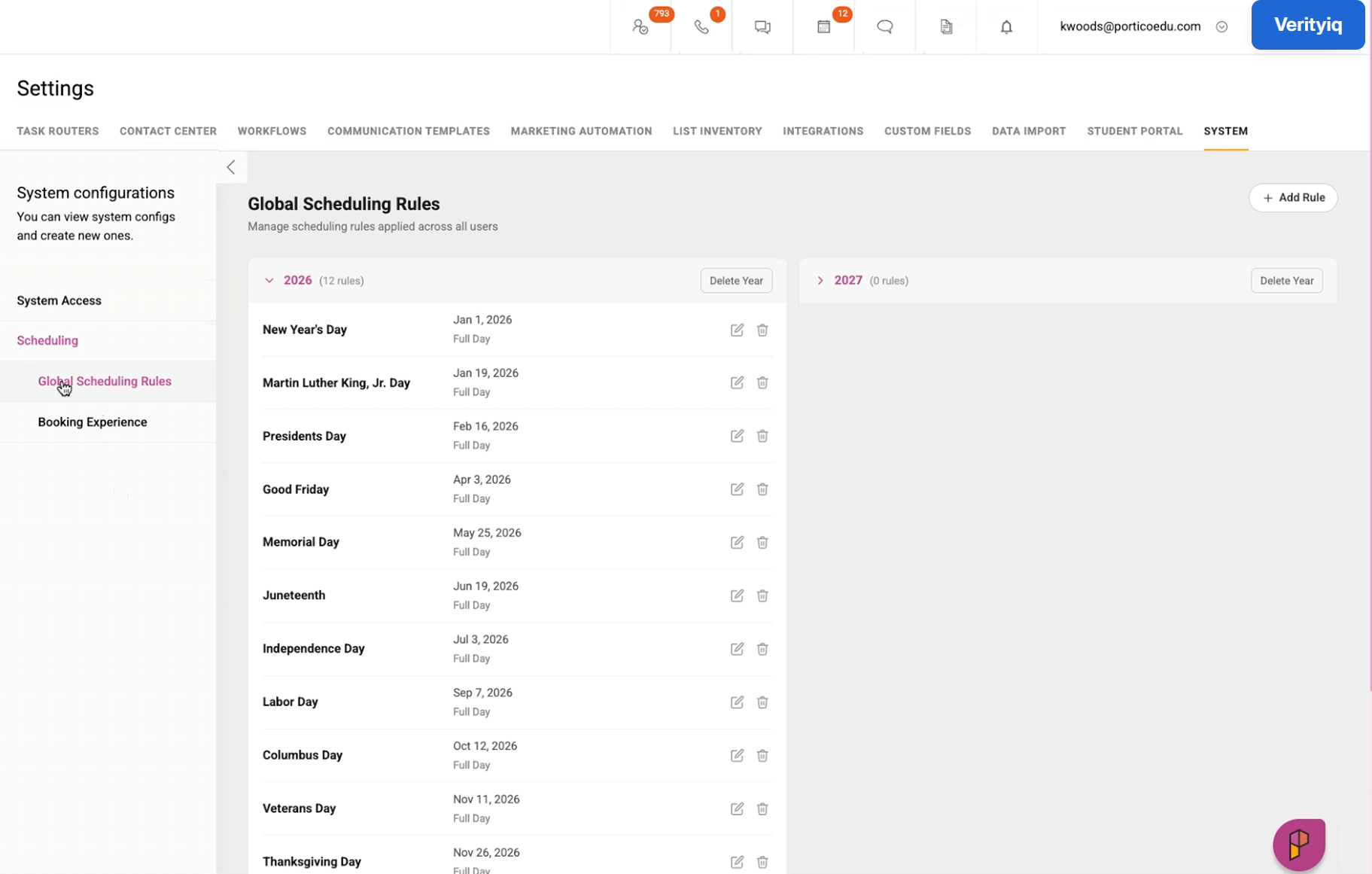
Global calendar scheduling options
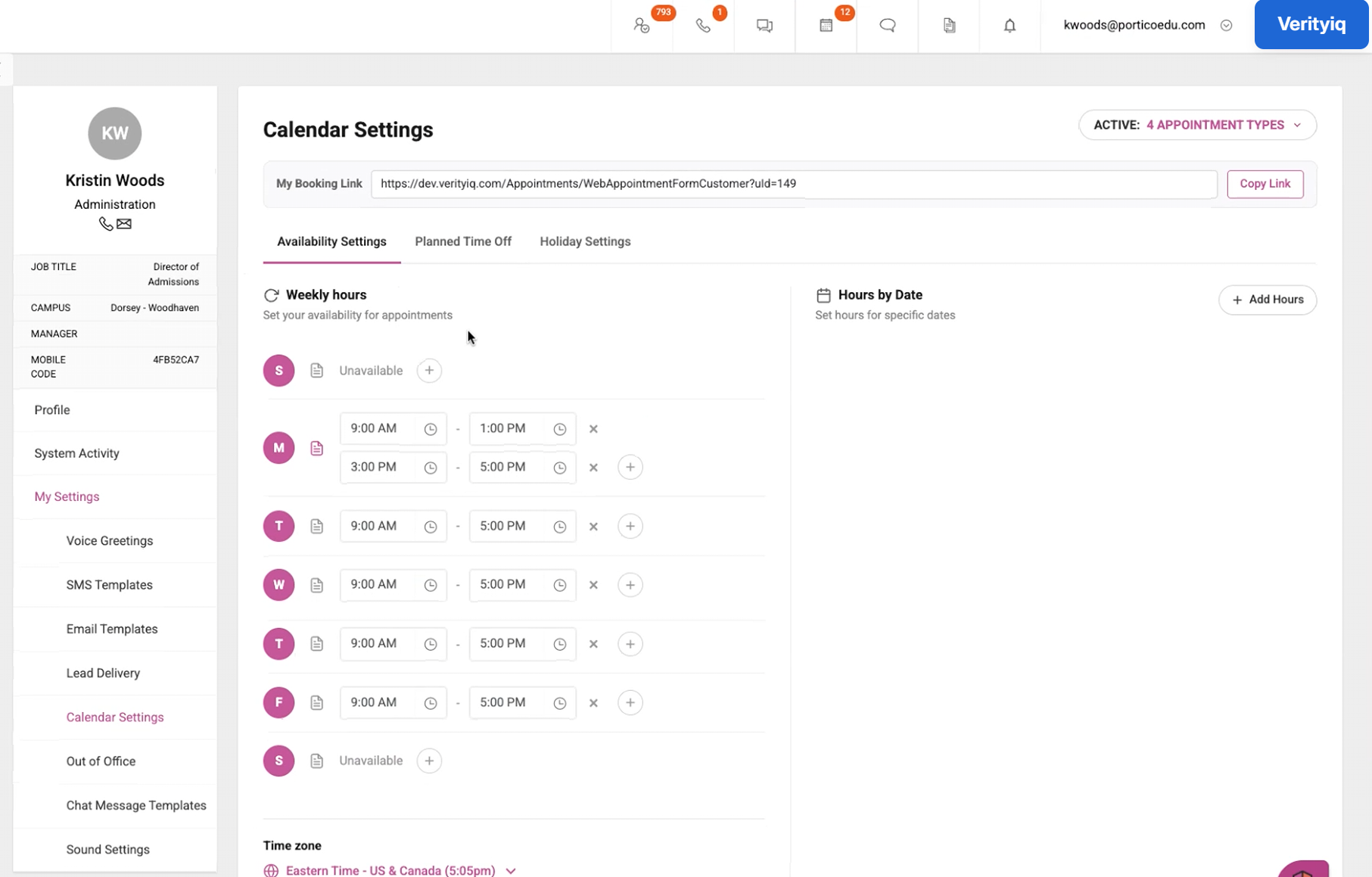
Set personal calendar availability, time off, and holidays

Bulk Document Send
Send documents to your entire cohort in a single action
What It Is
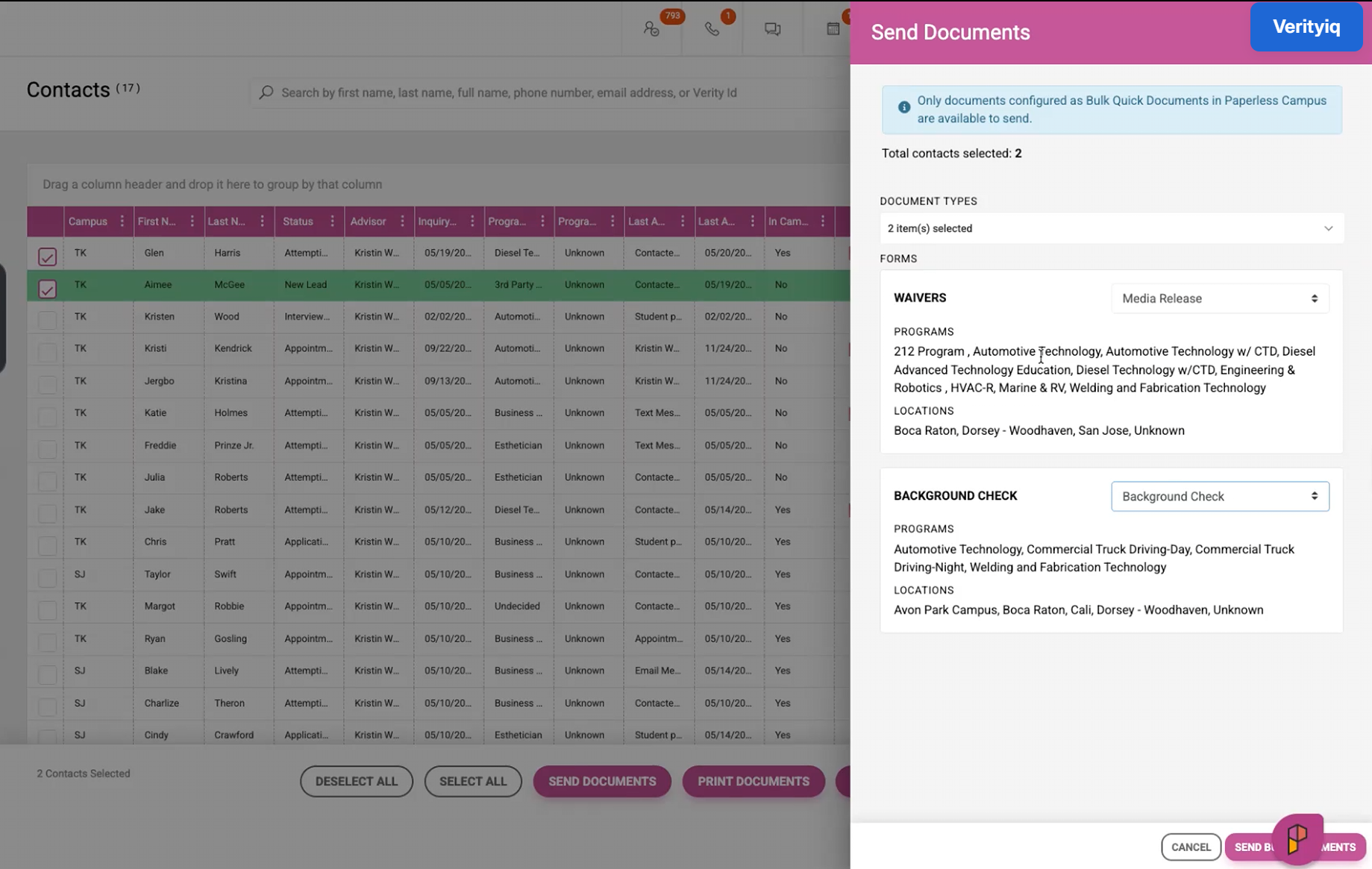
Administrators can now send quick documents to multiple students at once directly from the Contact Grid, triggering automated email and SMS notifications through a new Global Document Workflow.
Who It's For
System Administrators; users with enabled permissions
Problem Solved
Document distribution required individual sends, creating significant operational overhead for high-volume institutions.
Why It Matters
What used to take hours of individual effort now happens in a single action — with documents delivered directly to each student's portal and a complete audit trail for every send.
Details
- Select students from the Contact Grid or an Actionable Report, click "Send Document," and choose from bulk-flagged quick documents
- Documents are matched to students by campus and program — ensuring the right document goes to the right student
- Registered students receive documents in their Document Hub with notification via the Global Document Event flagged within Workflow Documents
- All sends are logged with source, document, recipients, sender, and timestamp
- "Send Document" is permission-controlled — System Admins have access by default; all other roles require explicit permission
- Quick documents must be flagged as "Bulk Documents" by an administrator to appear in the send modal

*COMING SOON
CRM Support Agent
Get answers faster — without leaving Portico.
What It Is
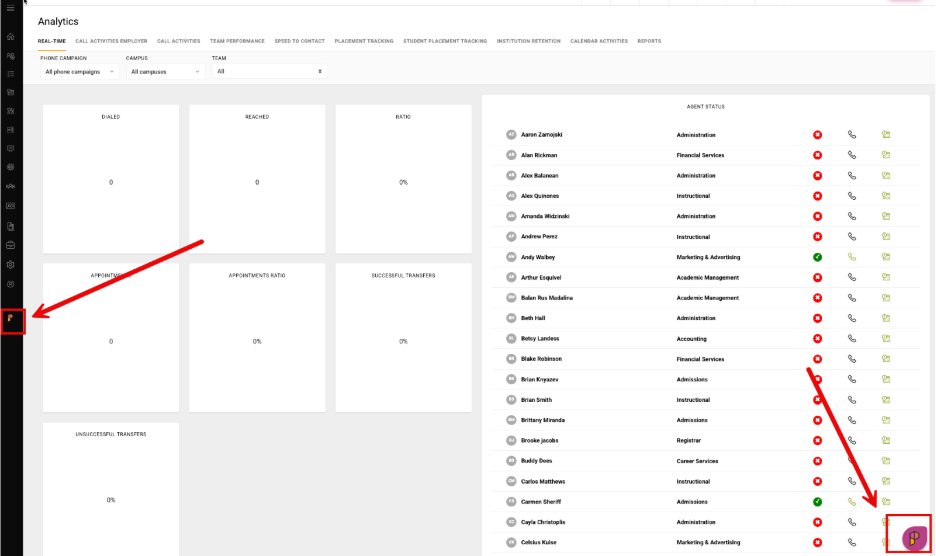
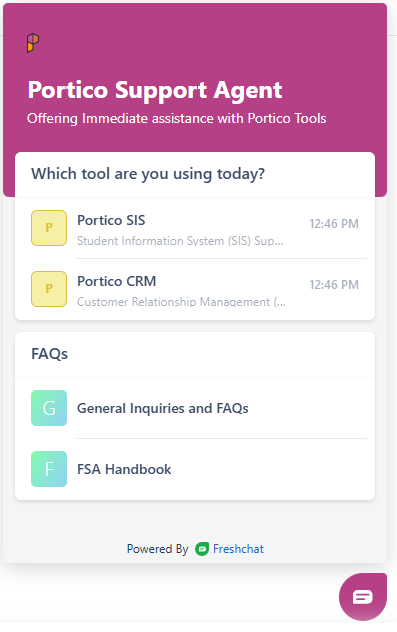
The new Portico CRM Support Agent (nicknamed "Freddy") is Portico's new AI-powered support chat solution. Embedded directly inside the platform, the Support Agent can help you quickly find answers to questions about the platform and common workflows without losing your place. Most importantly, our expert support team is still standing by to help at any time (just ask to contact Support). The Support Agent is simply another option to help you get the answers you need. To begin, simply click the floating "P" icon and select Portico SIS.
Who It's For
All Portico admin, staff and faculty users
Problem Solved
Staff had no way to get immediate answers — every support request required composing an email and waiting for a response.
Why It Matters
Staff can now get instant answers to common questions without disrupting their workflow. When our Agent can't resolve an issue, it automatically creates a support ticket — no extra steps are required.
Details
- Access Portico Support Agent through the existing Help/support button in the bottom-left corner of the UI (or find the floating P icon)
- CRM Support Agent attempts to answer questions using AI-powered responses
- If unresolved, the Agent automatically creates and submits a support ticket on the user's behalf
- SIS/CRM users are directed to a FreshDesk portal to select the appropriate product-specific agent

Custom Email Signature
Every email, on brand – every time
What It Is
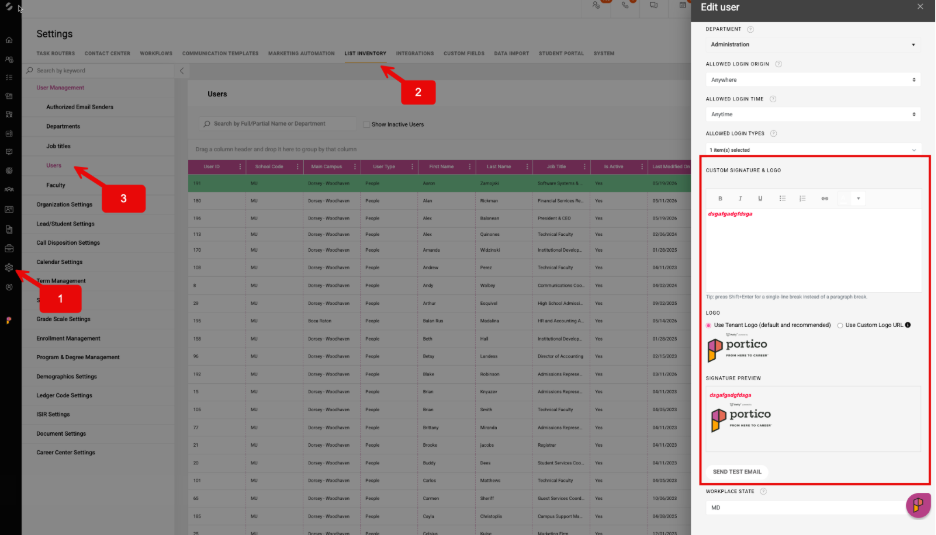
System Administrators can now configure a personalized email signature and logo for each user in Portico's User List Inventory.
Who It's For
System Administrators (configuration); Admissions Representatives, Enrollment Counselors, Advisors, and all staff sending communications through Quick Email
Problem Solved
Inconsistent and unbranded outbound communications from individual staff members
Why It Matters
Every email sent through Portico now reflects your institution's brand, with controlled, user-level personalization — reducing manual signature management and improving the professionalism of student-facing communications.
Details
- Signatures and logos are configured per user by a System Administrator
- Applies to all outbound Quick Email communications
- Supports institutional branding requirements for multi-campus and enterprise clients
- Reduces the need for individual users to manually manage their own signatures

Document Workflow Expiration Logic
Clean up and expire old pending document workflows!
What It Is
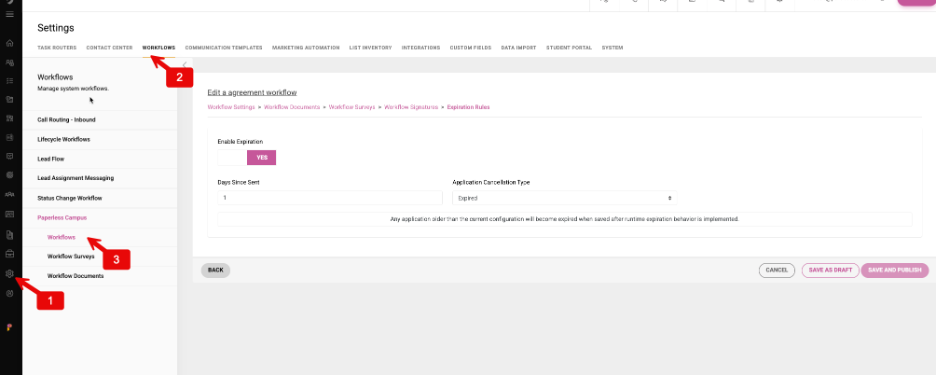
Administrators can now configure expiration logic directly within Paperless workflows — for Applicant Workflows, Enrollment Workflows, and Quick Document Workflows.
Who It's For
Admissions, Enrollment, Financial Aid, Registrar, and Operations teams managing required student documents
Problem Solved
Outdated pending document workflows piling up with no automated cleanup or expiration mechanism.
Why It Matters
The system now handles document expiration logic and clean workflow management across your institution.
Details
- Configure the after-day sent logic in the document workflows
- After the workflow is triggered and the number of days threshold is reached, the system will expire the workflow documents
- Each workflow at the student document hub will show the system expiration status, date, and time

Voicemail Forwarding & In-App Notification Center
Route voicemails to the right person — and keep everyone in the loop.
What It Is
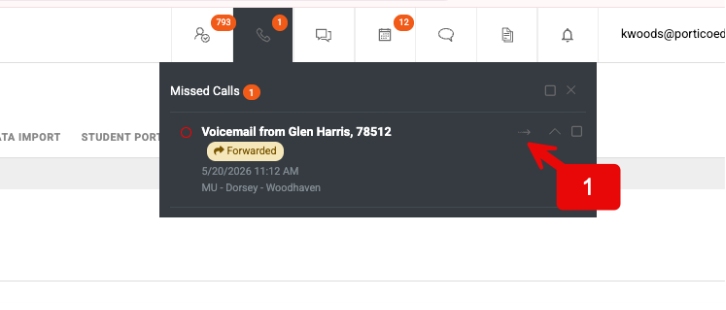
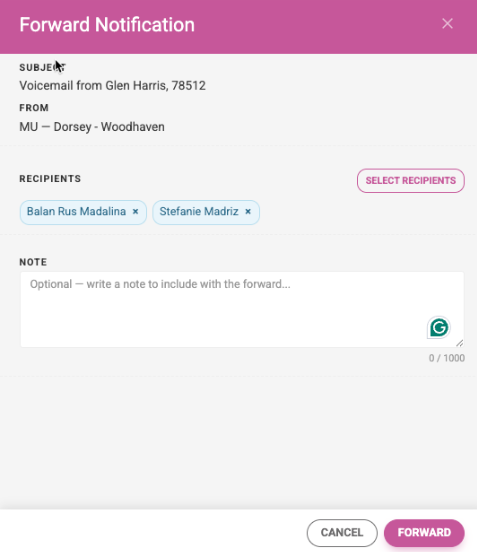
Users can now forward voicemails to teammates directly within Portico using a searchable, filterable directory, paired with a new in-app Notification Center that surfaces real-time updates across the platform.
Who It's For
Admissions Advisors, Financial Aid Representatives, Registrars, and all student-facing staff who manage inbound communications
Problem Solved
Voicemails were siloed with individual advisors, required manual rerouting outside the system, and offered no real-time visibility into communication handling across teams.
Why It Matters
The right message now gets to the right person — fast, in context, and without leaving Portico. The Notification Center keeps your entire team informed in real time, reducing missed follow-ups and improving response times.
Details
- Forward voicemails to one or more teammates from within the platform
- Search and filter the user directory by campus, department, and role
- Original voicemail is retained; full audit visibility is maintained
- New in-app Notification Center surfaces real-time notifications across the platform
- Supports multi-campus teams with distributed communication needs

A preview of what's on the way. Dates and details may shift as work progresses.
Direct Campaign Mapping
Inbound calls and texts to an advisor's direct number will be automatically bound to the appropriate campaign if applicable. Campaign context will surface right where you work — on accepting a call, and in the SMS conversation view.
Multi-Applicant Workflow with Duplication Logic
Support for schools with multiple applications based on campus and program combinations, with intelligent duplication handling.
Document Workflow Versioning
Update document workflow configurations with confidence — in-progress students stay on the version they started, while new students pick up the latest configuration, so changes never disrupt active workflows.
And more — Additional enhancements across CRM, Paperless, and Communications are in active development. Watch this space.

We'd love to hear from you and your colleagues about product feedback or what you'd like to see next.
Sign up to participate in future product feedback sessions or early design reviews.
Was this article helpful?
That’s Great!
Thank you for your feedback
Sorry! We couldn't be helpful
Thank you for your feedback
Feedback sent
We appreciate your effort and will try to fix the article