Portico CRM Release Notes - May 2026
This month, we are highlighting enhancements to flexible document mapping and communication management tools that help your staff improve visibility into student progression, streamline document workflows, and deliver clearer, more efficient student communications.
TABLE OF CONTENTS
- Document Upload & Mapping Enhancements
- Configurable In-Progress Task Limits
- Clearer SMS Opt-Out Messaging
- Restrict Editing for Lead Type & Classification Permissions
- COMING SOON:
- Bulk Document Send (Coming Soon)
- Unified Calendar Availability & Self-Booking Enhancements (Coming Soon)
- Voicemail Routing & In-App Notifications Center (Coming Soon)
- Calendar Callback & Status Visibility Improvements (Coming Soon)
- List Inventory Management Enhancements (Coming Soon)
- Personalized Communication Enhancements (Coming Soon)
- Out-of-Office Workflow & Communication Routing (Coming Soon)

CRM & Paperless: Document Upload & Mapping by mark@verityiq.com
Document Upload & Mapping Enhancements
Bring your existing documents into the platform and map data with greater flexibility
What It Is
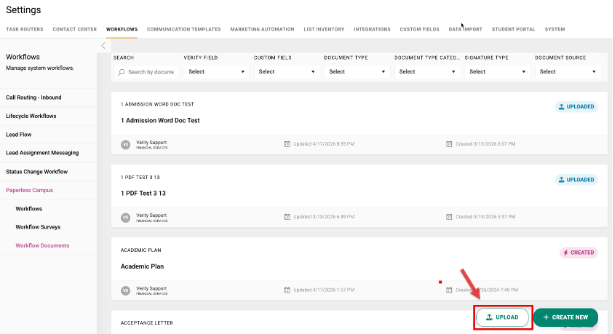
Institutions can now upload existing Word or PDF documents and visually map fields directly into those documents, including both CRM data fields and document-only fields used for one-time document generation.
Who It's For
Enrollment operations teams, admissions administrators, document management staff
Problem Solved
Manual document recreation and unnecessary CRM field creation
Why It Matters
Makes it easier to use existing institutional documents without rebuilding them from scratch, while reducing CRM clutter caused by one-time-use fields. Staff can now create more flexible document workflows and collect temporary data that only needs to appear in generated documents.
Details
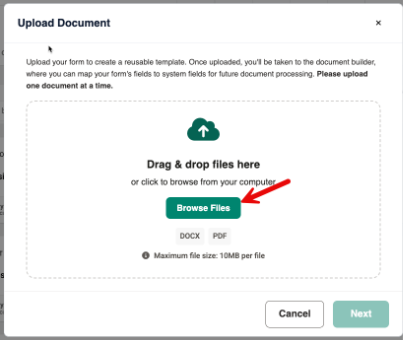
- Users can upload existing .docx and .pdf documents directly into workflow documents
- A visual mapping experience allows staff to connect document sections to CRM fields or document-only fields
- Document-only fields can be created and reused across surveys and document templates without storing the data permanently in the CRM
- Uploaded documents include metadata such as upload date, last updated information, and filtering options for uploaded versus system-created templates
- Survey builders can now use document-only fields to collect temporary information needed for generated documents
- Clear validation messaging helps guide users through file type, file size, and upload requirements

Configurable In-Progress Task Limits
Help balance workloads across contact center teams
What It Is
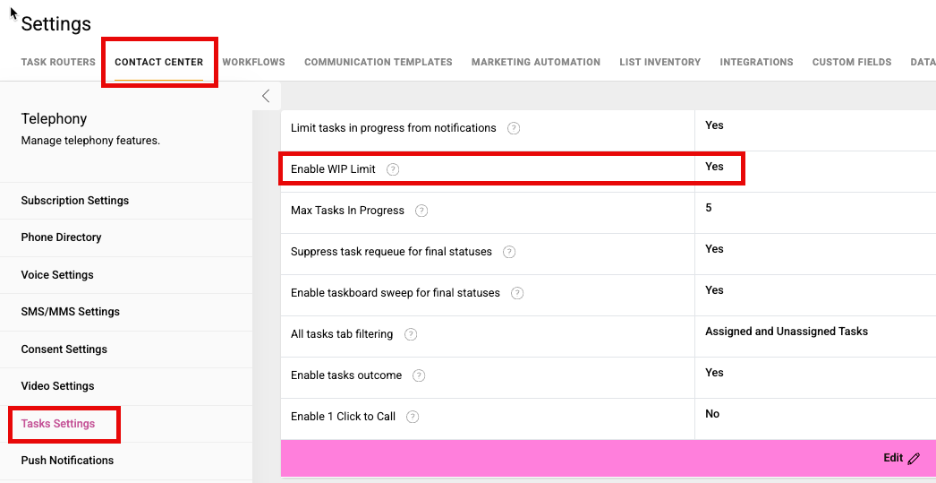
A new Contact Center setting that allows institutions to configure how many tasks a user can actively have in progress at one time.
Who It's For
Contact center managers, enrollment operations teams, admissions leadership
Problem Solved
Uneven workload distribution and task overload
Why It Matters
Helps managers balance workloads more effectively, improve accountability, and ensure tasks continue moving through queues efficiently.
Details
- Administrators will be able to configure maximum in-progress task limits by user
- Settings will be managed within Contact Center task settings
- Supports more balanced task management and operational efficiency

Clearer SMS Opt-Out Messaging
Improved transparency for student text communication preferences
What It Is
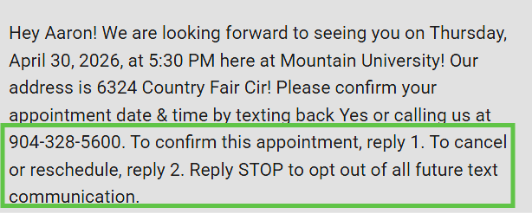
Updated SMS messaging language that provides clearer opt-out instructions and better communication around rescheduling and cancellation actions.
Who It's For
Contact center teams, admissions staff, student engagement teams
Problem Solved
Unclear SMS opt-out and response instructions for students
Why It Matters
Helps students better understand their messaging options while supporting clearer, more compliant communication practices.
Details
- SMS messages now include clearer opt-out guidance
- Updated messaging improves clarity around reschedule and cancellation responses
- Enhances the overall student communication experience

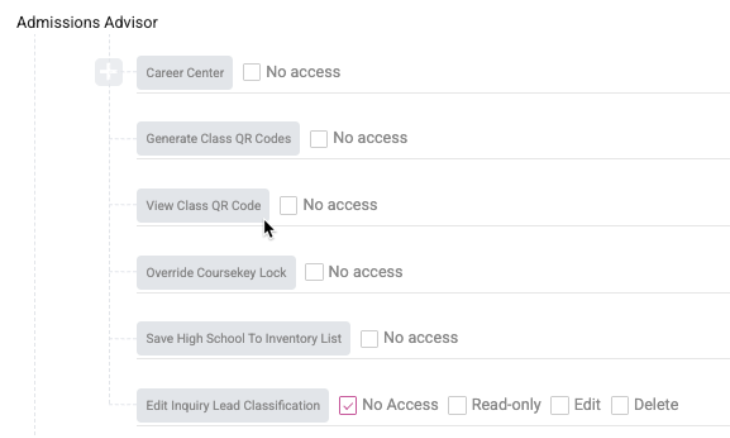
Restricted Editing for Lead Classification & Type Permissions
More control over who can modify lead classification settings
What It Is
New permission controls that restrict editing access for Lead Classification and Lead Type settings.
Who It's For
Admissions leadership, CRM administrators, enrollment operations teams
Problem Solved
Unintended or unauthorized changes to lead classification settings
Why It Matters
Helps institutions maintain cleaner lead data, improve consistency across teams, and ensure only authorized users can make critical classification updates.
Details
- Editing access for Lead Classification and Lead Type can now be permission controlled by system administrators in System Settings at both the global level and user level under student permissions
- Only authorized users will be able to modify classification settings
- Supports stronger governance and data consistency across enrollment teams


Unified Calendar Availability & Self-Booking Enhancements (Coming Soon)
A more connected scheduling experience for staff and students
What It Is
Upcoming enhancements to the scheduling experience that improve calendar availability management and expand self-booking capabilities for students and staff.
Who It's For
Admissions advisors, contact center teams, student-facing staff
Problem Solved
Scheduling conflicts and fragmented booking experiences
Why It Matters
Helps students book appointments more easily while giving staff a clearer and more unified scheduling experience.
Details
- Enhanced calendar availability management tools
- Expanded self-booking experience for students
- Continued improvements to Calendar 2.0 workflows and usability

Voicemail Routing & In-App Notifications (Coming Soon)
Better visibility into voicemail activity and communication follow-up
What It Is
New voicemail forwarding capabilities combined with an enhanced in-app notification center to help staff stay informed and respond faster.
Who It's For
Contact center teams, admissions advisors, student support staff
Problem Solved
Missed voicemail follow-ups and limited notification visibility
Why It Matters
Helps staff manage communications more efficiently and improves response times for student outreach.
Details
- Voicemails can be forwarded to appropriate staff members
- A new in-app notification center provides improved visibility into communication activity
- Designed to support faster follow-up and better communication coordination

Calendar Callback & Status Visibility (Coming Soon)
Improved visibility into scheduled callback activity
What It Is
Enhancements to callback tracking that automatically update scheduled callback statuses when calls are completed on the calendar.
Who It's For
Contact center teams, admissions staff, student engagement teams
Problem Solved
Manual callback status tracking
Why It Matters
Gives staff a more accurate view of callback activity and reduces the need for manual status updates.
Details
- Scheduled callbacks will automatically update once completed
- Improves visibility into outreach progress within the calendar experience
- Helps teams manage follow-up activity more efficiently

Other Coming Soon Features:
Bulk Email Send
List Inventory Management Enhancements
Personalized Communication Enhancements
Out-of-Office Workflow & Communication Routing

We'd love to hear from you and your colleagues about product feedback or what you'd like to see next.
Sign up to participate in future product feedback sessions or early design reviews.
Was this article helpful?
That’s Great!
Thank you for your feedback
Sorry! We couldn't be helpful
Thank you for your feedback
Feedback sent
We appreciate your effort and will try to fix the article