Portico SIS Release Notes - February 2026
This month’s release introduces Extended Schedule automation for clock hour programs, expanded SAP visibility and automation tools, and flexible Custom Student ID Generation — along with improved visibility for important action icons. Together, these updates strengthen academic progress tracking, streamline compliance workflows, and enhance everyday navigation across SIS and CRM.
TABLE OF CONTENTS
- Extended Schedule
- Increased SAP Visibility
- Institutional SAP Policy
- Automation for "UnMet" SAP outcomes
- Configurable Custom Student ID Generation
- Improved Visibility for Important Action Icons

Extended Schedule
Automated enrollment-level schedule adjustments for accurate clock hour tracking
What It Is
A new automation feature designed to enhance scheduling accuracy and visibility for clock hour enrollment attendance
Who It Is For
Academic departments, Registrars, & Retention teams
Why It Matters
Schools are unable to manually customize class schedules or class dates for an individual student. Extended Schedule solves this by generating a customized schedule at the enrollment level without altering the official class schedule or class dates.
This automation improves visibility into clock hour enrollment progress by supporting more accurate tracking of attendance, completion percentages, and pace/completion rate, while also
Details
- Extended Schedule automatically applies additional scheduled hours to an enrollment when needed. Options of which date to begin the additional schedule are either: At the end of a class, or At the end of the program
- Additional scheduled dates will only generate once attendance has been logged for all existing scheduled dates. If a student attends fewer hours than required, the system will automatically generate an additional scheduled date to account for the shortfall.
- Extended Schedule dates are highlighted at the student gradebook for visibility.
- Attendance Logs and report reflect the hours as "Extra Sch." Att. Type for visibility.
Important Notes
- Make-up time does not count towards scheduled hours.
- Posting make-up time will reduce the extended schedule accordingly.
Action Required
This feature can be enabled by updating the appropriate flag in the Academic Year Template.

Increased SAP Visibility
Enhanced transparency, audit tracking, and reporting for SAP records
What It Is
New enhancements designed to provide greater transparency and accessibility into Satisfactory Academic Progress (SAP) records.
Who It Is For
Academic & Financial Aid departments, Registrars, & Retention teams
Why It Matters
With enhanced audit tracking, document integration, and printing capabilities, institutions can more efficiently review, document, and communicate SAP outcomes.
Details
- SAP Log transcript view for improved record visibility
- Ability to print SAP logs (individual and bulk)
- Audit tracking of SAP-related changes
- Student History Report including enrollment and SAP-related changes
- Use of Projected GPA/GA for the qualitative component
- Evaluation Point transcript view for cumulative pace
- New SAP Log insert field to display SAP log details in paperless documents
Action Required
- Configuration is required for the SAP log to display on the Student Academic screen. Please review your settings to enable this feature.
- If you have any questions or would like assistance with configuration, reach out to your Client Success Manager.
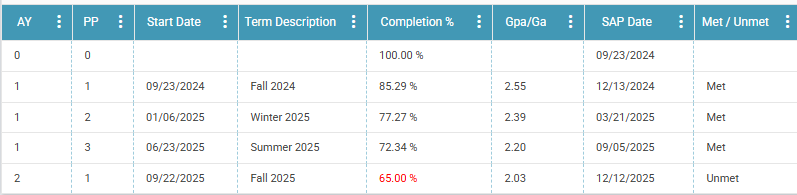
SAP Log

Institutional SAP Policy
Flexible internal SAP tracking beyond Title IV requirements
What It Is
A new enhancement that gives schools more flexibility in monitoring student academic progress.
Who It Is For
Academic departments, Registrars, & Retention teams
Why It Matters
Institutions can now create a secondary internal SAP policy with qualitative and/or quantitative components that differ from the official Title IV SAP policy. This allows schools to track student progress using a different metric for internal purposes. Many institutions use internal student academic progress thresholds as a proactive tool, similar to an early warning system, to identify at-risk students earlier and provide timely support before Title IV SAP issues occur. This improves intervention efforts and strengthens retention strategies.
Details
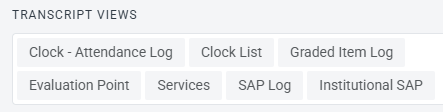
- Institutional SAP Log transcript view for improved record visibility
- Ability to print Institutional SAP log (individual)
- Institutional SAP Report to support tracking and monitoring of the Institutional SAP policy
Action Required
- Configuration is required for the SAP log to display on the Student Academic screen. Please review your settings to enable this feature.
- If you have any questions or would like assistance with configuration, reach out to your Client Success Manager.
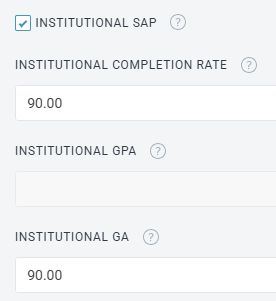
Settings from Institutional SAP

Automation for "UnMet" SAP outcomes
Automatic probation status updates tied to unmet SAP results
What It Is
A new enhancement designed to streamline how institutions assign and track "UnMet" SAP outcomes at the enrollment level.
Who It's For
Academic & Financial Aid departments, Registrars, & Retention teams
Why it Matters
This automation improves efficiency by eliminating the need for staff to manually update probation statuses student-by-student. It also enhances visibility, making it easier to identify and manage enrollments impacted by unmet SAP. Enrollments with an active Enrollment Level Status can be quickly identified using filters in reports and directly within the Contact Grid.
Details
- Schools can now assign a hierarchy to Enrollment Level Statuses (ELS) mapped to the Probation section of the enrollment record.
- When a student does not meet SAP, the appropriate Enrollment Level Status will automatically populate in the Probation section.
- For standard term credit hour programs, the system will also automatically populate the associated start and end dates along with the Enrollment Level Status.
Action Required
- Configuration is required to enable and define Enrollment Level Status hierarchy and mapping. Please review your settings to enable this feature.
- If you have any questions or would like assistance with configuration, reach out to your Client Success Manager.


Configurable Custom Student ID Generation
Flexible, school-defined Student ID formatting
What Is It
Institutions can now define and automatically generate their own Custom Student ID format within the SIS. IDs are created when a new enrollment record is added and can be used across reports, exports, and the student portal.
Who It's For
Schools that require structured Student ID formats (year-based, campus-based, program-based, etc.).
Problem Solved
Eliminates the need for manual ID tracking or workarounds when institutional ID standards don’t match a single, system-generated format.
Why It Matters
Keeps Student ID generation automated while allowing institutions to meet internal compliance and reporting requirements.
Details
- Configured under Settings → Student Portal → Custom Student ID
- Admins build formats using tokens (year, campus, program, sequential or random numbers)
- Live preview and validation included
- Applies to new enrollment records only; historical IDs are unchanged
- Both System ID and Custom Student ID appear on the student record
- Custom Student ID is searchable and available in select reports and exports
- Students may view their ID in the portal

Improved Visibility for Important Action Icons
Enhanced contrast for critical actions across the platform
What Is It
Important action icons like Close (X), Clear, and Remove now automatically adjust for better visibility based on the background they appear on.
Who It's For
All staff users across CRM and SIS
Problem Solved
Low contrast icons that were difficult to see or easy to miss
Why It Matters
Ensures critical actions are easy to find, improves usability, and supports modern accessibility standards.
Details
- Icons now use a dark, high contrast color on light backgrounds when needed
- Applies consistently across reports, pop-up windows, side panels, alerts, filters, tables, and input fields
- System administrators can enable the UserWay accessibility widget in Settings > Contact Center > Subscription Settings to provide accessibility tools for staff.

New Integrations: CIMA, Pivot Point LAB, and Portico Skills Tracker
Upcoming enhancements will further strengthen integration across the Portico ecosystem. The SIS integration will be expanded to include academic data captured through CIMA, PPL, and Skills tracking within the Attendance app. This enhancement will deliver key information such as scores, skills progress, and services data directly into the Portico SIS student record.
This update supports a more connected Portico ecosystem by ensuring key academic data from multiple departments is centralized in one place. With all relevant information housed within the SIS record, institutions benefit from improved visibility, stronger continuity across teams, and a true single source of truth for student progress and outcomes.
More details about timing and configuration will be shared closer to release.

We’d love to hear from you and your colleagues about product feedback or what you'd like to see next.
Sign up to participate in future product feedback sessions or early design reviews.
Was this article helpful?
That’s Great!
Thank you for your feedback
Sorry! We couldn't be helpful
Thank you for your feedback
Feedback sent
We appreciate your effort and will try to fix the article