Portico Recruit CRM Release Notes – July 2026
This month, we're excited to introduce the new Admissions Specialist course in Portico Pathways — our free online learning platform for Portico customers. The course features short, self-paced videos that help Admissions teams master everyday CRM workflows, build confidence faster, and get more from Portico Recruit.
We're also highlighting the release of Direct Campaign Mapping, a new feature that will make advisors' lives easier by automatically connecting inbound calls and texts to the right campaign.
Our latest release has also introduced more flexible Paperless application workflows, allowing institutions to manage different application processes by program and campus, along with new administrative controls for notifications, improved visibility into email templates, and a new API that makes it easier to bring campaign email content into other systems. Together, these updates help reduce manual work, improve visibility, and give your team more flexibility across CRM and Paperless.
TABLE OF CONTENTS
- Portico Pathways | Admissions Specialist Training Course
- Direct Campaign Mapping
- Multiple Application Workflows by Program & Campus
- Role Based Notification Deletion
- Email Template List Enhancements
- Email Campaign Content API
- Additional Improvements
- COMING SOON:

Portico Pathways | Admissions Specialist Training Course
New on-demand training course helps Admissions teams learn Portico CRM faster, with more confidence
What It Is
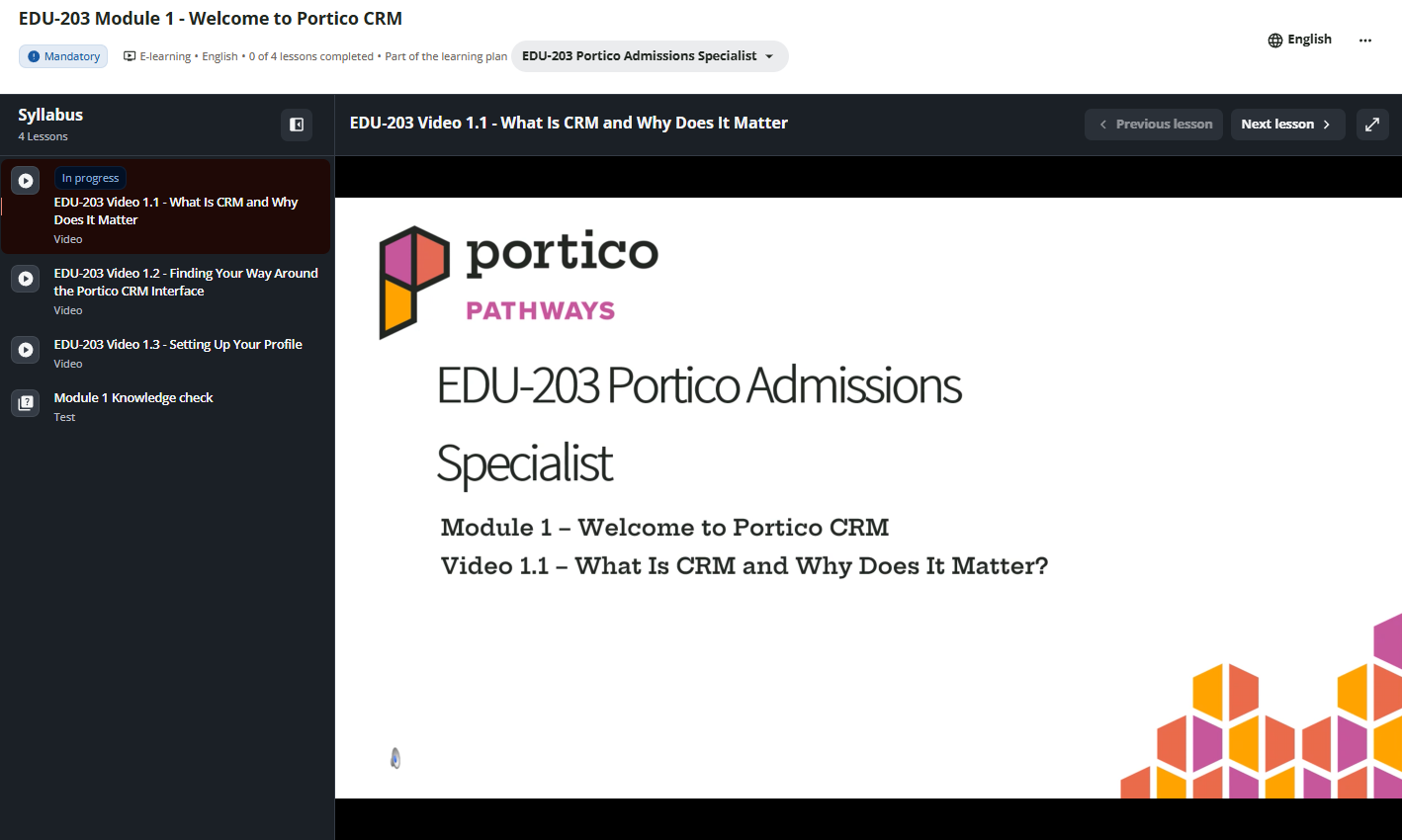
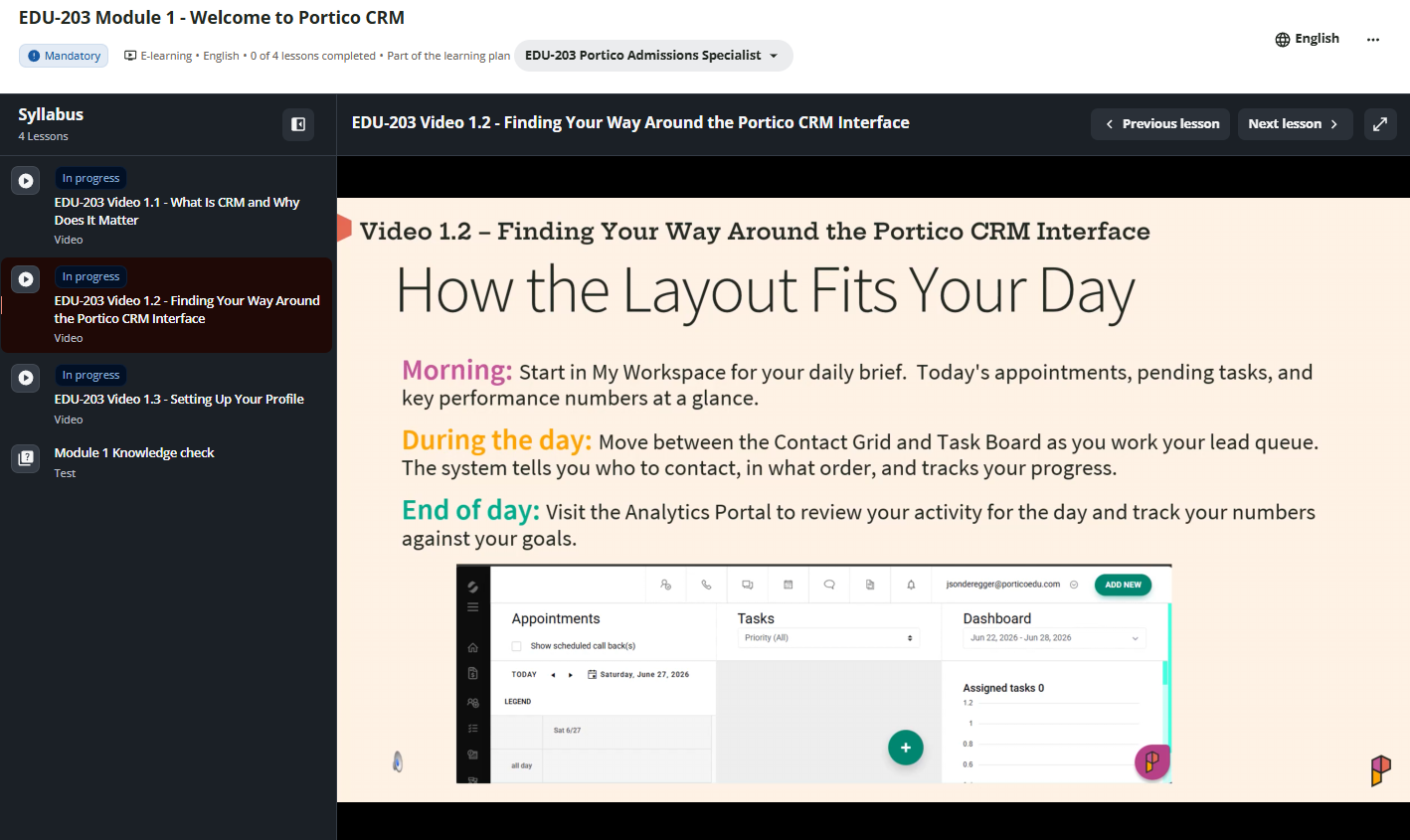
We're launching the first Portico CRM course in Portico Pathways — our new online learning platform for Portico customers. Designed specifically for Admissions Specialists, the course features short, on-demand video lessons covering the everyday workflows advisors use most, from managing leads and communicating with prospective students to scheduling appointments, tracking activity, and reporting. The first few modules are now live, with additional modules to be added in the coming weeks.
Who It's For
Admissions Specialists, recruiters, enrollment advisors, and managers who use Portico CRM, as well as new team members who need onboarding and existing users looking to sharpen their skills.
Problem Solved
Whether you're a new or existing user of Portico CRM, getting up to speed and staying confident with the platform can be a challenge. Portico Pathways provides self-paced, on-demand training that your team can access whenever they want.
Why It Matters
Whether you're onboarding a new advisor or helping experienced staff get more from Portico CRM, Pathways makes learning easier. Teams can build confidence faster, adopt best practices sooner, and use more of the platform's capabilities — all at their own pace and at no additional cost.
Details
- New Admissions Specialist course available through Portico Pathways
- Self-paced online training with short, easy-to-follow video lessons
- Covers the complete day-to-day Portico CRM workflow, including lead management, communications, scheduling, and reporting
- Designed as both new-user onboarding and an ongoing reference library
- Available at no additional cost for Portico customers
- Additional courses and modules are planned as the Portico Pathways library continues to grow.
>> Request Access to Portico Pathways (email: pathways@porticoedu.com)
Direct Campaign Mapping
Inbound replies, matched to the right campaign automatically
What Is It
When a lead calls or texts an advisor's direct number, Portico now recognizes whether the reply relates to an active campaign or if the advisor made a direct call -- and binds it to that campaign or direct context automatically. Advisors no longer have to chase disconnected direct-communication tasks or fix campaign attribution by hand. The campaign will show right where they work; dispositions update the correct campaign task, and reporting stays accurate.
What's included:
- Automatic campaign binding — inbound voice and SMS replies are matched to the advisor’s recent campaign activity, including cross-channel replies
- Campaign context everywhere — surfaced on the incoming-call window, SMS conversation view, task board, and Contact Hub
- Advisor control — confirm the suggested campaign, switch campaigns, or mark a reply as direct, gated by a new permission
Who It's For
Admissions Advisors and Campaign Managers running direct-number campaigns while also allowing their users to work direct calls.
Problem Solved
Inbound replies to a direct number created disconnected direct-communication tasks with incorrect campaign attribution, forcing advisors to manually find and update the original campaign task.
Why It Matters
Dispositions now update the correct campaign task, status, and attribution on their own, and advisors see the campaign context right where they work, so less manual reconciliation and cleaner reporting.
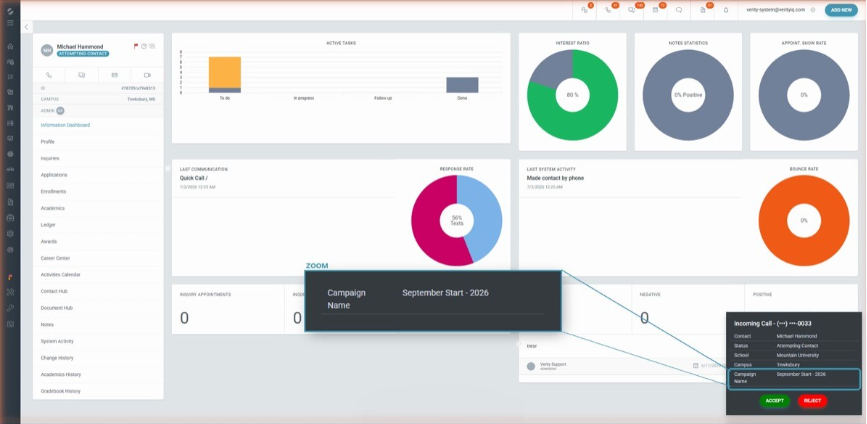
Incoming call on a direct number, with the matched campaign shown before the advisor answers
Details
- Recognizes campaign context across voice and SMS, including cross-channel replies (for example, a lead called by campaign who replies by text)
- Campaign context surfaces on the incoming-call window, the SMS conversation view, the task board, and the Contact Hub
- Advisors get campaign-aware disposition options, so saving a disposition updates the campaign task (dequeue, status change, requeue)
- Advisors can confirm the suggested campaign, switch to a different active campaign, or mark the reply as direct before saving, controlled by the new Manual Communication Context Override permission (off by default for all roles except System Administrator)
- Enabled per tenant through a self-service admin toggle in System → Contact Center → Subscription Settings, off by default
- Contact Hub timeline showing the call attributed to the campaign
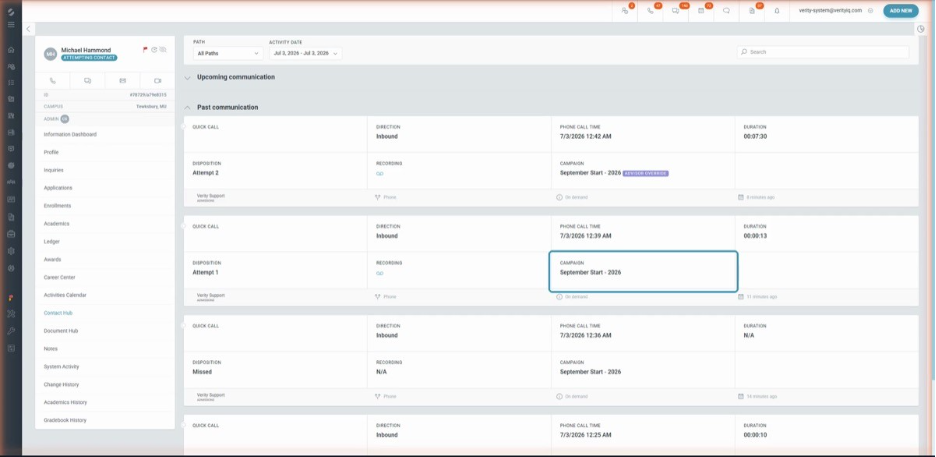
The Contact Hub Records the interaction against the correct campaign, so reporting stays accurate
Multiple Application Workflows by Program & Campus
One application workflow per program and campus, validated end to end
What Is It
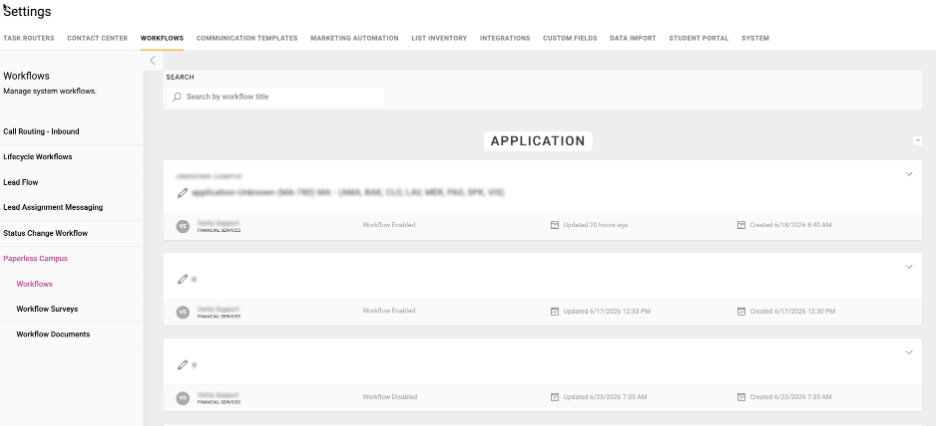
Administrators can now create and manage multiple Paperless Application workflows, each mapped to its own program and campus combinations, with validation that keeps application and agreement workflows correctly paired.
Who It's For
System Administrators and Admissions/Enrollment operations teams managing Paperless workflows
Problem Solved
Institutions were limited to a single shared Application workflow.
Why It Matters
Each program and campus can carry out the right application for pre-steps, and the system prevents conflicting or mismatched configurations before they cause problems downstream.
Details
- Create multiple Application workflows, each with its own program and campus selections
- The system blocks a second active workflow of the same type for the same program and campus combination
- An agreement workflow that requires an application cannot be activated without a matching Application workflow for the same program and campus; a clear validation message appears when one is missing, and drafts can still be saved to finish later
- When an application is opened, the system uses the Application workflow that matches the agreement's program and campus instead of falling back to an unrelated workflow, and fails cleanly when no match exists
- Existing single-workflow setups continue to work with no changes
Role Based Notification Deletion
Control who can clear notification, and for when
What Is It
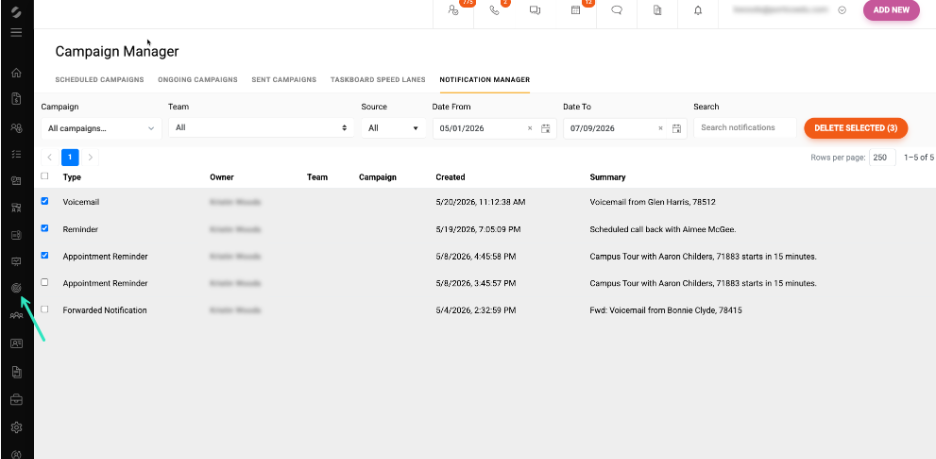
Administrators can now control who can delete notifications and at what scope, whether it is their own, their team's, or all users'.
Who It's For
System Administrators (configuration); team leads, escalation managers, and staff who manage notifications day-to-day.
Problem Solved
Notification deletion was not scoped by role, which limited how teams could keep their notifications manageable.
Why It Matters
Teams can keep notification volume under control while enforcing the right level of access for each role.
Details
- Configure permissions at the role level or as a per-user override; all options are disabled by default
- Three scopes, each set to read-only or delete: Manage Own, Manage Team, and Manage All notifications
- Team-scope deletion is limited to team leads, escalation managers, and members acting within their assigned teams
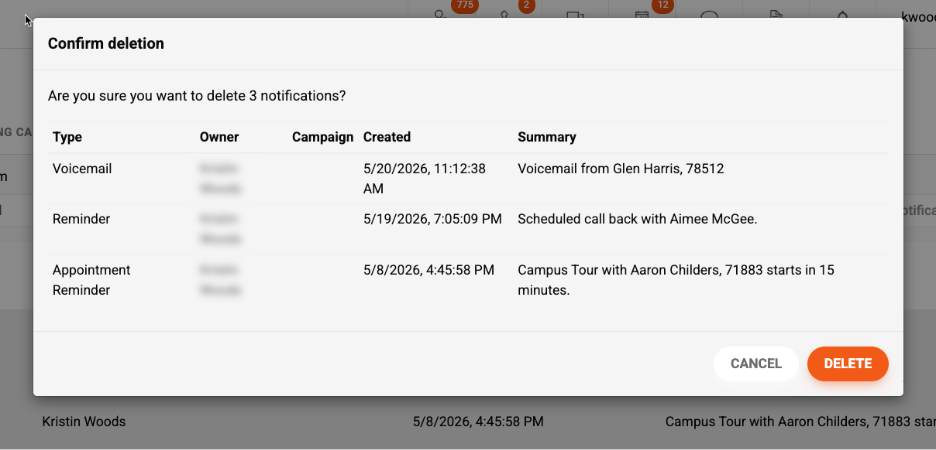
- Applies across lead, SMS, voicemail, and calendar notifications, and supports bulk deletion with a confirmation prompt on high-impact actions
Email Template List Enhancements
See who created each template, and where it came from
What Is It
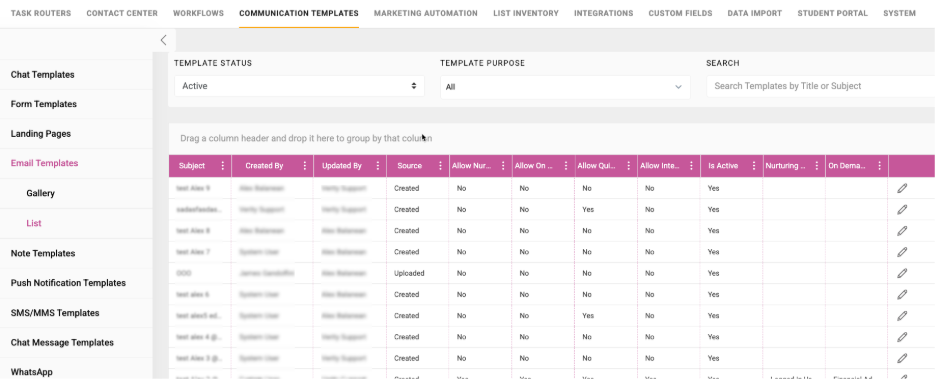
The email template list now shows who created each template and whether it was created in Portico or uploaded.
Who It's For
System Administrators and staff who manage email templates
Problem Solved
The list view did not show template ownership, and uploaded templates displayed only "System User," making templates hard to identify and audit.
Why It Matters
Administrators can quickly see the owner and origin of every email template, which makes template management and auditing easier.
Details
- New Created By column on the List view, matching the Gallery view
- Created By now displays the actual user who created or uploaded the template instead of "System User"
- New Source column indicates whether a template was Created within the CRM or Uploaded
- Sorting, filtering, searching, and editing continue to work as before
Email Campaign Content API
Pull Campaign email content into your own systems
What Is It
A new outbound API returns an email campaign's configured content when given a Campaign ID.
Who It's For
System Administrators and integration users at institutions syncing Portico data with external systems.
Problem Solved
Retrieving campaign email content outside Portico required manual lookup in the UI.
Why It Matters
Clients can pull campaign email details into external systems, reporting, or previews programmatically, without manual effort.
Details
- Accepts a Campaign ID and returns the associated email content, including subject, body, and campaign identifier
- Returns clear responses when the campaign is not found or has no email content configured
- Respects existing API and security permissions, and does not expose unrelated campaign or student data
Additional Improvements
 User Phone Number Visibility
Users can now see their own phone number in the top-right account dropdown and on their Profile page for quick reference.
 Appointment Booking Availability
Addressed an issue where editing an appointment type with User Booking enabled saved the Slot Duration as 0, which prevented available dates from displaying on the booking page.
 Paperless Preview and Printing for Large Documents
Addressed an issue where Paperless documents with embedded images returned to a blank screen or error on preview and print when the rendered document exceeded the browser's inline display limit.

A preview of what's on the way. Dates and details may shift as work progresses.
 User-Level Out-of-Office Automation
Step away with confidence. Advisors will set their out-of-office dates once and let Portico keep conversations moving automated SMS and email replies to inbound direct messages and missed calls using their own personal templates, plus optional call routing to a teammate or team so no student is left waiting while they are away.
 More Calendar enhancements
Continued investment in scheduling to make availability and booking even more seamless.
 Document management improvements
Ongoing enhancements to how documents are created, sent, and managed.
 AI on the way
New AI-assisted experiences are in the works to help your team work faster.
And more — Additional enhancements across CRM, Paperless, and Communications are in active development. Watch this space.

We'd love to hear from you and your colleagues about product feedback or what you'd like to see next.
Sign up to participate in future product feedback sessions or early design reviews.
Was this article helpful?
That’s Great!
Thank you for your feedback
Sorry! We couldn't be helpful
Thank you for your feedback
Feedback sent
We appreciate your effort and will try to fix the article