Portico Financial Aid Release Notes - June 2026
This release features our new FA Support Agent tool to deliver faster answers to support questions. It also includes initial updates for major upcoming features — the Loan Adjustment Queue and Automated Verification — while introducing meaningful improvements across support, compliance, and operational configuration.
TABLE OF CONTENTS
- FA Support Agent
- Admin Loan Adjustment Queue — First Look, more COMING SOON
- Verification Automation: Phase 1 (more COMING SOON)
- Additional Improvements

FA Support Agent
Get answers faster — without leaving CORE
What It Is
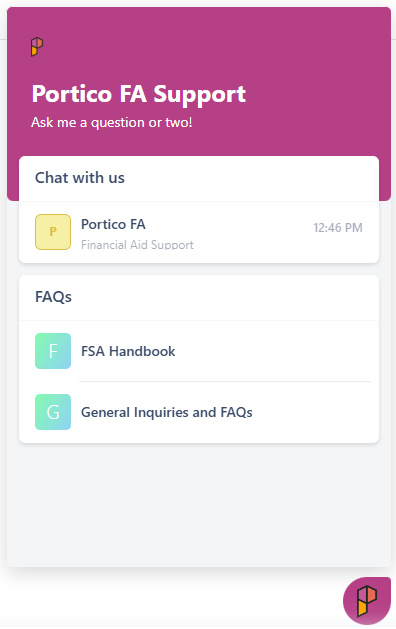
The new Portico Financial Aid Support Agent is now available directly within CORE, giving you faster access to help, guidance, and support resources right where you work.
Simply click the floating "P" icon in the corner of your screen to ask questions, find answers, submit support tickets, or access the Portico Support Portal.
Who It's For
All Financial Aid admin and staff users working in CORE.
Problem Solved
When questions come up during your day, finding answers can mean leaving your current screen, searching documentation, or navigating to the support portal. The new Support Agent brings help directly into your workflow so you can get answers faster and stay focused on serving students.
Why It Matters
The Support Agent provides immediate access to support resources without disrupting your work. Whether you need help understanding a feature, troubleshooting an issue, or finding guidance on a financial aid process, assistance is now just one click away.
Most importantly, this enhancement complements—not replaces—the personalized support you receive from Portico. Your Account Manager, Financial Aid Support Team, Managed Services team, and Help Center resources remain available exactly as they are today.
Details
To access, click the floating 'P' icon in CORE and select Chat With Us > Portico FA.
From the Support Agent, you can:
- Ask questions about CORE functionality and features
- Get guidance on financial aid processes and workflows
- Find answers to common "how-to" questions
- Access troubleshooting and best-practice recommendations
- Submit support tickets directly from CORE
- Open the Portico Support Portal and Help Center resources
Coming in July 2026
Beginning in July 2026, the old "CI Support" link in the CORE header will be retired. All support resources will continue to be available through the new Support Agent experience, making it your single destination for getting answers, submitting support requests, and accessing support resources and documentation.

Admin Loan Adjustment Queue — First Look, more COMING SOON
Proactively identifying funding and enrollment mismatches
What It Is
Portico is introducing the foundation for an Admin Loan Adjustment Queue — a back-end workflow that gives Portico Financial Aid Representatives visibility into students whose projected funding no longer aligns with the scheduled units reflected on the student record.
Who It's For
Portico's full-service client institutions, supported by their assigned Portico Financial Aid Representative. This is currently a back-end administrative function and is not yet a school-user-facing feature.
Problem Solved
When a student's projected or disbursed aid no longer matches their scheduled units, the current process often requires manually cloning and recalculating funding estimates. As compliance requirements increase, these adjustments can create significant review volume and operational bottlenecks.
This enhancement proactively surfaces those discrepancies, helping identify issues before they compound and laying the groundwork for a more automated adjustment process.
Why It Matters
The new workflow helps Portico FA Representatives identify scheduled unit changes earlier, support institutions through the adjustment process, and manage funding corrections more efficiently. Future functionality will support both pre-disbursement aid adjustments and post-disbursement refund workflows when aid was awarded based on incorrect credit amounts.
Details
This release delivers the foundational infrastructure and an early administrative interface. Future releases will expand the workflow and introduce school-facing tools that provide institutions with greater visibility into scheduled unit changes and projected aid discrepancies directly within CORE.

Verification Automation: Phase 1 (more COMING SOON)
Reducing manual review for straightforward verification cases
What It Is
Portico is introducing Phase 1 of Verification Automation, the first layer of automated clearance logic built on top of Verification AI. This enhancement identifies and clears certain low-risk verification records automatically, reducing manual review requirements.
Who It's For
Currently, this functionality supports Portico's Financial Aid Representatives serving full-service institutions. Future phases will extend these capabilities directly to institutional users within CORE.
Problem Solved
Verification review requires staff attention for every triggered record, even when students meet straightforward verification criteria. As processing volume grows, these low-risk cases can consume valuable time that could be spent on more complex files.
Why It Matters
Phase 1 focuses on the lowest-risk verification profiles, including students whose Department of Education data has already been verified and who meet specific household and documentation criteria. When all requirements are met, the system can automatically clear the verification process without additional review, helping reduce processing volume and improve efficiency.
Details
This release is the first phase of a broader automation roadmap built on Verification AI's document review and data comparison capabilities. Additional verification scenarios are already in development, with future enhancements bringing more automation directly into CORE.

Additional Improvements
This release also includes improvements across several functional areas of the Financial Aid platform, including:
- Funding Estimate and Cost of Attendance calculations
- Award packaging and disbursement processing
- Pell Grant and compliance-related calculations
- NSLDS program data handling
- Payment period automation
- Pell Reconciliation imports
- Enrollment status reporting accuracy
- Student communications and notifications
- Financial Aid reporting and exports
- Overall system performance and processing reliability
Please reach out to our Support or Product teams with specific questions.

We'd love to hear from you and your colleagues about product feedback or what you'd like to see next.
Sign up to participate in future product feedback sessions or early design reviews.
Was this article helpful?
That’s Great!
Thank you for your feedback
Sorry! We couldn't be helpful
Thank you for your feedback
Feedback sent
We appreciate your effort and will try to fix the article