Portico Financial Aid Release Notes - March 26, 2026
This month, we’re highlighting improvements that help Portico FA software (aka 'CORE') in its preparation to support the regulatory changes put forth by the OBBBA regulatory updates (or what we're calling "OB3"). These changes -- amongst others -- will help reduce manual work and offer peace of mind through new governance and logic. They include intuitive designs that help users transition into OB3 practices while also strengthening integration and data consistency across the CORE platform.
TABLE OF CONTENTS
- Institutionally Determined Loan Limits (UI/UX) (OB3 Readiness)
- OFA-Driven Need Analysis
- 2026–27 ISIR Layout Update (OB3 readiness)
- New Grade Levels for 2026–27 (OB3 readiness)
- Grandfather Logic at the Package Level (OB3 readiness)
- Student Record “Recent” Quick Access Dropdown

Institutionally Determined Loan Limits (UI/UX) (OB3 Readiness)
Configure program + academic-level loan limits with guardrails
What Is It
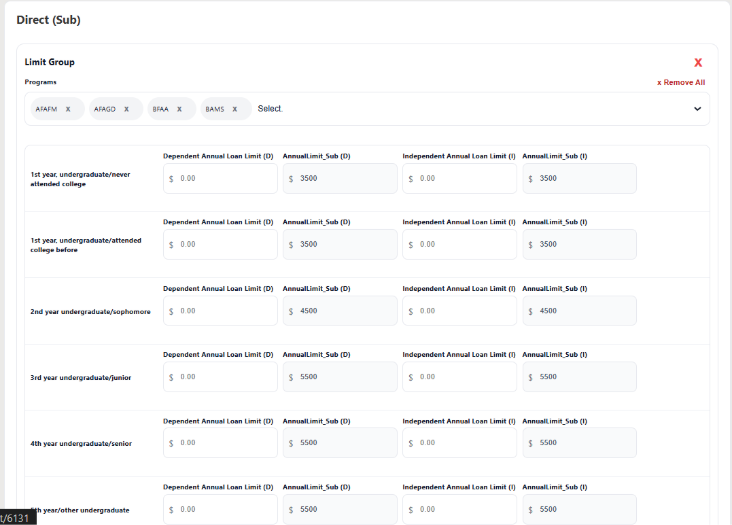
At the fund type level in CORE, you will now see this icon  at the PLUS, SUB and UNSUB loan level. This is the visual indication that allows the user to configure the amount of loans that a student in specific program/s can receive. The new “Configure Fund Type” attribute lets schools configure annual loan limits by Program + Academic Level, with dependent/independent values validated against max caps.

Who It’s For
Financial Aid Admins, School Admins
Problem Solved
Schools need program-specific loan limit control without breaking compliance caps.
Why It Matters
Prevents over-awarding by enforcing max values while still allowing flexibility where institutions need it.
Details
- Configure per Fund Type → Program → Academic Level
- Editable dependent/independent values with read-only max values
- Inline validation (≥ 0, Value ≤ Max)
- Persists configuration and reloads on revisit

OFA-Driven Need Analysis
More accurate Pell/Sub need analysis using configurable OFA flags
What Is It
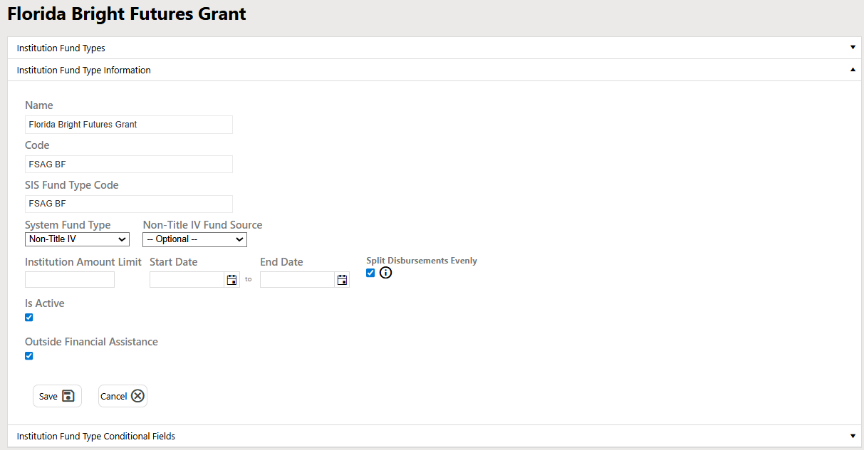
We added an OFA Flag to fund types in CORE and this flag updates need analysis logic to calculate OFA dynamically. But what does that really mean? Per NASFAA.org OB3 ‘If a student’s non-federal scholarships and grants alone equal or exceed their full Cost of Attendance (COA), then they cannot receive a Pell Grant (even if they are otherwise eligible).” The OFA flag meets this criterion at the fund type level and will be effective for the 26-27 starts.
Disclaimer:
The OFA-driven Pell eligibility check functions correctly when a brand-new funding estimate is created. It will also execute when a funding estimate is cloned; however, it does not currently account for prior disbursement activity.
When cloning, the system recalculates eligibility across all terms without recognizing:
- That the estimate is a clone,
- That Pell disbursement dates may have already passed, or
- That some or all Pell funds may have already been disbursed.
As a result, the logic may remove Pell across all terms — including terms where disbursements have already occurred. Under federal regulations, past disbursements cannot be retroactively eliminated. Only future, undisbursed amounts should be adjusted.
At this time, the system does not evaluate disbursement dates by term or payment period when applying OFA logic in a cloned estimate. A future enhancement will enhance the logic by ensuring the recalculation only affects remaining, undisbursed Pell funds and does not disturb completed disbursements.
Who It’s For
Financial Aid Admins, Packaging teams
Problem Solved
Need analysis now identifies and aligns with updated rules without forcing a hardcoded fund list. The user gets to designate which fund types are OFA and the system dynamically accessed each allocated amount gross/net again the AY COA keeping institutions compliant.
Why It Matters
Makes need analysis for internal, external scholarships and grants scalable and policy driven as regulations shift without the need for manual calculations.
Details
- Fund Types now support OFA Flag (default false/off; configurable)
- OFA calculation includes “Other Funding” where OFA Flag = true/on
- Updated logic:
- Pell: If COA – OFA <= 0 → Pell eligibility = 0
- Subsidized: Sub Need = COA – OFA – Pell
- Auto Recalc updated so valid Other Funding entries aren’t wiped when toggled on/off (only resets incomplete entries), layman’s terms when the fund type is OFA Auto Recalc will not remove the fund type from the FE when save. If the user removes the fund type but leave an amount in the allotment fields and saves the FE logic will wipe out the amount then.

2026–27 ISIR Layout Update (OB3 Readiness)
The CORE software can interpret 2026-27 layout updates while retaining 2025-26 behavior
What Is It
The CORE software has been updated to support the new 2026–27 ISIR layout (Version 2) while continuing to read previously received ISIRs against the prior layout (Version 1).
Who It’s For
Aid processing teams; institutions importing ISIRs into CORE and on to your institution.
Problem Solved
Layout changes can break imports or misread historical records plus as the regulatory boards change and transition having 2 versions support the continuity of prior ISIR flow without disruptions but also supports the transitioning 26-27 ISIRs as they start to flow.
Why It Matters
Lets CORE accept new ISIR updates without corrupting historical interpretation.
Details
- Incoming ISIRs are read using the updated layout version
- Previously received ISIRs continue using the existing layout logic

New Grade Levels for 2026–27 (OB3 Readiness)
Supports new graduate/professional grade levels for 2026–27 forward
What Is It
OB3 introduces new grade level to be interpreted by Financial Aid systems for the beginning award year 2026–27:
8 → Graduate Never Professional
9 → Graduate was Professional
10 → Professional Never Graduate
11 → Professional was Graduate
12 → Graduate Concurrent Enrollment
13 → Professional Concurrent Enrollment
Who It’s For
Supports system wide packaging/need analysis logic and downstream validation for loans.
Problem Solved
Distinguishes the outlined grade level breakout per OB3 and removed the existing 6/7 grade levels which are no longer valid for loans originated in 2026–27+.
Why It Matters
Prevents invalid grade-level reporting and supports new rulesets for next award year.
Details
- New grade levels added: 8–13
- Rules:
- Grade Levels 6 & 7 remain valid for 2025–26 and prior
- Grade Levels 8–13 required for 2026–27 and forward
- Invalid combinations return Reject edit 996

Grandfather Logic at the Package Level (OB3 Readiness)
Accurate grandfather eligibility and end date per package
What Is It
Implements grandfather eligibility evaluation per Packaging (PKG) (not just per student) and surfaces the results in FE Student Detail per package.
Who It’s For
Financial Aid Admins and processors reviewing package-specific eligibility
Problem Solved
Student-level eligibility can mask package-level differences and cause incorrect eligibility/end-date calculations for OB3.
Why It Matters
Improves correctness and transparency for aid decisions during rule transitions.
Details
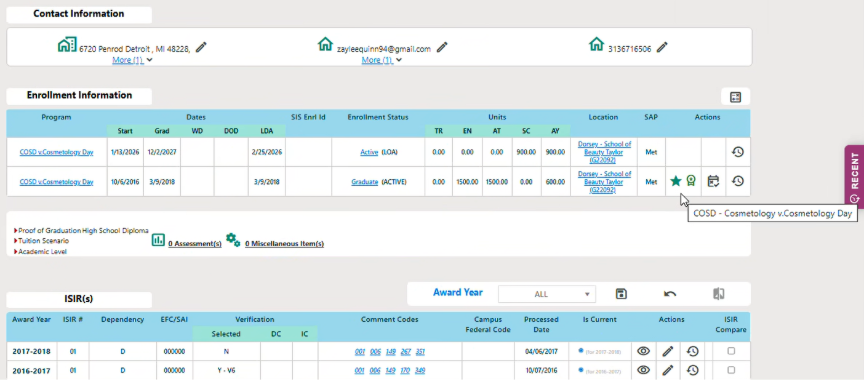
- Eligibility checks include enrollment status and direct loan gross > 0
- Hard date status check: June 30, 2026
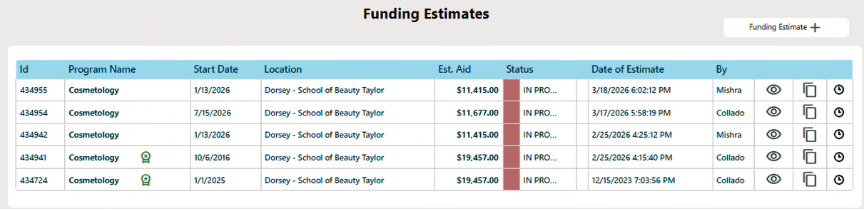
- Displays per package in FE Student Detail
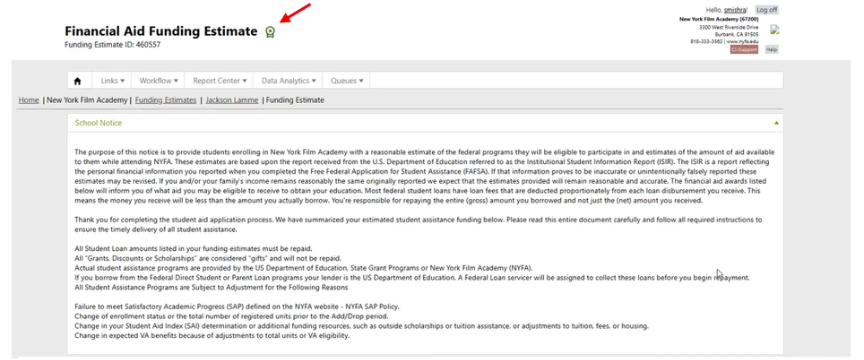
How it does, What it does
Two new tracking points were added to the CORE Packaging logic in the Financial Aid Software:
- "Was the student packaged?" — A Yes/No system flag that marks whether a student has been packaged as of a specific point in time.
- "If yes, when?" — A timestamp that captures the exact moment the student was packaged.
Why it matters
The timestamp is the critical piece — it's used to accurately determine whether a student qualifies for grandfathering (i.e., being locked into older rules/rates). The system needs to know precisely when a student was packaged to decide:
- Did they get packaged before or after a policy/rule change?
- Do they keep that grandfathered status for the remainder of their time in the program?
In everyday terms
Think of it like a "price lock" at a subscription service. If you signed up before a price increase, you're grandfathered into the old rate — but only if the system can prove exactly when you signed up. This timestamp does exactly that for financial aid packaging.

Student Record “Recent” Quick Access Dropdown
Faster navigation back to recently viewed students
What Is It
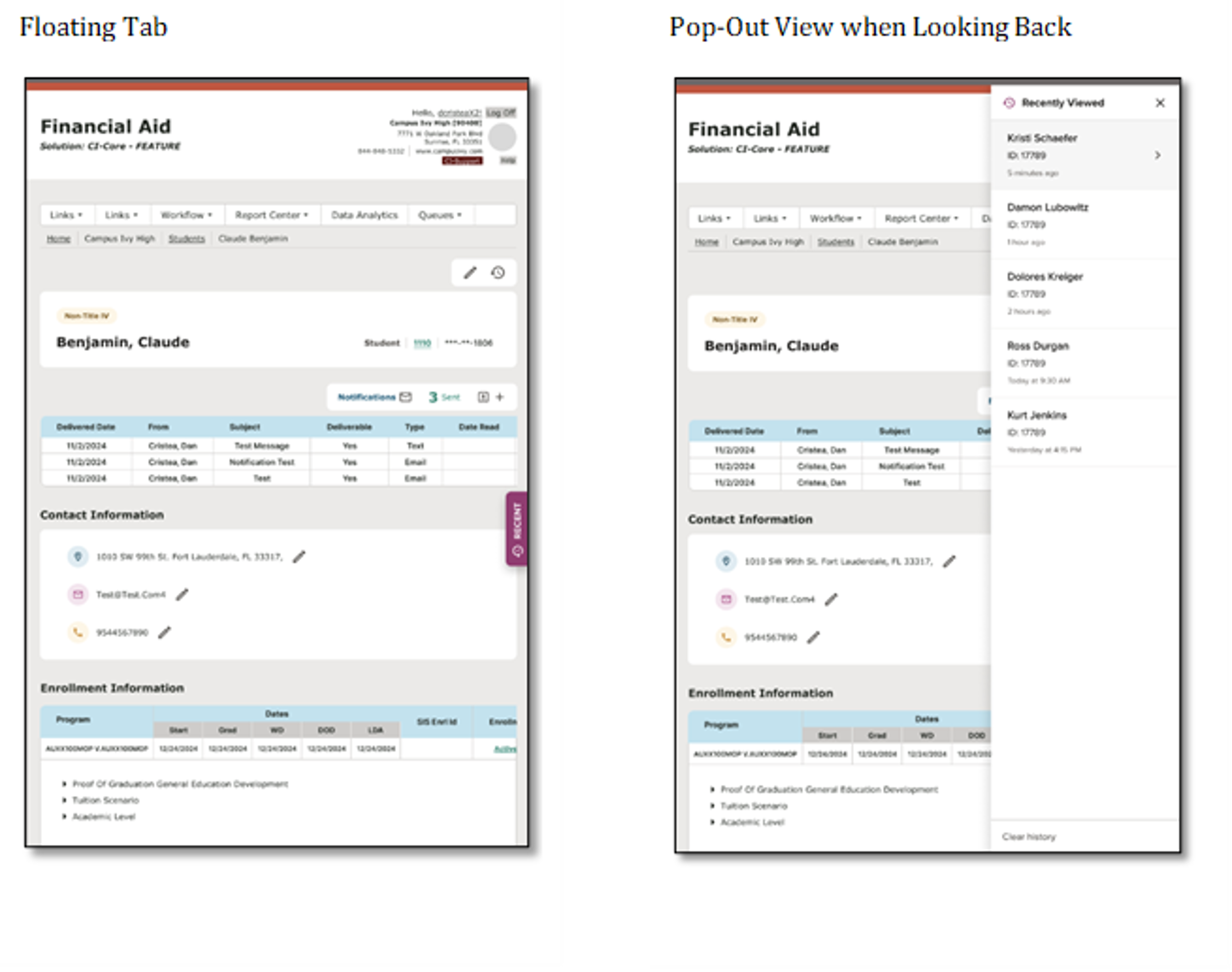
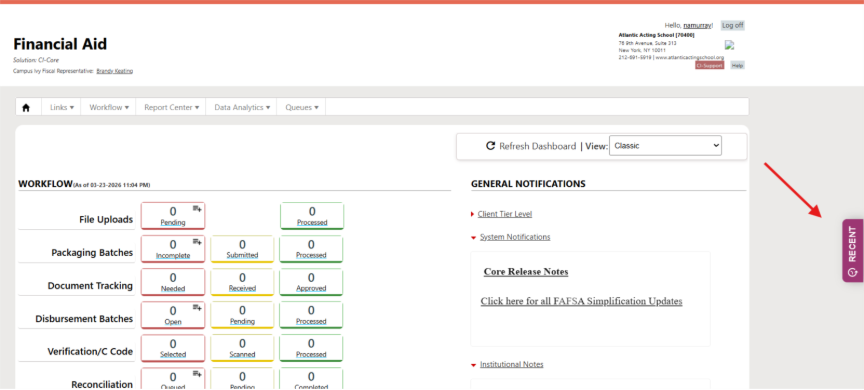
Adds a quick-access UI pattern to jump back to the last few student records you viewed.
Who It’s For
Processors working across many student records
Problem Solved
Losing your place after a crash/browser close means re-searching and wasted time.
Why It Matters
Reduces friction and improves workflow continuity.
Details
- Recent student list persists across navigation sessions
- Supports quick return without researching
Was this article helpful?
That’s Great!
Thank you for your feedback
Sorry! We couldn't be helpful
Thank you for your feedback
Feedback sent
We appreciate your effort and will try to fix the article