Portico Financial Aid Release Notes - May 5, 2026
This release continues our Financial Aid software platform’s (CORE) commitment to OB3 readiness while delivering meaningful improvements across branding, compliance, and financial aid operations. Highlights include expanded multi-location branding controls, updated ISIR schema and comment codes for 2026–27, new federal loan limit enforcement for OBBBA, and a restored reconciliation module for disbursement date discrepancies.
We’ve also introduced new API endpoints for self-serve reporting and document management, added AI-powered feature flags for Funding Estimate and FA Verification, and resolved key bugs in the NPC, SAGE correction icon, and Non-T4 funding logic — all while strengthening data consistency across the CORE platform.
Key Highlights:
- OB3 readiness & compliance updates
- 2026–27 ISIR schema update (new Version field + field renumbering)
- New 26–27 ISIR comment codes (331–352 added; deprecated codes deactivated)
- OB3 federal loan limit updates + PLUS suppression in Funding Estimate (AY 17+)
- Funding Estimate enhancements
- New API endpoints (Funding Estimate Direct Costs + Document AY Backfill)
- Bug fixes (NPC calculation, SAGE correction icon, Non-T4 funding logic, reconciliation date discrepancies)

Location-Level Branding (Feature Flag)
Admins at multi-location institutions can now upload a logo at the location level.
What’s New
Admins at multi-location institutions can now upload a logo at the location level, rather than only at the institution (OPEID) level. This allows each campus under the same OPEID to display its own branding on the Student Detail page — without affecting schools that don’t have the feature enabled. This feature is controlled by a feature flag and must be enabled per institution by your Portico account team.
How It Works
- When the flag is OFF: behavior is unchanged — one logo upload option at the institution level.
- When the flag is ON: a new logo upload field appears under each Location record. Only one image can be uploaded per location; if you upload a new image, it replaces the previous one. Once uploaded, the location-level logo displays on the Student Detail page for students associated with that campus.
FEATURE FLAGS:

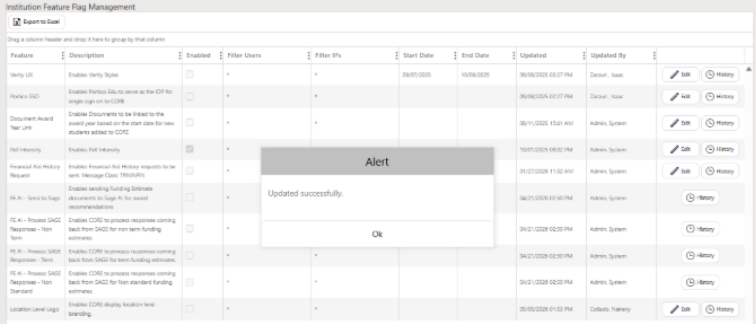
WHEN THE FLAG IS ON:
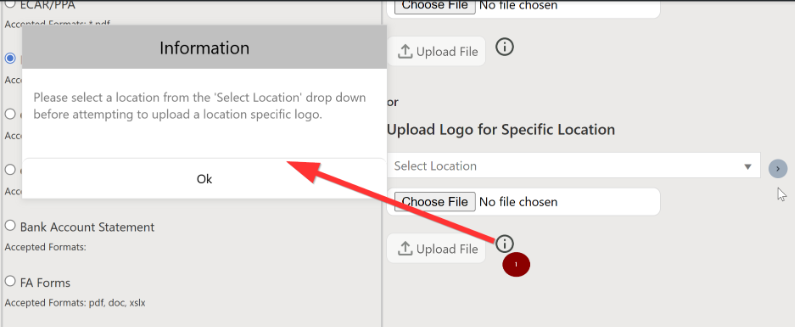
FILE UPLOAD PAGE:
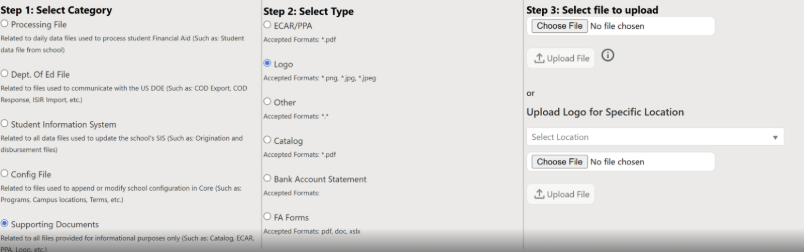
WHEN THE FLAG IS OFF:
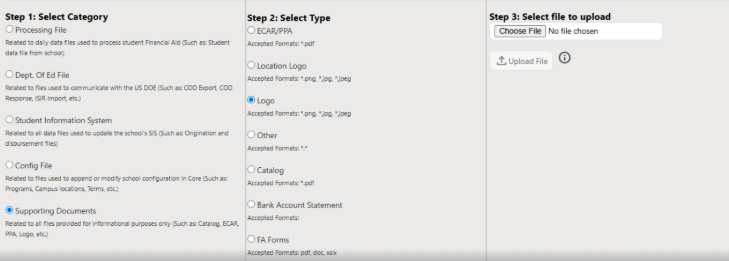
RESULTS:


Student Disbursement Zero-Out API
The Student Disbursement Zero-Out API is now publicly exposed for regulatory compliance and reconciliation workflows.
What’s New
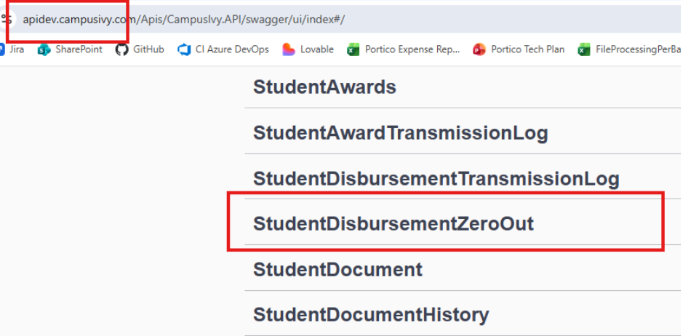
The Student Disbursement Zero-Out API (/api/StudentDisbursementZeroOut) is now publicly exposed, allowing institutions to programmatically access disbursement zero-out data for regulatory compliance and reconciliation workflows.
This endpoint helps Financial Aid teams stay on top of “queued” or “failed” status transmissions.
Key Details:
- The API enforces a maximum 89-day date window per request. Date ranges wider than 89 days will return an HTTP 400 error with a clear message. Plan your API calls accordingly by splitting larger date ranges into multiple requests.
- Standard bearer token authentication is required; unauthenticated requests return HTTP 401.
- The DS/DU loan limit fields (DSAnnualLimit, DSAggregateTotal, DSAggregateTotal_Remaining, DUAnnualLimit, DUAggregateTotal, DUAggregateTotal_Remaining) that were briefly added to this endpoint have been removed. These fields are not present in the report column chooser or the API response.
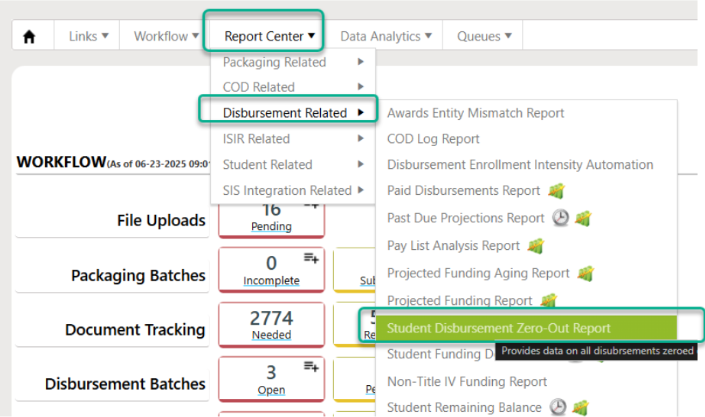
CONNECTED REPORT IN CORE:
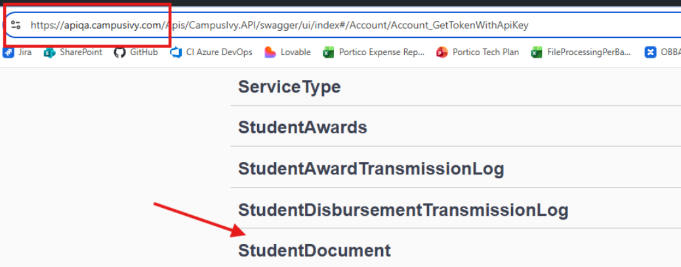
APIs:

Assigned FA Rep Displayed on Student Details
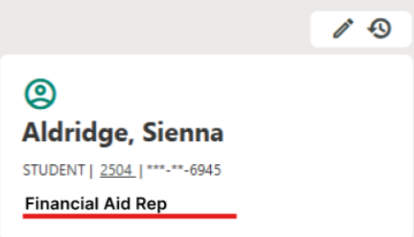
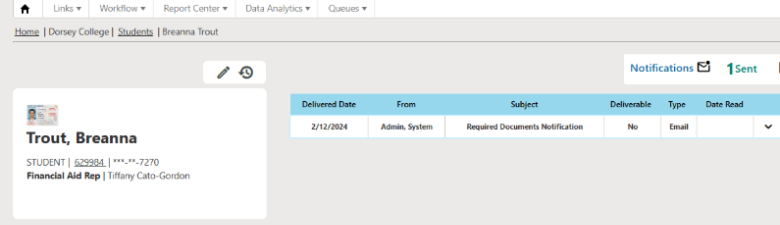
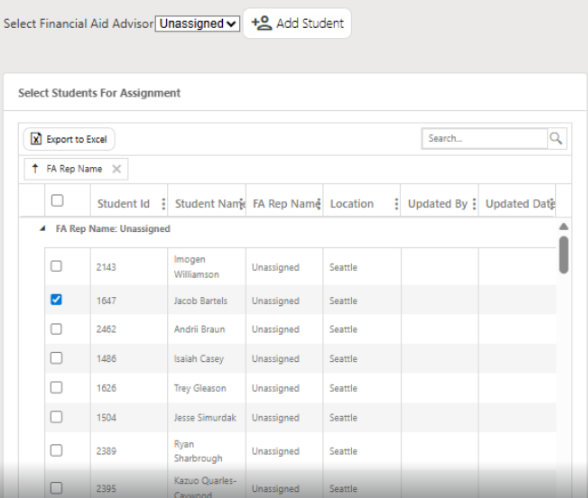
The assigned Financial Aid Representative is now displayed prominently in the top section of the Student Details page.
What’s New
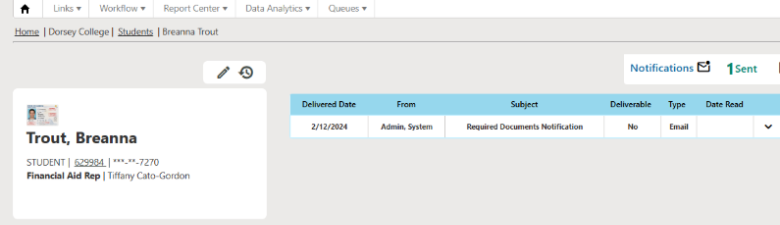
The assigned Financial Aid Representative is now displayed prominently in the top section of the Student Details page, so FA staff can immediately see who owns a student’s file without having to dig through other screens.
How It Works:
- If a student has an assigned FA Rep, their name and contact information appear near the top of Student Details.
- If no FA Rep is assigned, the field shows “Not assigned” — no blank or ambiguous space.
- RBAC is respected — visibility of this field follows existing role-based access control rules.
NEW VIEW:
STUDENT ASSIGNMENT:

UEI Number Displayed on Batch Screen
The institution’s Unique Entity Identifier (UEI) number is now displayed directly on the Batch screen.
What’s New
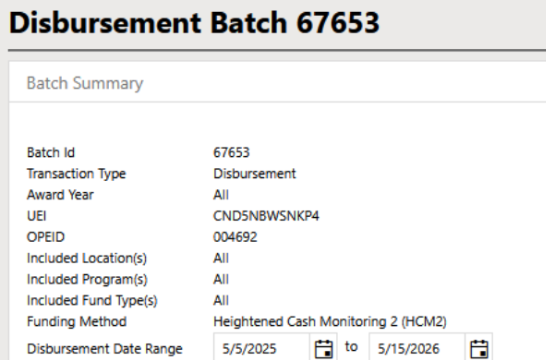
The institution’s Unique Entity Identifier (UEI) number is now displayed directly on the Batch screen, so users can complete batch processing without having to navigate away to the OPEID section to look it up.
The UEI field is read-only on the Batch screen and always reflects the current value from the OPEID section. No editing of the UEI is possible from this screen. EID section. No editing of the UEI is possible from this screen.
Screenshot of the Batch screen with the UEI number visible in the display.


Non-T4 Program: Funding Estimate & Award Restrictions
Students enrolled in non-Title IV programs are now properly excluded from Title IV funding workflows.
What’s New
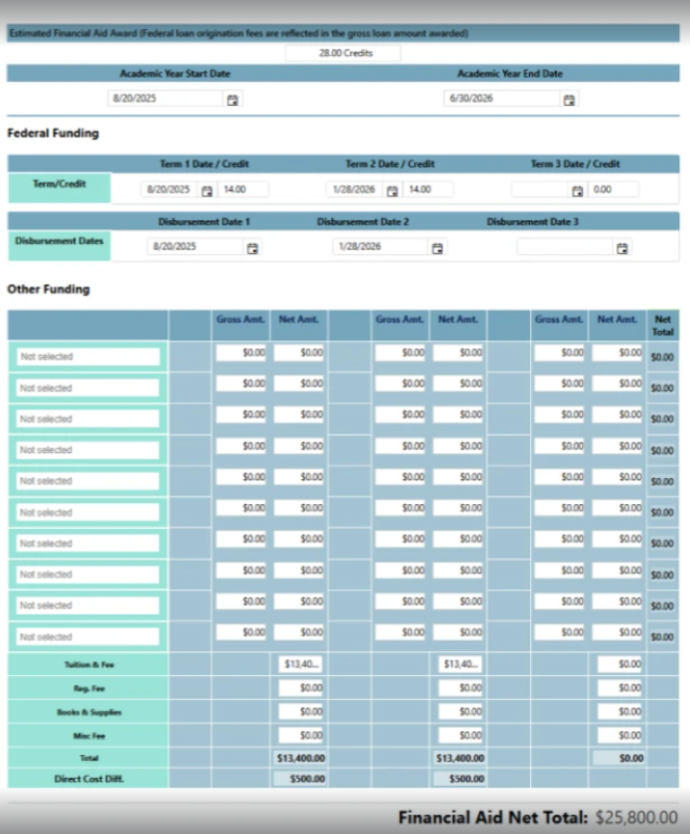
Students enrolled in non-Title IV programs are now properly excluded from Title IV funding workflows. This affects both the Funding Estimate and manual award creation:
- Reflective in Funding Estimate: The system no longer generates Pell, Subsidized, Unsubsidized, or PLUS estimates for students in non-T4 programs. These award types will not appear in the FE, and no corresponding awards will be created.
- Reflective in Award Creation: When a student’s package is associated with a non-T4 program, the manual award creation page will no longer display Sub, Unsub, PLUS, or Pell as options.
This ensures non-T4 students are not incorrectly packaged with Title IV aid and removes R2T4, FAFSA triggers, MPN, and Entrance Counseling requirements for these programs.
NON-T4 Eligible Funding Estimate:

Reconciliation Module — Disbursement Date Discrepancy Fix
The Reconciliation Module has been restored to surface disbursement date mismatches between CORE and COD.
What’s New
The Reconciliation Module has been restored to its previous behavior of surfacing disbursement date mismatches between CORE and COD, even when award dollar amounts match.
Previously, a regression caused the module to stop flagging these date discrepancies. This meant schools were unaware when COD had rejected a date update, leaving CORE and COD out of sync — a compliance risk that was only discovered during audits.
What’s fixed:
- The reconciliation output now correctly flags cases where the disbursement date in CORE differs from the date in COD.
- The disbursement date indicator on the student Award level now turns red when a date mismatch exists, making discrepancies immediately visible to FA staff without needing to run manual reports.

ISIR Schema Update — Version Field & 26–27 Field Renumbering
The ISIR record layout has been updated to align with the Department of Education’s revised schema for the 2026–2027 award year.
What’s New
The ISIR record layout has been updated to align with the Department of Education’s revised schema for the 2026–2027 award year. A new Version field has been inserted at field position #24, and all subsequent fields have been renumbered accordingly.
Version field values:
| Value | Meaning |
|---|---|
| 0 | Reserved for FSA |
| 1 | OBBBA Updates |
| 2–9 | Reserved for Future Use |
ISIR files can now be successfully parsed with the new field in place. Existing ISIR processing continues to function correctly with no downstream errors from the renumbering.

26–27 ISIR Comment Codes — New & Deprecated
Document triggers have been updated to reflect the new and deprecated FAFSA comment codes for the 2026–2027 award year.
What’s New
Document triggers have been updated to reflect the new and deprecated FAFSA comment codes for the 2026–2027 award year, effective March 2026.
New comment codes added (331–352): These codes cover new identity verification scenarios and NSLDS loan limit flags. Five of the new codes (343, 345, 346, 348, 352) carry an FPS C Flag, requiring action — FA staff should review the student’s financial aid package or NSLDS when these codes appear.
Deprecated codes deactivated: Comment codes 014, 026, 040, 076, 083, 096, 114, and 127 have been marked “Not Used” and deactivated across all institutions in instances 1 and 2.

Academic Year Dates on Funding Estimate Display
The Funding Estimate list on the Student Detail page now shows additional date context.
What’s New
The Funding Estimate list on the Student Detail page now shows additional date context:
- The “Start Date” label has been renamed to “Prgm. Start Dt.” (Program Start Date) — display only, no data changes.
- AY Start Date and AY End Date are now displayed alongside each FE, consistent with how they appear in the Award Information section.
 NEW VISUALS:

In the final phase of this feature the user will be able to see all the associated AY that the FE may contain.

Funding Estimate Direct Costs API Endpoint
A new POST API endpoint returns Funding Estimate direct costs along with student and program context.
What’s New
A new POST API endpoint is available that returns Funding Estimate direct costs along with student and program context, enabling schools to power self-serve reporting (e.g., Power BI dashboards) without building new CORE reports.
Endpoint: POST /api/FundingEstimateDirect (search by Student ID, SSN, Funding Estimate ID, AY start date, or Program)
Responses include: FE ID, direct costs, student name, student ID, campus location, enrollment start date, and academic year details (ID, start date, end date). Searching by program may return multiple FEs.

Document AY Tagging — Backfill API Endpoint
A new API endpoint allows institutions to backfill Award Year (AY) tagging on existing student documents.
What’s New
A new API endpoint allows institutions to backfill Award Year (AY) tagging on existing student documents that were uploaded before AY tagging was introduced, without requiring a file re-upload.
Endpoint: POST /v1/institutions/{institutionId}/students/{studentId}/document-academic-year-updates
Key Behaviors:
- Processes multiple documents in a single request.
- Passing awardYearId: null clears the AY tag.
- Unknown document IDs return a DOCUMENT_NOT_FOUND error for that entry without failing the rest of the batch. Top-level response status is Completed or CompletedWithErrors.

FA Verification Feature Flag — By Institution
A new institution-level feature flag enables or disables FA Verification on a per-institution basis.
What’s New
A new institution-level feature flag has been added for FA Verification. This gives Customer Success and Managed Services teams the ability to enable or disable the FA Verification solution on a per-institution basis — and provides a circuit breaker if the feature causes issues for a specific school.
The flag defaults to off. Contact your Portico account team to enable it.
Feature Note: When turned on, all users (PIBO and Institution) will see the AI note. A future update (CID-12841) will provide visibility to only PIBO staff when on and allow for all visibility when fully enabled.

Funding Estimate AI Enable Flag
A “Funding Estimate AI” feature flag is now available in Tertiary Configuration for Software-Only institutions.
What’s New
A “Funding Estimate AI” feature flag is now available in Tertiary Configuration for Software-Only institutions.
Key Rules:
- Only visible for Software-Only institutions (not Full-Service, where FE AI is already operational for all clients).
- Defaults to disabled when first appearing for an eligible institution.
- 4 flags in total: one controls sending to SAGE; the remaining three control processing by FE type (No-Term, Term/Non-Standard, and Term/Standard).

OB3 Federal Loan Limit & PLUS Rule Updates
Funding Estimate logic has been updated to comply with OBBBA federal regulatory changes for Award Year 17+ (2025–26 and beyond).
What’s New
Funding Estimate logic has been updated to comply with OBBBA federal regulatory changes for Award Year 17+ (2025–26 and beyond):
- PLUS suppression in FE: When a student is non-grandfathered (gf=false), in AY > 16, and enrolled in a grad/professional program (grade levels 5–8), PLUS loan options will no longer appear in the Funding Estimate.
- Updated Unsubsidized loan limits for AY > 16:
- Academic levels 10, 11, 13 (Professional): Annual limit $50,000 / Aggregate limit $200,000
- Academic levels 8, 9, 12 (Graduate): Aggregate limit $100,000
These changes apply to FE only and do not affect awarding rules.

NPC Funding Calculation Fix
The Net Price Calculator now correctly calculates and displays funding results across all Funding Estimate types.
What’s New (bug fix):
The Net Price Calculator (NPC) was not displaying COA or funding breakdown figures for all Funding Estimate types. This has been resolved — the NPC now correctly calculates and displays funding results across all FE types.
Coming Soon: A bug that is not displaying the Direct Cost in the NPC output is currently being repaired.

SAGE Correction Icon Fix
The icon indicating a SAGE correction was made on a student’s record now displays correctly again.
What’s New (bug fix):
The icon that indicates a SAGE correction was made on a student’s record was broken due to an unrelated prior code change. The icon now displays correctly again, restoring visibility of correction status at a glance.

We’d love to hear from you and your colleagues about product feedback or what you'd like to see next.
Sign up to participate in future product feedback sessions or early design reviews.
Was this article helpful?
That’s Great!
Thank you for your feedback
Sorry! We couldn't be helpful
Thank you for your feedback
Feedback sent
We appreciate your effort and will try to fix the article