Portico SIS Release Notes - May 13, 2026
This month’s Portico SIS release introduces powerful automation, enhanced reporting usability, expanded integrations, and workflow improvements designed to help institutions run more efficiently and accurately.
Highlights include Automated Student Status Changes, new Attendance Log filtering tools for clock-hour institutions, expanded inbound API capabilities, improved class session change handling, and additional actionable reporting features to streamline student communication and operational workflows.
TABLE OF CONTENTS
- ⚡ Automated Student Status Changes
- Attendance Log Transcript Filter Enhancements
- Supporting Class Session Changes
- Expanded SIS Inbound API Endpoints
- Expanded Actionable Features in Reports

⚡Automated Student Status Changes ⚡
We’re excited to announce the release of Automated Student Status Changes, a new feature designed to streamline enrollment management and improve operational efficiency.
What’s New
Institutions can now define rules and triggers that automatically update student enrollment statuses when specific conditions are met. This automation allows schools to establish consistent logic that drives status changes based on institutional processes and student activity.
Why It Matters
Managing student status changes manually can be time-consuming and may create inconsistencies across reporting and compliance processes.
This enhancement helps institutions:
- Reduce manual administrative work
- Improve compliance accuracy
- Ensure timely and consistent status updates
- Strengthen reporting and student progression tracking
- Standardize enrollment status management across teams
By automating status changes, institutions can create a more efficient and reliable process while improving visibility into the student lifecycle.
Action Required
- Student Lifecycle Workflows may require activation.
- Configuration is required to define the rules and triggers that will drive automated status changes.
- Please contact Support for assistance with setup and implementation.

Attendance Log Transcript Filter Enhancements
The enhanced Attendance Log transcript view with new filtering capabilities is designed to improve usability and support critical clock-hour processes.
What’s New
A new filter option is now available within the Attendance Log transcript view, allowing users to quickly search and return results based on:
- Cumulative Scheduled Hours
- Cumulative Attended Hours
- Hours as of Date
Users may utilize one filter option at a time to ensure clear and accurate results. The filter will:
- Return the date associated with entered cumulative scheduled or attended hours
- Return cumulative scheduled and attended hours based on a selected date
- Display only rows that match or intersect the filtered result
- Display surrounding rows when values fall between dates
- Display all matching rows when values are shared across dates
Why It Matters
For clock-hour institutions, identifying cumulative scheduled and attended hours is critical for processes such as financial aid disbursement and R2T4 calculations. Previously, users were required to manually scroll through lengthy attendance logs without persistent headers, increasing the likelihood of confusion and errors.
These new filters improve efficiency, usability, and accuracy by allowing Financial Aid, Bursar, R2T4, and Academic teams to quickly locate the information they need.
Who It Impacts
This enhancement primarily supports clock-hour schools and users in:
- Financial Aid
- R2T4
- Bursar
- Academic departments
Action Required
No configuration is required.



Supporting Class Session Changes
We’ve enhanced the class withdrawal functionality to better support Class Session Changes for clock-hour students.
What’s Improved
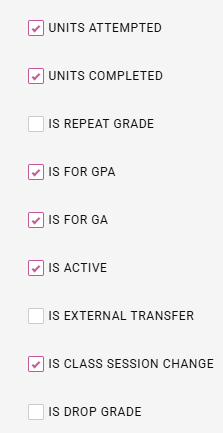
A new Is Class Session Change flag has been added to the Grade Scale. When a grade with this flag is selected, the Withdrawal Date field will populate even if the grade is marked as Units Complete. This supports scenarios where a student is shifting from one class session to another with different days or times, without changing programs, Academic Year Templates, or the course itself.
Why It Matters
Clock-hour students may need to move to a different class schedule while retaining the hours they have already attempted and attended. This enhancement allows prior class scheduled dates to be unscheduled while still ensuring earned hours are counted appropriately.
With this update, applicable hours will be reflected correctly in:
- Attendance percentages
- SAP calculations
- Units in the FAAA report
- Academic and financial aid records
Action Required
Users should configure Grade Scale flags appropriately to determine when hours should count as units attempted and completed for Class Session Change scenarios.


Expanded SIS Inbound API Endpoints
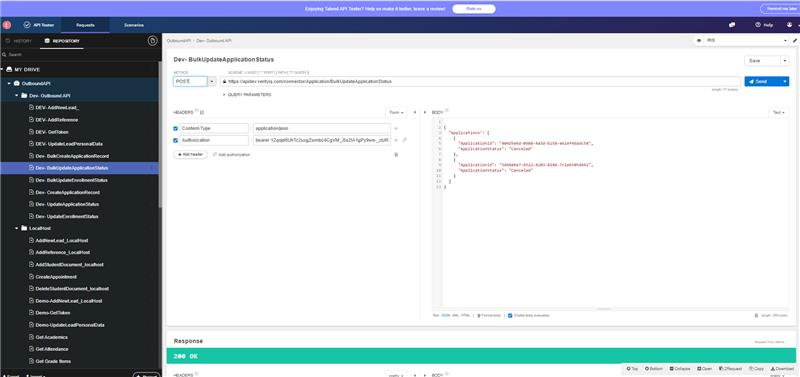
This new expansion of Portico SIS Inbound API Endpoints enables integration partners and third-party systems to programmatically push data directly into the SIS.
What’s New
The SIS now supports inbound REST API endpoints for:
- Enrollment Status Updates
- Application Create & Update
These endpoints follow the same inbound API pattern already established within Portico CRM, providing a consistent integration experience across the Portico platform. Support for both individual and bulk operations is included.
Why It Matters
Schools and integration partners often manage student data across multiple systems. These new endpoints eliminate the need for manual re-entry by allowing external systems to securely sync data directly into the SIS.
This enhancement helps institutions:
- Reduce administrative overhead
- Improve data consistency across systems
- Support real-time or scheduled integrations
- Increase confidence that SIS records reflect current student activity
- Expand automation opportunities across the student lifecycle
For Portico clients, this also strengthens interoperability with existing institutional tools and supports future AI-driven automation initiatives.
Who It Impacts
This enhancement primarily supports:
- Integration partners
- School IT and technical teams
- Registrars and administrative staff managing cross-system workflows
Action Required
API credentials and integration configuration are required. Technical documentation for supported endpoints and accepted values is available for implementation teams.

Expanded Actionable Features in Reports
We’ve expanded Actionable Features to the Pre-Graduation Audit and LOA & Re-entry Details Report, allowing users to take bulk actions directly from the report view.
What’s Improved
Users can now select one or multiple students using the report checkboxes. Once selected, the Actionable toolbar appears at the bottom of the screen, enabling users to perform bulk actions without navigating away from the report.
Available actions include:
- Sending documents
- Printing documents
- Making updates
- Adding students to communication campaigns
- Text campaigns
- Email campaigns
- Team campaigns
Why It Matters
This enhancement improves efficiency by allowing users to take immediate action directly from the report interface, reducing unnecessary navigation and streamlining follow-up workflows for students.
Who It Impacts
This enhancement supports teams managing student communication, documentation, and follow-up processes related to upcoming potential graduates, LOA and re-entry return activity.
Action Required
No configuration is required.


We’d love to hear from you and your colleagues about product feedback or what you'd like to see next.
Sign up to participate in future product feedback sessions or early design reviews.
Was this article helpful?
That’s Great!
Thank you for your feedback
Sorry! We couldn't be helpful
Thank you for your feedback
Feedback sent
We appreciate your effort and will try to fix the article