Portico SIS Release Notes – July 2026
We're excited to introduce several new enhancements to Portico SIS this month. First, we have launched the new Academic Specialist course in Portico Pathways — our free online learning platform featuring short, self-paced video lessons that help your team members master everyday SIS workflows and get the most out of Portico tools. Just reach out to pathways@porticoedu.com for access!
We're also introducing a new Attendance by Enrollment Report to simplify state board reporting as well as more flexible batch registration filtering, configurable Institutional SAP checkpoints, and additional enhancements across the platform. Together, these updates help your team work more efficiently while making it easier than ever to learn and get the most from Portico SIS.
TABLE OF CONTENTS
- Attendance by Enrollment Report
- Portico Pathways | Academic Specialist Training Course (NEW TRAINING PLATFORM)
- Enrollment Level Status Filtering for Class Count Batch Registration
- Configurable Institutional SAP Checkpoints
- Additional Enhancements

Attendance by Enrollment Report
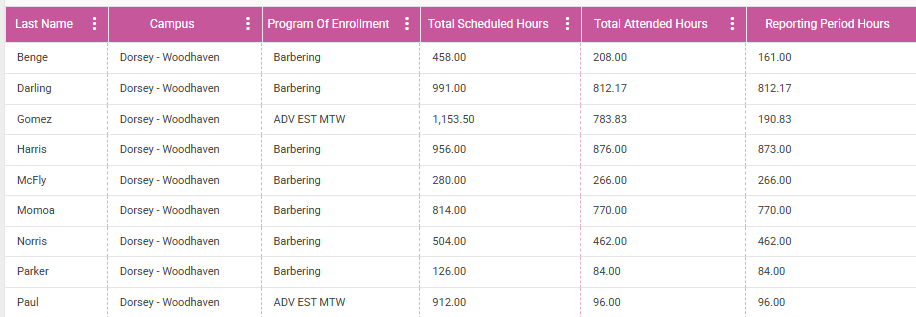
We’re introducing a new Attendance by Enrollment report to simplify state board reporting for Beauty & Wellness institutions.
What’s New
The new report provides cumulative attendance information by enrollment, including scheduled, attended, absent, make-up, and transfer hours, along with key enrollment dates such as Leave of Absence and Withdrawal. A new State License field has also been added to the Institution Profile, allowing each campus’s license number to appear on the report.
Why It Matters
Preparing state board submissions often requires collecting attendance information from multiple sources. This report centralizes required attendance data into a single report, helping institutions prepare state reporting more efficiently while improving consistency and reducing manual effort.
Who It Impacts
- Beauty & Wellness Schools
- Academic Operations
- Compliance Teams
Action Required
Please contact Support to enable it for your institution.

Portico Pathways | Academic Specialist Training Course
New on-demand training course helps Academic teams learn Portico SIS faster, with more confidence
What It Is
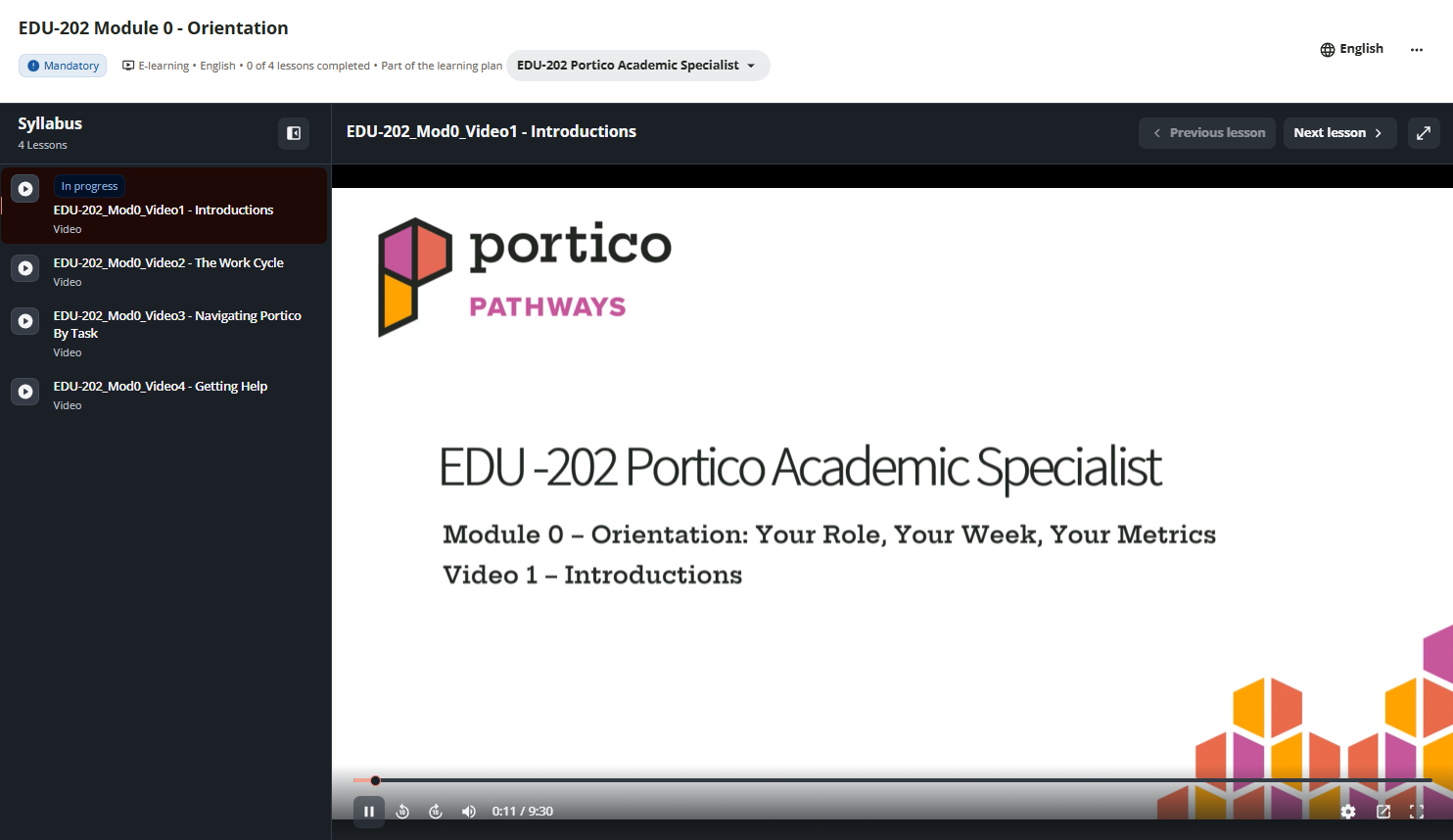
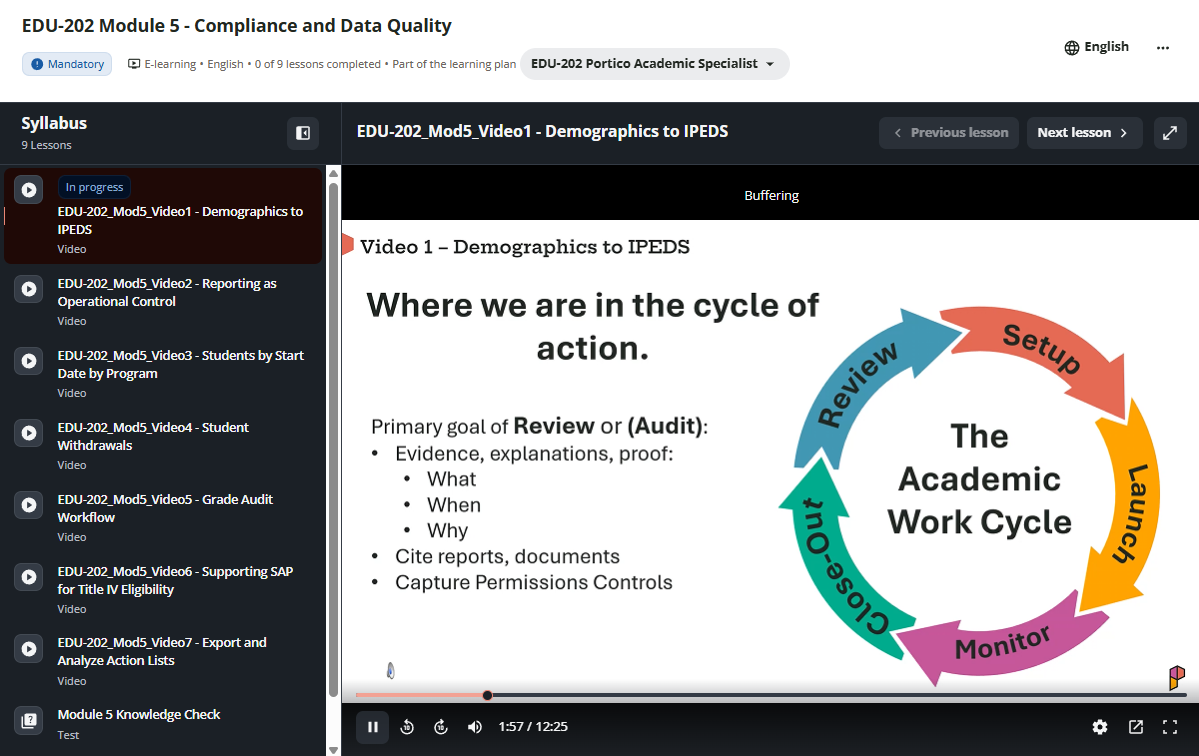
A new Portico SIS training course in Portico Pathways — our free online learning platform for Portico customers. Designed specifically for Academic Specialists, Registrars, and Academic Operations teams, the course features short, on-demand video lessons covering the everyday SIS workflows users rely on most, from scheduling students and managing classes to attendance, gradebooks, academic progress, reporting, and compliance. The first modules are now available, with additional content coming soon.
Who It's For
Academic Specialists, Registrars, Scheduling Coordinators, Academic Operations teams, and managers who use Portico SIS, as well as new employees who need onboarding and experienced users looking to strengthen their skills.
Problem Solved
Whether you're training a new Academic Specialist or helping experienced staff expand their knowledge, learning Portico SIS can take time. Portico Pathways provides self-paced, on-demand training that teams can access whenever it's convenient.
Why It Matters
Portico Pathways helps Academic teams become productive more quickly, follow consistent best practices, and make better use of Portico SIS across scheduling, attendance, gradebooks, reporting, and compliance. Teams can learn at their own pace, revisit topics whenever needed, and access all training at no additional cost.
Details
- New Academic Specialist course available through Portico Pathways
- Free, self-paced online training with short, easy-to-follow video lessons
- Covers everyday Portico SIS workflows, including scheduling, attendance, gradebooks, academic progress, reporting, compliance, permissions, and academic records
- Designed for both new-user onboarding and ongoing professional development
- Includes practical, role-based lessons based on real Academic Specialist responsibilities
- Currently available at no additional cost for Portico customers
>> Request Access to Portico Pathways
(email: pathways@porticoedu.com)

Enrollment Level Status Filtering for Class Count Batch Registration
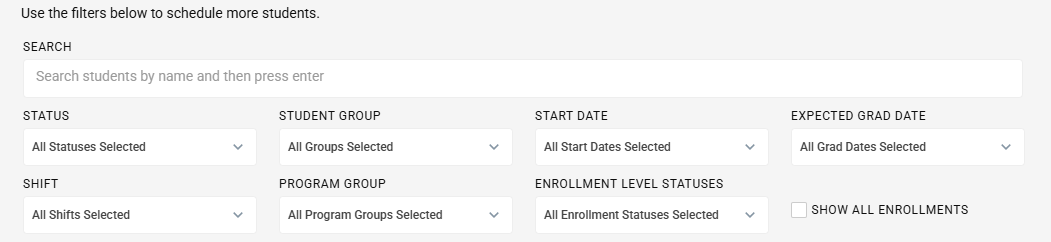
We’ve expanded scheduling flexibility by adding a new Enrollment Level Status filter to the Class Count Batch Registration process.
What’s New
When scheduling students through the Class Count Ratios report, users can now filter students by Enrollment Level Status before performing batch registration.
Only enrollment statuses configured as part of the Enrollment Summary section are available for selection.
Why It Matters
This enhancement gives academic teams greater control over which students are included in batch scheduling activities, making it easier to target the appropriate population while reducing manual filtering.
Who It Impacts
- Registrars
- Academic Operations
- Scheduling teams
Action Required
No configuration is required.

Configurable Institutional SAP Checkpoints
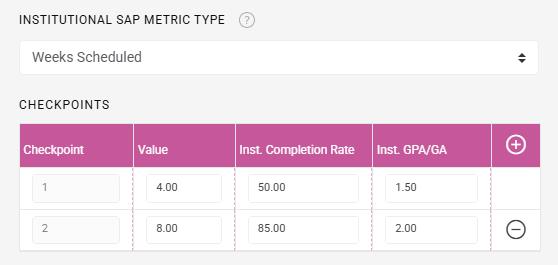
We’ve expanded Institutional SAP by allowing schools to configure academic progress evaluations independently from Financial Aid SAP payment periods.
What’s New
Institutions can now define Institutional SAP checkpoints based on metrics that best support their academic policies, including:
- Hours Attended
- Hours Scheduled
- Weeks Attended
- Weeks Scheduled
- Credits Attempted
- Credits Completed
- Financial Aid Payment Periods
Schools can configure checkpoint frequency along with required completion rate and GPA/GA thresholds. Evaluations automatically recalculate if attendance or grades are updated, and results are displayed within both the Institutional SAP Log and Institutional SAP Report.
Why It Matters
Institutions often evaluate academic progress differently than Financial Aid SAP requirements. This enhancement provides greater flexibility by allowing schools to establish Institutional SAP checkpoints that align with their own academic standards while maintaining automated evaluations and improved visibility into student progress.
Who It Impacts
- Academic Departments
- Registrars
- Retention Teams
Action Required
Configuration is required within the Academic Year Template.

Additional Enhancements
Increased the Service Name field limit from 150 to 250 characters, improving compatibility with external systems and allowing longer service descriptions without manual abbreviations.

A preview of what's on the way. Dates and details may shift as work progresses.
Bulk Cancel/Swap Class Dates
Gradebook Assignment Retake Policy

We'd love to hear from you and your colleagues about product feedback or what you'd like to see next.
Sign up to participate in future product feedback sessions or early design reviews.
Was this article helpful?
That’s Great!
Thank you for your feedback
Sorry! We couldn't be helpful
Thank you for your feedback
Feedback sent
We appreciate your effort and will try to fix the article