
Clinical Management Release Notes - May/June 2026
We've introduced two new updates to the Trajecsys Clinical Management solution to make shift scheduling easier to manage and communicate.
Coordinators can now control exactly when shifts become visible to students (Clinical Shift Publishing & Unpublishing) and instantly notify affected students when a shift is canceled (Clinical Shift Cancellation) — all without manual emails or schedule workarounds. The result is a smoother scheduling process and fewer surprises for everyone involved.
TABLE OF CONTENTS

Clinical Management (Trajecsys)
Clinical Shift Publishing & Unpublishing
For Trajecsys clinical management users, control exactly when students see their shift schedule — no more guessing if it’s ready.
What Is It
Program coordinators can now publish and unpublish clinical shifts directly from the shift record, controlling when a shift becomes visible to students on their calendar.
Who It’s For
Program coordinators and administrators who build and maintain clinical shift schedules.
Problem Solved
No way to hold a shift schedule until it’s finalized — students could see shifts before they were confirmed.
Why It Matters
Coordinators can now finalize a schedule behind the scenes before students ever see it, and pull it back if something changes mid-setup — so students only ever see a shift that’s been confirmed and is ready to act on.
Details:
- Publish and unpublish are managed from the shift record
- Unpublished shifts are visible to coordinators and administrators only — students will not see a shift until it has been published
- Once published, the shift is available for faculty assignment and student self-registration
- A new Published/Unpublished filter on the Shifts tab makes it easy to see the status of all shifts at a glance
- A new Published column on the Shifts tab displays published status for each shift
Watch the video:
00:00: This demo showcases how to efficiently manage clinical shift publishing and
00:04: unpublishing from the Clinical Management Admin Panel.
00:08: You'll see how to filter and organize shift data to streamline workforce management.
00:12: Click the Admin Panel to open the main administrative dashboard where you can
00:16: manage various settings and data.
00:18: Click Assignments to view and manage the current assignments within your
00:21: organization.
00:23: Click Shifts to access the scheduling and shift management interface.
00:29: A new “Published” filter provides additional options and allows you to customize the
00:32: data view based on your needs.
00:35: Here you will see a new "Published" column to filter and display if the shift is
00:39: published by showing a checkmark
00:41: Click here to edit the shift
00:43: This new box is now displayed.
00:45: when checked, the shift is published and available for assignments.
00:50: to change a shift to unpublished
00:51: - simply uncheck the box.
00:53: Click Submit to apply the selected filters and update the shift list accordingly.
00:58: A new confirmation box will appear confirming the unpublish action - to save
01:03: - Click "Yes" to confirm.
01:05: Select "Any" in the published filter to see all Published & unpublished shifts.
01:11: Click Unpublished to filter and view shifts that are not published.
01:15: Click Apply Filter to update the shift list with unpublished shift data.
01:20: This demo highlights
01:21: how you can efficiently filter and manage publishing shifts.
01:25: Start optimizing your workforce scheduling today by exploring these features.

Clinical Management (Trajecsys)
Clinical Shift Cancellation
No more manual emails when a clinical shift is canceled.
What Is It
Program coordinators can now cancel a specific shift occurrence directly from the calendar, and students are automatically notified — no manual outreach required.
Who It's For
Program coordinators, administrators, students
Problem Solved
Coordinators manually emailing students every time a shift is canceled
Why It Matters
When a shift is canceled, students find out immediately through a home page banner, in-app notification, and email — so they're never showing up to a shift that no longer exists. Coordinators can include a note explaining the reason, and the rest of the shift schedule stays completely untouched.
Details
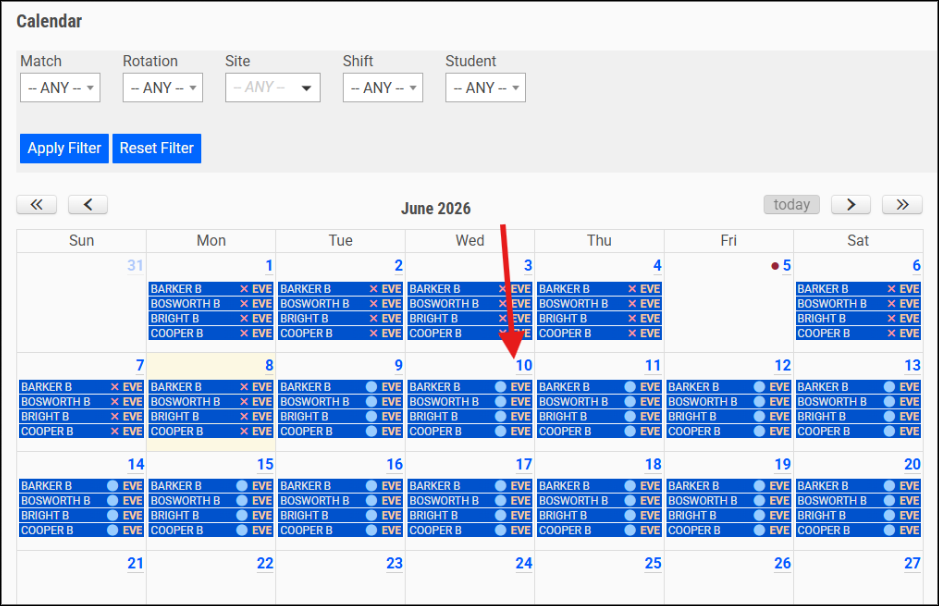
- Select a date on the clinical calendar, choose which shift(s) to cancel, and optionally add a note — students are notified automatically
- Cancellation applies only to the selected date; all other occurrences in the shift series remain unchanged
- Canceled shifts appear in a distinct color on the calendar so coordinators can see at a glance which dates have been canceled
- Cancelled shifts are removed from the students "Scheduled Hours"
- Students receive notification via home page banner, in-app notification, and email; the cancellation note is included in the notification
Available to Coordinators and above; no configuration required
Watch the video:
00:03: This demo showcases how Clinical Management simplifies shift cancellations, helping
00:07: administrators quickly update schedules and communicate changes to students.
00:13: From the Calendar view, select a date to view and manage all scheduled shifts
00:17: for that day.
00:18: Click the desired date (for example, 5) on the calendar.
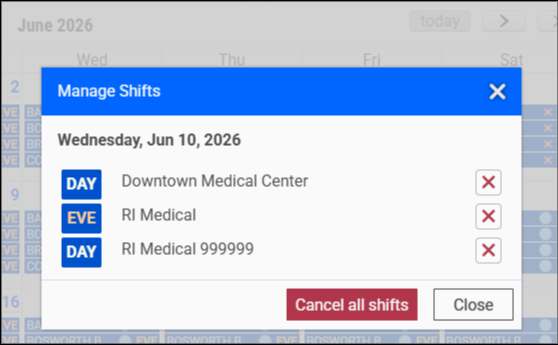
00:21: This will display all scheduled shifts for the selected day.
00:25: To cancel an individual shift, click the "X" next to the shift.
00:29: To cancel every shift
00:30: scheduled for that day,
00:31: select "Cancel All Shifts".
00:34: Once you select to cancel - Click Cancellation Note (Optional) to provide a reason
00:38: for the cancellation.
00:40: Enter a note, such as "Canceled due to staff coverage."
00:44: This message will be visible to affected students.
00:47: Click "Yes,
00:47: Cancel" to confirm and process
00:49: the shift cancellation.
00:51: Click the Note icon to review the cancellation reason associated with the shift.
00:57: When selected - the cancellation note will be visible.
01:01: Click "Close" to exit the cancellation details window.
01:04: If any shifts for that day have been canceled,
01:06: a red circle icon will appear on the date,
01:08: providing a visual indicator that one or more shift cancellations have occurred.
01:13: Select the date to view the updated shift details and cancellation status.
01:18: You will still be able to see the cancelled shift for that day.
01:22: Click "Close" to exit the date view.
01:24: Click Logout to securely exit the Clinical Managment application. The
01:28: next steps demonstrate the student experience after the cancellation.
01:33: After logging in as the student, a notification appears indicating the shift has
01:37: been canceled.
01:38: Example Notification: June 5th, 2026 — Canceled: RI Medical EVE. Coordinator
01:45: Note: Canceled due to staff coverage.
01:48: Students can also view canceled shifts directly from the Calendar view.
01:53: The student will be able to Click the canceled shift date (5) on the calendar to
01:57: review the cancellation details and coordinator note.
02:01: The cancellation details screen displays the shift status, cancellation date, and
02:05: any notes provided by the coordinator.
02:08: Click "Home" to go back to the application’s home screen.
02:12: This demo highlights how Clinical Management simplifies shift cancellations by
02:16: providing administrators with a quick cancellation workflow
02:19: while ensuring students receive clear communication and immediate visibility into
02:24: canceled shifts.

We’d love to hear from you and your colleagues about product feedback or what you’d like to see next.
Sign up to participate in future product feedback sessions or early design reviews.