
Clinical Management Release Notes - September 2026
More control over clinical shifts. Clearer records. Faster answers.
This month’s Trajecsys Clinical Management release makes everyday scheduling work easier for faculty and program teams.
Faculty can now publish and unpublish clinical shifts directly, reducing handoffs and helping schedules move forward faster. We’ve also simplified the Scheduled Hours view so teams see active students by default, while alumni records remain available whenever historical review is needed. And with the new Clinical Management Support Agent, users can get quick answers to common questions without leaving the platform. Together, these updates give users more direct control, clearer information, and another way to get help when they need it.
TABLE OF CONTENTS
- Faculty Shift Publishing and Unpublishing
- Alumni Excluded from Scheduled Hours
- Clinical Management Support Agent

Faculty Shift Publishing and Unpublishing
Manage clinical shifts from start to finish — without waiting on a coordinator.
WHAT IT IS
Faculty users can now publish and unpublish clinical shifts directly from the shift record. They can publish a shift as it's created or adjust its visibility later while editing it.
WHO IT’S FOR
Faculty members who create or manage clinical shift schedules, along with coordinators and other users with higher-level permissions.
PROBLEM SOLVED
Publishing and unpublishing shifts previously required Coordinator-level access. Faculty often had to wait for someone else to make a shift visible to students — or hide it while changes were being made.
WHY IT MATTERS
Faculty can manage more of the scheduling process themselves, reducing handoffs and helping programs keep shift information current for students.
DETAILS
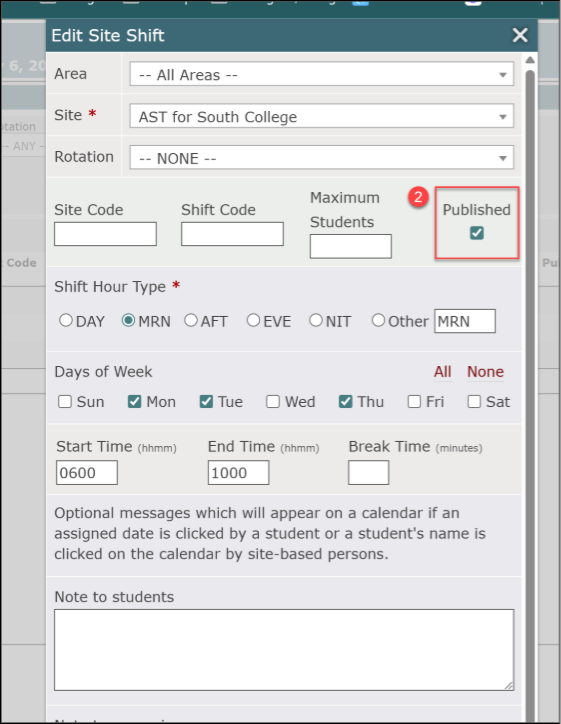
- Users with Faculty permissions or higher will see a Published checkbox when creating or editing a clinical shift.
- Selecting Published makes the shift visible to students and available for assignment.
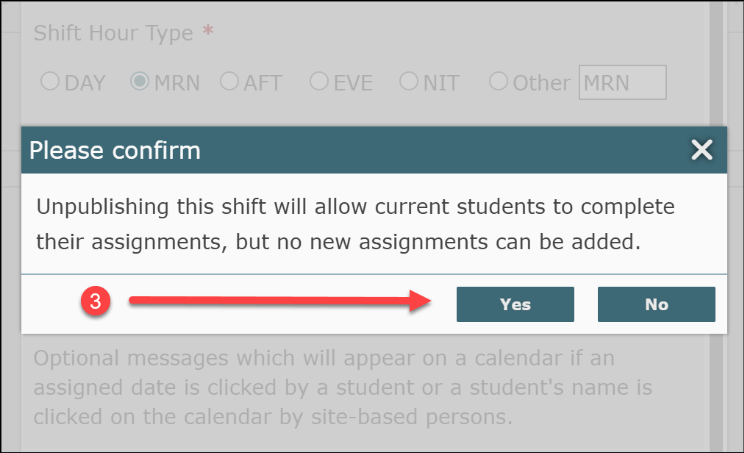
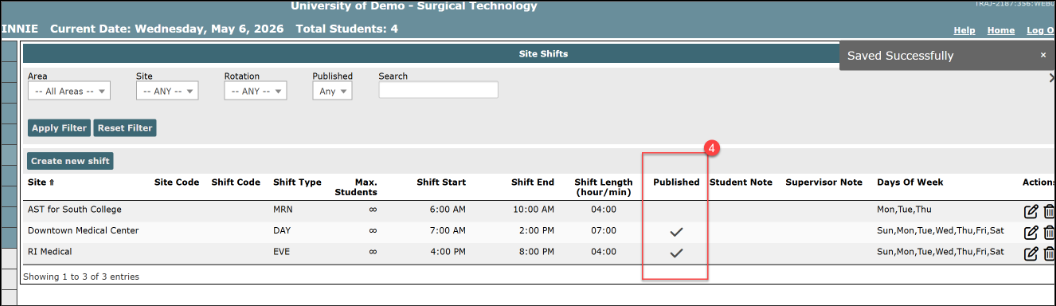
- Clearing Published hides the shift from students while updates are made.
- A shift can be published at the time it is created, so there is no separate publishing step.
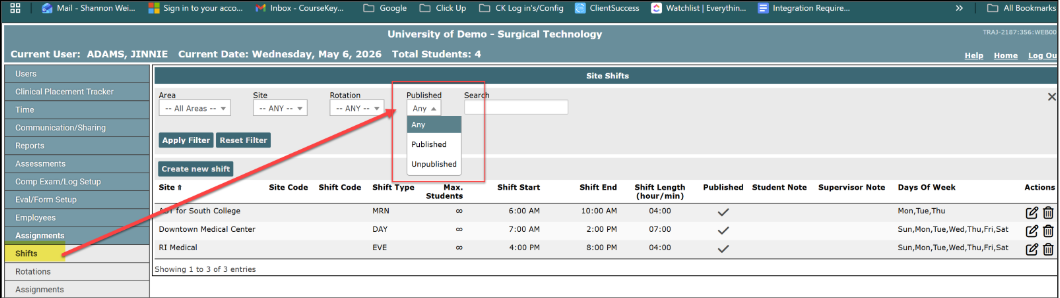
- The Shift tab now includes a filter to show published shifts, unpublished shifts, or both.
- Faculty publishing permissions apply to shifts available from the Site Shifts page; they are not limited to shifts created by that faculty member.
- Publishing or unpublishing a shift does not trigger an automatic notification to students or coordinators.
A new filter is now displayed in the Shift tab which allows you to filter on only published or unpublished.
When adding a new shift or editing an existing shift - a new box appears allowing a faculty member to publish/unpublish.

Alumni Excluded from Scheduled Hours
Keep current student assignments front and center without losing historical records.
WHAT IT IS
Students with an Alumni status are now excluded from the Assignments – Scheduled Hours page by default. A new Include Alumni toggle brings their scheduled hours back into view whenever historical information is needed.
WHO IT’S FOR
Program administrators, coordinators, and faculty who review or manage scheduled clinical hours.
PROBLEM SOLVED
Alumni records could appear alongside active students, adding clutter and making it easier to mistake historical hours for current assignments.
WHY IT MATTERS
Teams get a cleaner, more relevant view of current student activity while retaining access to alumni history for audits, record review, and other follow-up needs.
DETAILS
- The Assignments – Scheduled Hours page now excludes students whose status is Alumni from its default view.
- Turn on Include Alumni to display alumni students and their scheduled hours.
- If a student’s status changes to Alumni, the student is removed from the default view immediately—even when the semester is still in progress.
- Scheduled hours for active students are unchanged.
- This update applies specifically to the Assignments – Scheduled Hours page; other Assignments pages and reports are unchanged.
Alumni students no longer appear on the Assignments: Scheduled Hours page. To review hours, use the Include Alumni toggle.


Clinical Management Support Agent
Get answers faster, without leaving the site.
WHAT IT IS
The new Trajecsys Support Agent is an AI-powered support chat experience available directly within Trajecsys Clinical Management. It can help users quickly find answers about the platform and common workflows without losing their place. Portico’s expert support team is still available whenever additional help is needed; just ask to contact Support.
WHO IT’S FOR
All Trajecsys Clinical Management administrators, staff, and faculty users.
PROBLEM SOLVED
Getting help with a question often required a back and forth with the team in order to get a response — even when the answer was straightforward.
WHY IT MATTERS
Users can get immediate answers to many common questions while staying focused on their work. If the Support Agent cannot resolve an issue, it can create a support ticket for the Trajecsys team without requiring the user to start over.
DETAILS
- Open the Portico Support Agent by selecting the floating P icon.
- Choose Trajecsys Clinical Management to connect with the product-specific Support Agent.
- Enter a question in plain language. The Support Agent uses AI-powered responses to help with common product questions and workflows.
- If the issue is not resolved, ask to contact Support. The Agent will create and submit a support ticket on the user’s behalf.
- The Trajecsys support team remains available for questions that need personal assistance or further investigation.
IMPORTANT TO KNOW
The Support Agent is an additional way to get help — not a replacement for Portico’s support team. Users can request personal support at any time.

We’d love to hear from you and your colleagues about product feedback or what you’d like to see next.
Sign up to participate in future product feedback sessions or early design reviews.
Was this article helpful?
That’s Great!
Thank you for your feedback
Sorry! We couldn't be helpful
Thank you for your feedback
Feedback sent
We appreciate your effort and will try to fix the article