
Student-Led Makeup Time Enhancements
January 28, 2026
Our latest release expands the Student-Led Makeup Time functionality on the Portico Attendance app by introducing greater administrative control, clearer workflows, and improved student visibility into makeup time adjustments. These enhancements were designed to give schools more flexibility in how student-led makeup sessions are initiated, managed, and closed.
Key Features:
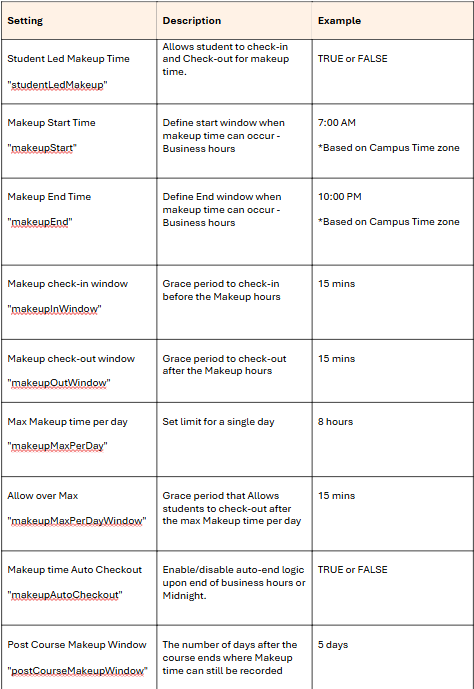
- Configurable Makeup Time Hours based on campus time zone
- Configurable Makeup Check-In and Check-Out windows
- Configurable Max Makeup time per day
- Configurable Makeup time Auto Checkout
- Administrative ability to approve, edit & reject student-led makeup time
- Student visibility into approved and edited makeup time entries
- Automated notifications to students when makeup time is approved or modified
- Validation to prevent overlapping attendance and makeup records
- Proper flagging of makeup time for SIS integration and reporting accuracy
Benefits:
- Greater institutional control over when and how makeup time is used
- Reduced administrative errors through validation and clear error messaging
- Increased transparency for students regarding makeup time decisions
- Improved data integrity for attendance tracking and SIS reporting
- More consistent and predictable makeup time workflows
Constraints:
- Makeup time can only occur within configured makeup hours
- Regular attendance sessions always take precedence over makeup windows
- Feature behavior is dependent on accurate campus time zone configuration
- Bulk edits are limited to the same day
Enablement Settings:
- Student-Led Makeup Time must be set to TRUE
- Makeup time configuration must be defined at the delivery method or administrative level
Permission Settings:
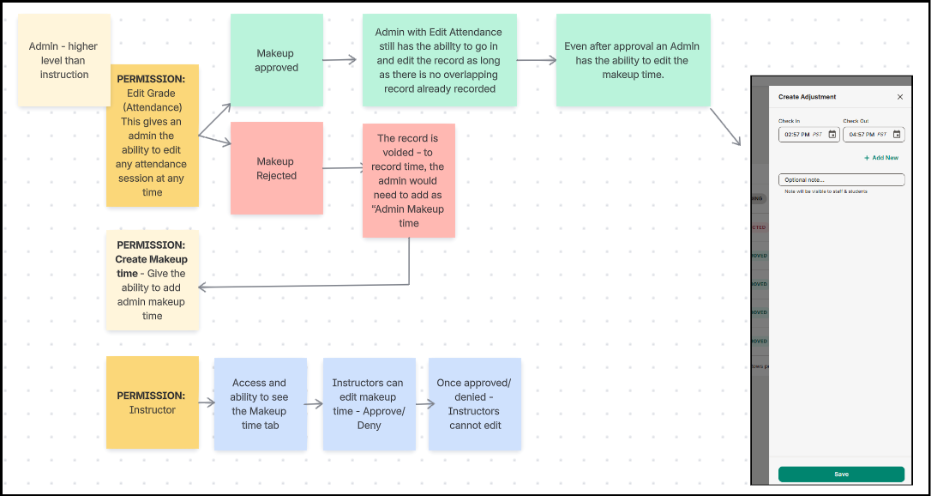
Administrative permissions are required to:
- Approve makeup time
- Edit or adjust makeup time records
Applicable Permission and approval flowchart:
- Admin – Edit grades: Full Edit functionality unless Rejected
- Once Rejected, the record should be added as Admin makeup time
- Records do not get deleted, and history will remain showing rejected.
- Instructor – Access Makeup time and can approve & reject, will not be able to edit after approval or reject.
Training Steps:
- From the Student App: https://youtube.com/shorts/TYOf_6se7VY?feature=share
- Admin approval process: https://www.loom.com/share/7fddb85a6f024e26a902190d8cee1696

We’d love to hear from you and your colleagues about product feedback or what you'd like to see next.
Sign up to participate in future product feedback sessions or early design reviews.
Was this article helpful?
That’s Great!
Thank you for your feedback
Sorry! We couldn't be helpful
Thank you for your feedback
Feedback sent
We appreciate your effort and will try to fix the article