Attendance, Smart Nudges, & Payments Release Notes - January-February 2026
This month, we’re highlighting several updates that make it easier to collect payments, manage attendance, track student progress, and monitor automated communications. These enhancements help your staff work more efficiently, respond faster, and maintain accurate data across the platform.
TABLE OF CONTENTS
- Apple Pay & Google Pay
- New Past Due Fee Reporting
- Editable Student-Led Makeup Time
- Skills Tracker Reporting Updates
- Smart Nudges - Execution Status & Last Sent Columns

Payments
Apple Pay & Google Pay
More payment options for faster, easier checkout.
What Is It
Adds Apple Pay and Google Pay as available payment methods in the Payments platform, giving users a quicker and more convenient way to complete payments.
Who It's For
Students and payers making payments, and finance/admin teams looking to improve payment completion rates.
Problem Solved
Reduces payment friction by offering familiar digital wallet options, especially for mobile users.
Why It Matters
By supporting Apple Pay and Google Pay, schools can improve the payment experience, reduce checkout drop-off, and collect payments more efficiently.
Details
- Apple Pay and Google Pay appear as selectable payment options at checkout
- Uses the payer’s saved wallet information to speed up the payment process
- Fully integrated with existing payment workflows and reporting
Apple Pay
Google Pay

Payments
New Past Due Fee Reporting
Clearer, more complete financial visibility across students, invoices, and fees.
What Is It
Introduces three new financial reports and enhances existing reports with additional student identifiers to improve reconciliation, tracking, and follow-up on past due balances and fees.
Who It's For
Finance teams, bursars, administrators, and staff responsible for billing, collections, and reporting.
Problem Solved
Previously, past due and fee data were fragmented and lacked key student identifiers, making it harder to reconcile balances, follow up with students, and tie transactions back to SIS records.
Why It Matters
These updates give schools a more complete, actionable view of outstanding balances and fees—making it easier to manage collections, improve communication, and ensure accurate financial reporting.
Details
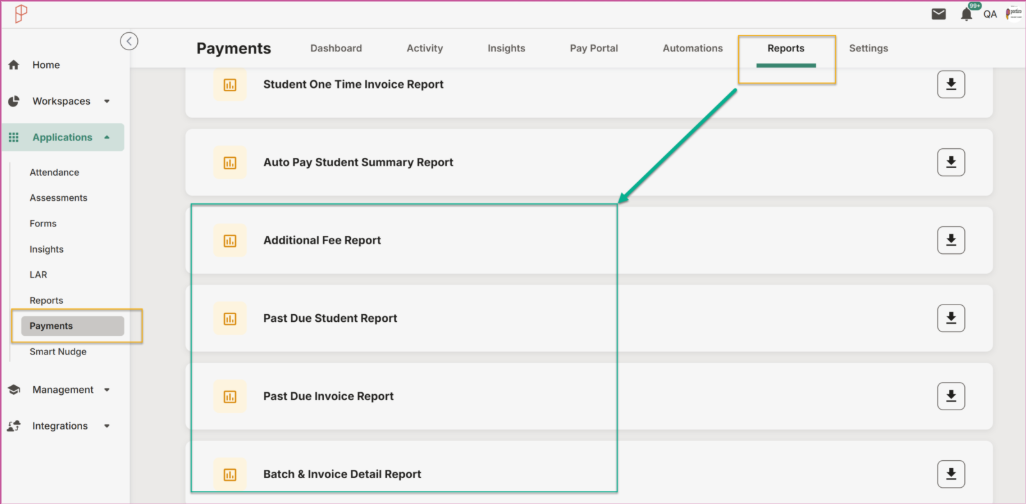
- New: Detailed Past Due Report by Invoice – A new report that shows all scheduled payments/invoices that are past due.
- New: Past Due Report by Student – A new report showing past due details at the student level.
- New: Additional Fee Report – A new report showing additional fees added to invoices (e.g., late fees).
- New: Batch & Invoice Detail Report – A new report that links paid invoices to bank batches from the processor, allowing reporting directly in the Payments portal and reducing the need to pull reports from Sola.
- Report Enhancements – All reports (including the automated Daily Transaction Report) now include Student Issued ID and Student Email for easier identification and reconciliation.

Editable Student-Led Makeup Time
Fix mistakes in student-submitted makeup time—without starting over.
What Is It
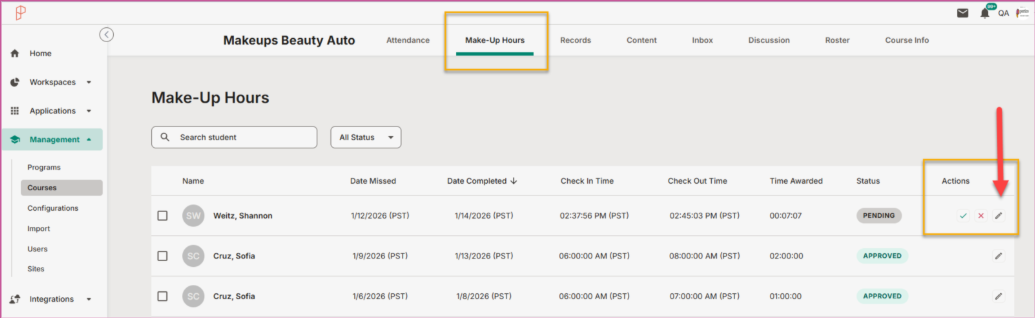
An enhancement that allows authorized staff to edit student-led makeup time entries after submission, rather than requiring them to reject and recreate records.
Who It's For
Administrators and instructors who review and manage student-led makeup time entries.
Problem Solved
Previously, errors in student-submitted makeup time required records to be rejected and re-entered, creating extra work and potential data gaps.
Why It Matters
Editing makeup time entries saves time, reduces errors, and ensures attendance records remain accurate while preserving approval workflows and audit history.
Details
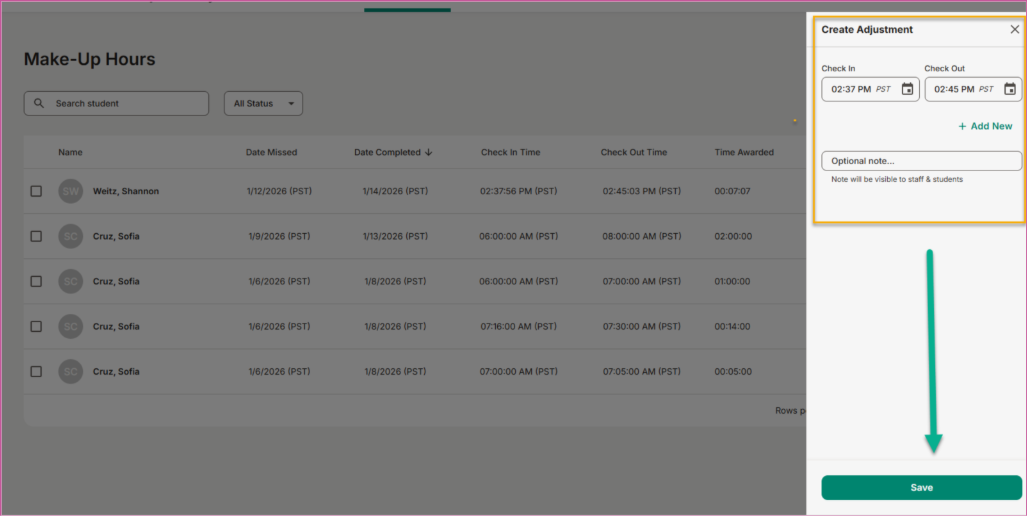
- Authorized staff can edit student-led makeup time entries after submission
- Updates apply without removing the original record or approval flow
- Changes are tracked to maintain accuracy and accountability
Skills Tracker
Skills Tracker Reporting Update
See approved and pending skills in one place—no guesswork required.
What Is It
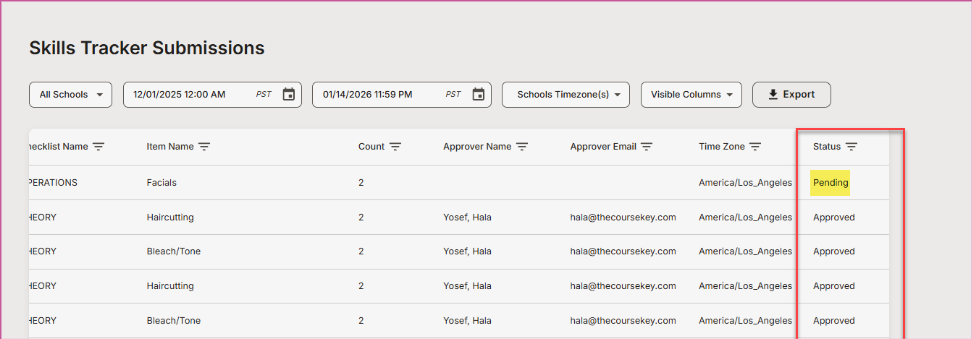
An enhancement to the Skills Tracker Report that now includes pending skill items, in addition to approved ones, to give a complete view of student progress.
Who It's For
Instructors, preceptors, program admins, and compliance teams tracking skill and competency completion.
Problem Solved
Previously, the report only showed approved skills, making it difficult to identify which items were still awaiting review or action.
Why It Matters
By surfacing pending items alongside approved skills, staff can quickly spot what needs attention, prioritize reviews, and keep students moving forward.
Details
- Skills Tracker Report now includes Pending skill items
- Approved and pending items are clearly distinguished in the report
- Enables faster follow-up and more accurate progress tracking

Smart Nudges
Execution Status & Last Sent Columns
Quickly see when nudges ran and whether they succeeded or failed.
What Is It
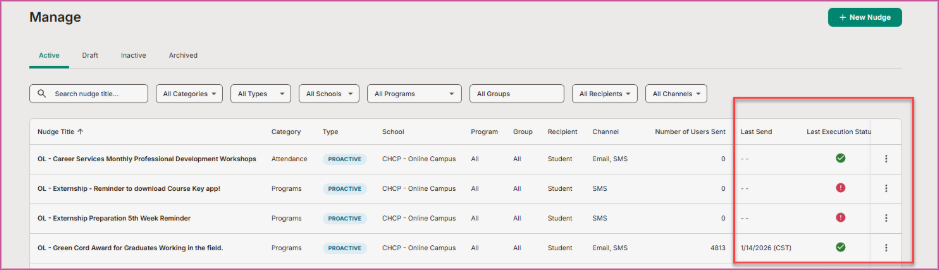
New columns added to the Smart Nudge Manage dashboard that display the last sent date and the execution status of each nudge.
Who It's For
Administrators and staff managing automated student communications with Smart Nudge.
Problem Solved
Previously, it was difficult to tell if a nudge had run successfully or when it last executed without digging into logs or troubleshooting.
Why It Matters
These columns provide instant visibility into nudge health, making it easier to spot failures, confirm successful runs, and take action quickly.
Details
- New Last Sent Date column shows the most recent execution time
- New Execution Status column indicates whether the last run was Successful or Failed
- Helps admins quickly identify nudges that may need attention

We’d love to hear from you and your colleagues about product feedback or what you'd like to see next.
Sign up to participate in future product feedback sessions or early design reviews.
Was this article helpful?
That’s Great!
Thank you for your feedback
Sorry! We couldn't be helpful
Thank you for your feedback
Feedback sent
We appreciate your effort and will try to fix the article