Portico Financial Aid Release Notes - October 2025
This month, we’re excited to introduce three major enhancements and preview an upcoming feature — all designed to make your Financial Aid and Reconciliation operations more transparent, efficient, and compliant.
- Clone Indicator for Funding Estimates — Quickly identify cloned Funding Estimates, see who created them, and when, improving auditability and reducing confusion.
- Break Setup by Location/Program within Institutions — Configure academic breaks with precision by program and location, ensuring compliance and flexibility across complex institutional structures.
- Automated Email Reminders for Bank Statement Submissions — Automatically notifies school users on the 1st, 16th, and end of each month to upload missing bank statements, escalating urgency when needed and linking directly to the upload portal for a seamless submission experience.
- Coming Soon: Clone Lineage Visualization — A full visual history of cloned Funding Estimates, helping teams trace data lineage end-to-end with complete clarity.
TABLE OF CONTENTS
- Clone Indicator for Funding Estimates
- Break Setup by Location/Program within Institutions
- Automated Email Reminders for Monthly Bank Statement Submissions

Clone Indicator for Funding Estimates
Bringing transparency and auditability to your Financial Aid workflows. Know at a glance which FEs are cloned — and where they came from.
This release introduces a Clone Indicator enhancement to the Funding Estimate (FE) interface, helping Financial Aid teams instantly recognize cloned FEs, their source, and the cloning user. This improvement reduces confusion, strengthens audit integrity, and saves time when managing multiple Funding Estimates.
What It Is
A distinct clone icon now appears beside any cloned Funding Estimate in all relevant UI views — including the Student Detail page, FE Bucket, and FE Detail. Hovering over this icon (or viewing within the FE) displays detailed source information.
Who It’s For
Financial Aid processors, approvers, and managers working with multiple Funding Estimates.
Problem Solved
Previously, users couldn’t easily distinguish cloned FEs from originals, resulting in duplicated work and audit inefficiency. This update introduces clear, visual differentiation and built-in source transparency.
Why It Matters
This enhancement streamlines daily workflows, improves data accuracy, and supports audit readiness by clearly indicating cloned records and their origins.
Feature Details
- Clone icons are visible wherever FEs appear — consistent placement across all views.
- Hovering over the icon reveals:
- Original FE ID
- Cloning user
- Clone timestamp
- Tooltip example: “Cloned from FE-1061906 by Nan Murray on 10/28/2025 at 12:42 AM.”
- Automatically logged for compliance in the audit trail (aligned with CID-9830).
- Fully accessible and performance-optimized.
How to Identify a Cloned Funding Estimate
1. In the FE List View (Bucket or Student Detail): Look for the Clone Icon () in the right-hand column.

FE Clone Icon
2. Within the FE Detail View: A highlighted message shows who cloned the FE, from which record, and when.
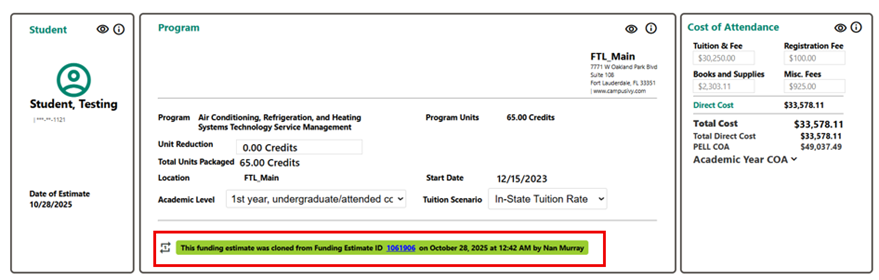
FE Clone Detail Banner
COMING SOON: Future phases will introduce a Clone Lineage Visualization, allowing users to view a complete FE ancestry tree (e.g., FE-12134 → FE-14567 → FE-14892).

Break Setup by Location/Program within Institutions
Empowering institutions with precise, scalable, and automated academic break management
This release enhances Portico’s CORE platform to allow break setup by both program and location, delivering greater flexibility, compliance, and operational control for institutional administrators. With this update, institutions can now assign academic breaks with pinpoint accuracy across diverse programs and locations — ensuring regulatory compliance (including R2T4 calculations), reducing errors, and improving efficiency.
What It Is
Administrators can now define academic breaks that are specific to individual programs and locations. The enhanced configuration ensures each break applies correctly to the relevant calendar and program version.
Who It’s For
System Administrators and Institutional Operations teams managing multi-location or multi-program configurations.
Problem Solved
Previously, breaks were applied institution-wide, leading to inconsistencies in compliance and data alignment. This enhancement ensures each break is tied precisely to the right program and location.
Why It Matters
- Ensures alignment with R2T4 and funding estimate rules.
- Reduces manual adjustments and audit risk.
- Supports large institutions with complex academic structures.
Details
- Assign breaks per program and location directly in the CORE Program section.
- Manage, update, and maintain breaks efficiently at both term and program levels.
- Compatible with legacy data migration and mass synchronization workflows.
Automated Email Reminders for Monthly Bank Statement Submissions
Streamlining financial reconciliation through automation and proactive compliance reminders
This release brings automation to the bank statement reminder and submission process, helping schools stay compliant and easing the workload for both campus users and Portico’s internal reconciliation teams. The new automated workflow ensures that all participating institutions are promptly notified when monthly bank statements are due — and guided seamlessly to upload the required files directly within CORE.
What It Is
The system now automatically sends email reminders to school users on the 1st, 16th, and final day of each month to prompt submission of their monthly bank statements.
Why It Matters
This automation eliminates manual reminder tasks, reduces delays, and strengthens monthly reconciliation accuracy.
Details:
- Reminders are automatically triggered and sent to each institution’s designated contact in the Institution Preferences table.
- Messages increase in urgency with each cycle — from soft reminders to final notices.
- If a user uploads a bank statement before the next reminder, the system automatically stops further emails.
- Reminder content and tone follow standardized templates (aligned with CID-6341 communications).
________________________________________
| Date | Notification Type | Purpose |
| 1st of Month | Initial Reminder | Soft notification for upcoming submission |
| 16th of Month | Second Reminder | Escalates urgency if no upload |
| End of Month | Final Reminder | Final call before escalation |
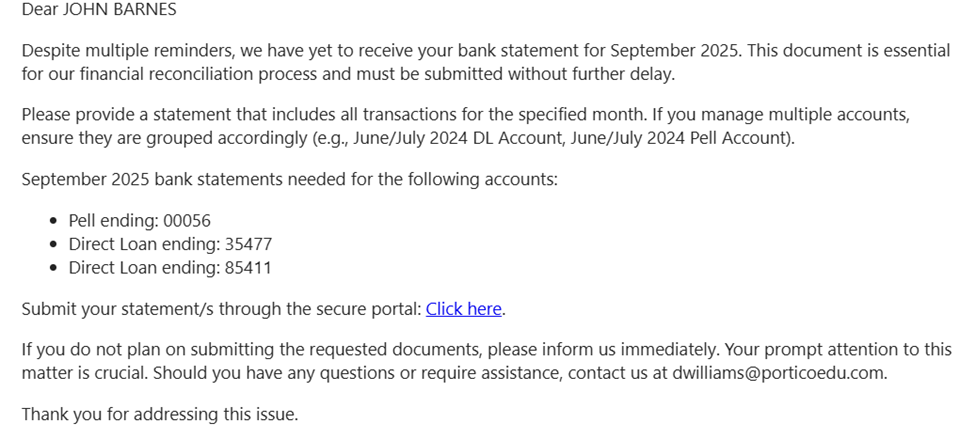
Direct Upload Link in Email
From inbox to upload in one click
- Each email now contains a secure hyperlink that takes users directly to the CORE File Upload section — after authentication — where they can submit their bank statement documents immediately.
- This direct access reduces confusion, ensures the right files are uploaded, and closes the notification loop once the document is received.
________________________________________
Dynamic Notification Logic
Smart checks that stop redundant reminders.
- The system includes pre-notification logic that checks whether a statement has already been uploaded for the month.
- If an upload exists, the system cancels all pending notifications for that cycle — ensuring users never receive unnecessary reminders.
________________________________________
Internal Visibility for Reconciliation Teams
Improved oversight for compliance tracking
- Each time a bank statement is uploaded, an automated acknowledgment is sent to confirm receipt.
- This helps Portico’s Reconciliation Team monitor submission progress and quickly identify schools that have not yet provided required statements.
________________________________________
Who This Impacts
- School Users: Receive automated reminders and direct upload access.
- Internal Reconciliation Teams: Gain improved visibility into missing or late submissions.
- Portico Operations: Reduced manual follow-ups and higher compliance consistency.
________________________________________
COMING SOON:
While the current release automates notifications and uploads, upcoming enhancements will introduce new customization and tracking features:
- Ability to tag each uploaded file with the corresponding month, date, and year of the statement.
- Option to select the associated bank account when multiple accounts exist per UEI.
- Automatic file naming on the backend to include month, year, and account number, simplifying reconciliation workflows.
- Enhanced bank account configuration UI showing account types and masked account numbers for improved transparency.
These features are currently under development and will roll out in an upcoming release.

We’d love to hear from you and your colleagues about product feedback or what you'd like to see next.
Sign up to participate in future product feedback sessions or early design reviews.
Was this article helpful?
That’s Great!
Thank you for your feedback
Sorry! We couldn't be helpful
Thank you for your feedback
Feedback sent
We appreciate your effort and will try to fix the article