Portico CRM Release Notes - December 2025
This month, we’re rolling out powerful new features designed to supercharge your team’s productivity and make everyday tasks faster, smarter, and more efficient!
TABLE OF CONTENTS
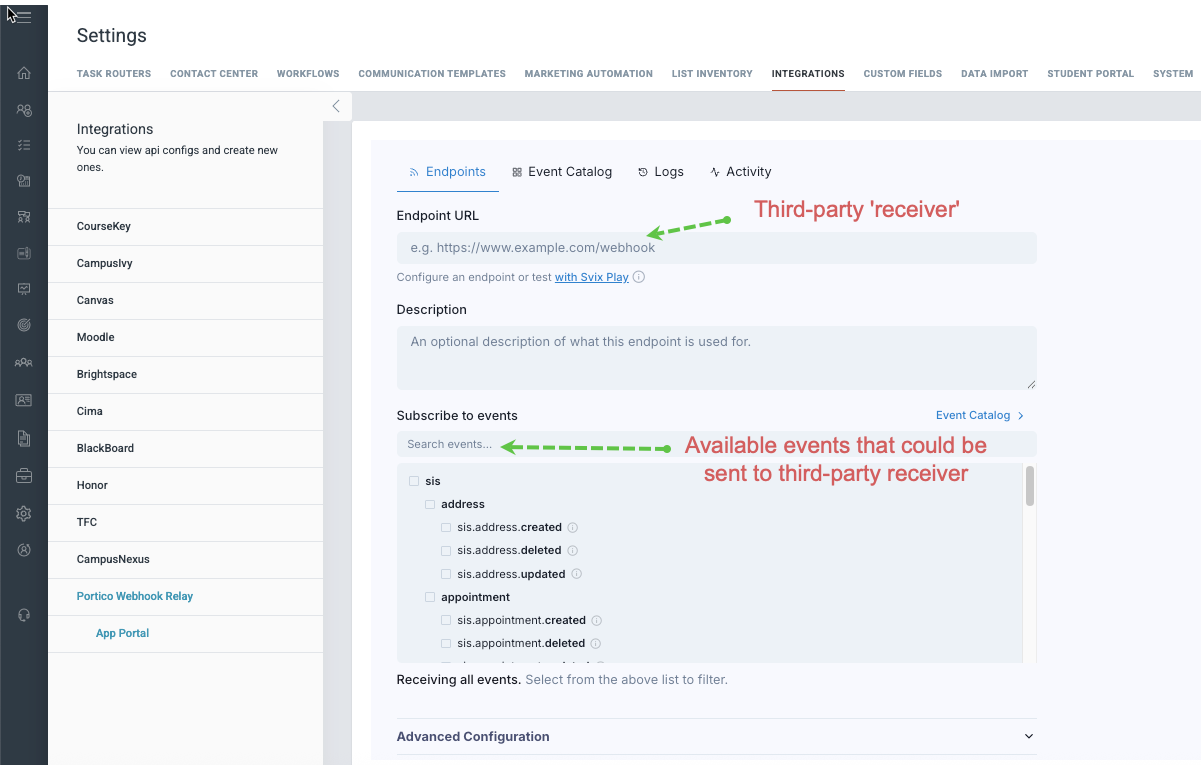
- Webhook Relay Support
- Vendor API (Outbound) Updates
- Bi-Directional Calendar Sync
- Need one of these features?

Webhook Relay Support
Connect your CRM to the tools you already love!
What Is It
Webhooks enable real-time, event-driven integration between your CRM and third-party systems. When specific events occur in your CRM, webhooks automatically send data to your external tools.
Who It's For
Administrators
Problem Solved
Without webhooks, integrating the CRM with external tools requires manual data exports or custom development. Teams couldn’t respond to CRM events in real time across their tech stack.
Why It Matters
Webhooks unlock powerful automation possibilities that save time and keep your data fresh across all your systems:
- Automatically sync new leads to Google Sheets and various third-party tools in your tech stack
- Create backup and audit logs in external systems for compliance
- Conditional logic is not available at this time; conditional logic and additional events will become available throughout the coming months

Vendor API (Outbound) Updates
Give your vendor partners the tools they need to keep your data accurate and up-to-date!
What Is It
API endpoint updates that allow third-party vendors and call centers to update vendor-booked appointments, submit call disposition outcomes, and send notes through the Outbound API—either on a single request or individually. These updates can also modify key student information in a single post.
Who It's For
System Administrators, Admissions Teams, Vendor Partners
Problem Solved
Schools working with vendor partners or call centers had no consistent way to capture real-time updates from vendors, calling inquiries, or booking appointments for their staff.
Why It Matters
This transforms how you work with vendor partners by:
- Eliminating manual data entry for vendor created appointments and notes updates captured by vendors
- Ensuring contact records reflect the most current student information from actual conversations
- Automatically triggering your workflows when vendors log specific call outcomes
- Providing complete accountability with detailed change history showing who made each update and when
- Reducing missed appointments through accurate time zone handling
- Improving compliance with mandatory notes for sensitive changes like "Do Not Call"
Additional Details: Change History & Audit Trail
Every vendor update is logged in the system's change history. Logs include which vendor made the change, date and time, old value and new value, and any required notes.

Bi-Directional Calendar Sync
Your CRM and email calendars, working together in perfect harmony!
What Is It
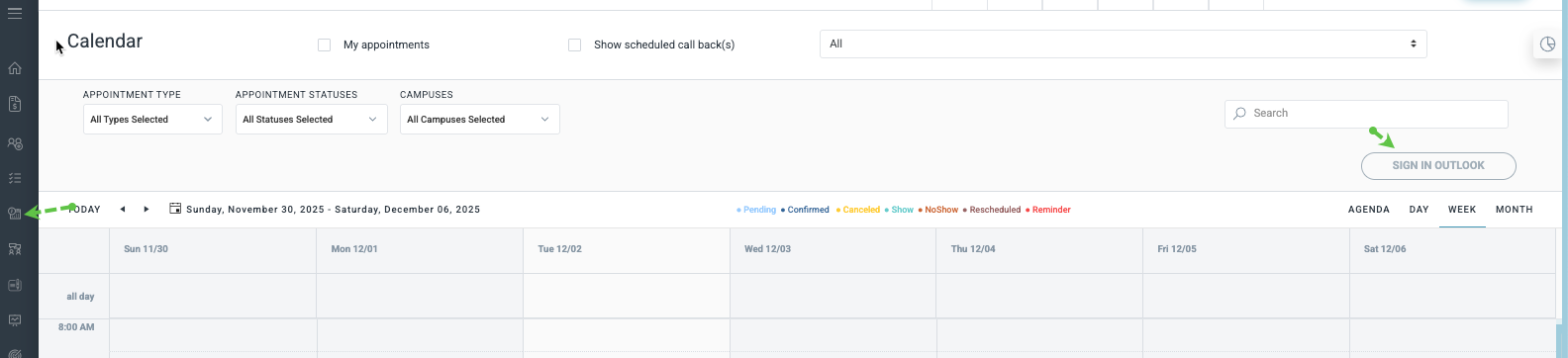
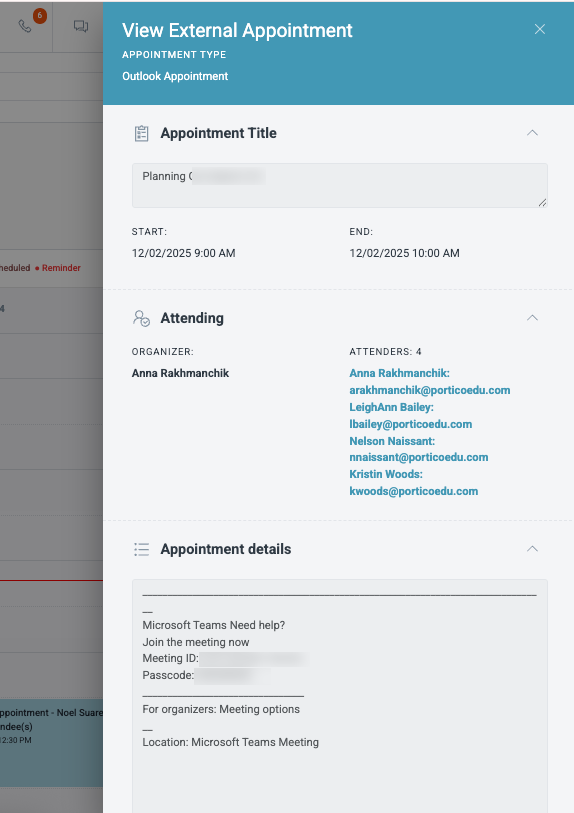
Real-time, bi-directional synchronization between your CRM and Outlook calendars. Now your CRM can pull appointments from your email calendar, and you can manually push CRM appointments to your email provider—ensuring your schedule stays consistent across all platforms.
Who It's For
All users, especially Admissions Teams and Advisors
Problems Solved
Previously, the CRM only supported a one-way sync to Outlook, meaning appointments created in your email calendar wouldn't appear in the CRM. This led to scheduling conflicts, missed appointments, and forced staff to manually duplicate calendar entries across platforms.
Why It Matters
This enhancement transforms how your team manages appointments by:
- Eliminating scheduling conflicts—appointments created in Outlook now automatically appear in your CRM upon syncing.
- Reducing manual data entry and duplicate calendar management.
- Providing real-time visibility of your complete schedule across all platforms.
- Enabling prospective students and staff to see accurate, up-to-date availability.
- Improving data consistency and accuracy across your entire tech stack
Details
- From Email to CRM: Appointments created in Outlook automatically sync to the CRM in real-time
- From CRM to Email: Push CRM appointments to your Outlook calendar with a manual sync (by design for user control)
- Google sync is on the way! Need one of these features?
Need one of these features?
Our team must turn on some enhanced features. If you don't see them in your account, contact Support and we'll help enable them.

We’d love to hear from you and your colleagues about product feedback or what you'd like to see next.
Sign up to participate in future product feedback sessions or early design reviews.
Was this article helpful?
That’s Great!
Thank you for your feedback
Sorry! We couldn't be helpful
Thank you for your feedback
Feedback sent
We appreciate your effort and will try to fix the article