Portico Attendance & SmartNudges Release Notes - October 2025
This month, we are highlighting the below new features that help you and your staff save time, enforce policies consistently, and improve student engagement.
TABLE OF CONTENTS
- Portico SIS + Attendance Integration
- SSO Enhancements for Multi IDPs
- Smart Nudge Template Enhancements & Expansion

Portico SIS + Attendance Integration
Foundational Data Sync, Automated Enrollment Updates, and Integration Logs, all designed to help your teams reduce manual work and maintain data accuracy across Portico SIS and the Attendance Platform. These updates enable your staff to work more efficiently by automating synchronization between systems, streamlining setup, and enhancing visibility into data flow.
What Is It
Automatically syncs foundational data from SIS to Attendance whenever new records or updates occur — no manual intervention required.
Who It's For
Implementation teams, administrators, and institutional IT staff managing SIS integrations.
Problem Solved
Eliminates the need for manual data mapping and recurring sync operations.
Why It Matters
Ensures accurate, up-to-date information across platforms while reducing configuration time during onboarding and updates.
Details
- Syncs Programs, Courses, Users, and Enrollments in near real time.
- Automatically reflects SIS updates within Attendance for consistent data integrity.
- Enables faster implementation timelines and fewer setup errors.
- Includes internal logs for internal staff visibility and client-facing logs for external partners.
SSO Enhancements for Multi IDPs
Schools can now configure multiple Single Sign-On (SSO) connections within the same CourseKey tenant — enabling different login providers for different user groups, such as Students and Staff.
What Is It
An enhancement to the attendance platform SSO feature that allows multiple SAML identity provider (IdP) configurations per school or campus. The system automatically routes users to the correct login provider based on their role or email domain.
Who It's For
Institutions that use separate authentication systems for Students and Staff (for example, schools that have distinct faculty and student directories).
Problem Solved
Previously, each school could connect only one SSO provider for all users, requiring unified credentials across groups. Now, schools can maintain separate IdPs while still giving everyone a seamless, secure login experience.
Why It Matters
- Reduces friction and login errors for institutions with multiple user directories.
- Supports phased rollouts — enable SSO for Staff first, then Students.
- Aligns with institutional security and IT policies without custom workarounds.
Details
- Supports - Multiple SAML 2.0 IdPs per school/campus
- SSO Routing - Automatic based on user type (Student, Staff)
- Enablement - Controlled in Admin Settings (per group toggle)
- No change for schools using a single IdP — setup remains the same.
Smart Nudge Template Enhancements & Expansion
We’ve expanded Smart Nudge functionality with new templates and enhanced scheduling options to give clients more flexibility and actionable insights when communicating with students.
What Is It
This release introduces several new and improved Smart Nudge templates, along with advanced scheduling controls for General Nudges. These updates make it easier to automate, customize, and target student engagement messages based on progress and attendance data.
Who It's For
Clients and administrators who use Smart Nudges to improve communication.
Problem Solved
These enhancements add new automation and data-driven options to help schools better support students throughout their programs.
Why It Matters
- Saves time by automating routine communications.
- Provides deeper visibility into attendance, progress, and performance.
- Enables targeted, timely outreach to improve retention and accountability.
Template Details
Advanced Scheduling for General Nudges
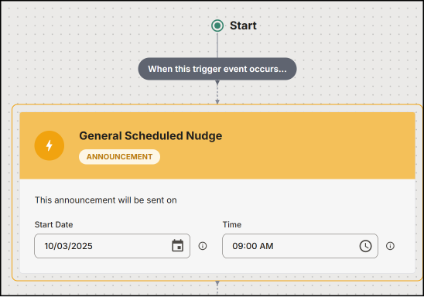
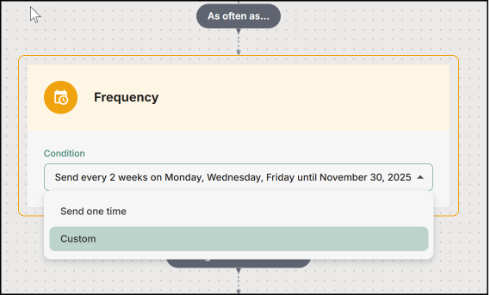
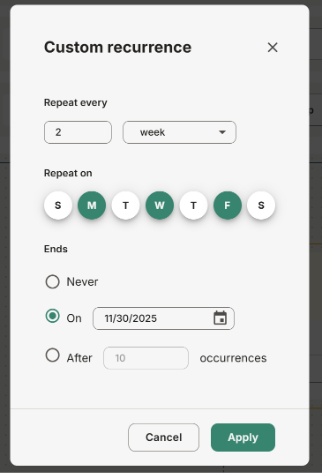
Customers can now schedule General Nudges with flexible customization options, allowing messages to be sent at specific times, dates, or recurring intervals to align with institutional communication schedules.
Skills vs Hours Completion Template
A new template that helps track and compare skill completion progress against logged hours, giving administrators and instructors a clearer picture of overall student performance.
Weekly Check-In Template
Includes on-time and late variations. This template consolidates check-in activity from the previous week to give insights into attendance patterns and engagement consistency.
Cumulative Program Hours Template
Introduces hours reached and hours missed variations to help monitor ongoing program progress and identify students who may be falling behind on required hours.
Upcoming Course Start Template (Updated)
Adds flexibility by allowing clients to choose whether the nudge is sent a set number of days before or after the course start date—ideal for pre-course reminders and early engagement follow-ups.
Advanced Scheduling:

We’d love to hear from you and your colleagues about product feedback or what you'd like to see next.
Sign up to participate in future product feedback sessions or early design reviews.
Was this article helpful?
That’s Great!
Thank you for your feedback
Sorry! We couldn't be helpful
Thank you for your feedback
Feedback sent
We appreciate your effort and will try to fix the article